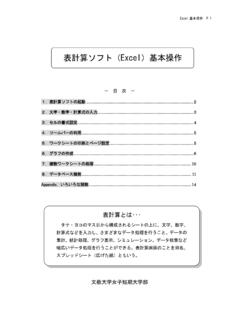
表計算ソフト(Excel)基本操作
Excel基本操作 P.2 1.表計算ソフトの起動 タスクバーにある[Excel]のアイコン をクリックする。 画面の構成 アクティブセル マウスポインタ 数式バー シート見出し 基本用語 ワークシート・・・・行と列で構成されたウィンドウのこと。
Download 表計算ソフト(Excel)基本操作

Information
Domain:
Source:
Link to this page:
Documents from same domain

医薬品卸売業の経営戦略に関する研究
open.shonan.bunkyo.ac.jp卒業論文 医薬品卸売業の経営戦略に関する研究 文教大学情報学部経営情報学科 a9p21135 牧野 美愛 2014 年1月
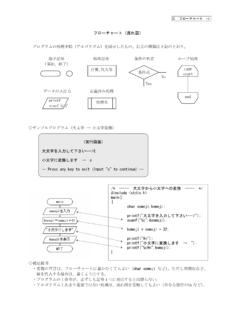
フローチャート(流れ図) - open.shonan.bunkyo ...
open.shonan.bunkyo.ac.jpC フローチャート -3- 繰り返し型(その1)for文 for ( 初期値;繰り返し条件;増分値 ){ 処理の内容 } (例1)同じ文字列を10個表示するプログラム

ICカード - open.shonan.bunkyo.ac.jp
open.shonan.bunkyo.ac.jp3 1、ICカードの概要 クレジットカードの偽造やスキミングなどによるトラブルが最近急増している。この被

社会に認められる企業とは - open.shonan.bunkyo ...
open.shonan.bunkyo.ac.jp2009 年1 月 幡鎌ゼミ 文教大学 情報学部 経営情報学科 卒業論文 社会に認められる企業とは a5p21123 福田 歩
卒業論文 「キャラクタービジネスの戦略に関する研 …
open.shonan.bunkyo.ac.jp幡鎌ゼミ 卒業論文 文教大学情報学部経営情報学科 2009.1.12 提出 a5p21073 菅原由以 3 第1章 はじめに

中国の物流業の現状 - open.shonan.bunkyo.ac.jp
open.shonan.bunkyo.ac.jp文教大学 情報学部 経営情報学科 卒業論文 平成19年1月13日 1 卒業研究 中国の物流業の現状 a3p21505 張 新耀
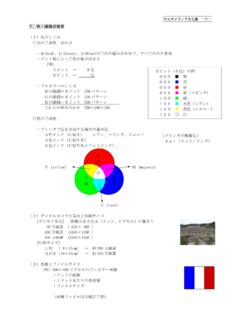
マルチメディア文化論 - open.shonan.bunkyo.ac.jp
open.shonan.bunkyo.ac.jpマルチメディア文化論 -9- (4)動画のしくみ(静止画を連続的に表示) ・フレーム ・フレームレート ・ビットレート

アパレル業界の経営戦略 - open.shonan.bunkyo.ac.jp
open.shonan.bunkyo.ac.jpa3p2106 佐々木 博史 1 文教大学 情報学部 経営情報学科 卒業論文 平成19年1月13日 アパレル業界の経営戦略
日本のコーヒー市場に 関する研究 - 文教大学
open.shonan.bunkyo.ac.jp卒業研究 日本のコーヒー市場に 関する研究 文教大学 情報学部 経営情報学科 b0p21047 神尾勇貴 2014 年1 月
フローチャート(流れ図) - open.shonan.bunkyo ...
open.shonan.bunkyo.ac.jpC フローチャート -2- if文 ①単純if型(もし~ならば、 を行う) ②if-else型(もし~ならば を行い、そうでないときは×××を行う)
Related documents

Top 30 Microsoft Excel Interview questions
www.exceltip.comMS Excel 2003 65536 256 16777216 MS Excel 2007 1048576 16384 17179869184 MS Excel 2010 1048576 16384 17179869184 MS Excel 2013 1048576 16384 17179869184 Q4. Which option do we use to adjust the text within a cell and what is the procedure to do it? Answer: To adjust text in a cell, we use Wrap text option. It can be used in two ways: ...
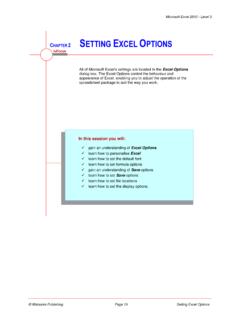
Chapter 2 - Setting Excel Options
www2.westsussex.gov.ukclick on Excel 97-2003 Workbook (*.xls) Click on [OK] to save the changes File tab of the Ribbon and select Save type is automatically set to Excel 97-2003 Workbook (*.xls)... Click on [Cancel] Repeat steps 1 to 4 and change Save files in this format back to Excel Workbook (*.xlsx) For Your Reference… To set save options: 1.
Steps to Creating a Basic Epidemic Curve Using Microsoft ...
www.cdc.govdocument in (most likely the Excel Workbook option). If you wish to send the document to someone who may have an earlier version of MS Excel, recommend selecting the Excel 97-2003 Workbook option. Steps to Creating a Basic Epidemic Curve Using Microsoft Excel 20 07 27 Step 17a (optional) – To create a, epicurve that has multiple time ...

A Guide for mAnAGers - AcqNotes
acqnotes.comLaw 101-510 on nov. 5, 1990, and amended in 2003, 2004, and 2006. it required the dod to establish education, training, and certification for acquisition professionals. § Introduction | 12 technical considerations ranging across science, technology, develop-

Basics of Spreadsheet
www.nios.ac.inThe grid of Excel 2007 is having 1,048,576 rows and 16,384 columns. Thus it provides a user with 1,500% more rows and 6,300% more columns than the Microsoft Office Excel 2003. The last column in Excel 2007, is XFD instead of IV in Excel 2003. The number of cell references per cell is increased to limit as maximum available memory.

SSS Form ML-1
www.sss.gov.phInternet Edition (1/2003) Title: SSS Form ML-1 Author: SSS Subject: Member Loan Payment Return Created Date: 191030813093323 ...

PET/CT Facility Design - AAPM
aapm.orgThe 18F-Injected Patient as a Source (average of diff i i 2003f different investigators, 2003) 0.075 ( Sv/hr)/MBq0.279 (mrem/hr)/mCi all at 1 m from surface of body average value from Superior 0.279 (mrem/hr)/mCi body, average value from several investigators