
Getting started with Webex Meetings.
2. To start a meeting on the fly, click Start a meeting. 3. To join a scheduled meeting tap the big green Join button next to the meeting you want to Join. From the mobile app 1. For a scheduled meeting, click the “Join” button on the notification or from the My Meetings page of the app. 2. Tap Start Meeting to start an ad hoc
Download Getting started with Webex Meetings.

Information
Domain:
Source:
Link to this page:
Documents from same domain
Sharing and Presenting Tools - Cisco Webex
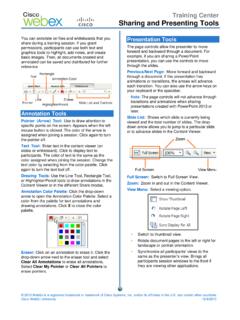
www.webex.comtext color by selecting from the color palette. Click again to turn the text tool off. Drawing Tools: Use the Line Tool, Rectangle Tool, or Highlighter/Pencil tools to draw annotations in the Content Viewer or in the different Share modes. Annotation Color Palette: Click the drop-down arrow to open the Annotation Color Palette. Select a
Getting Started - Cisco Webex
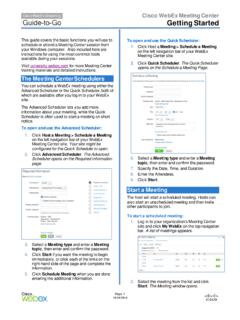
www.webex.comRecorder panel opens and recording begins. 4. Click the . Pause. button ( ) when you want to stop recording briefly, and click it again to re- start. 5. Click the . Stop. button ( ) to end the recording completely. You are prompted to confirm that you want to stop recording. Note: A new recording is created each time you stop recording and ...

Datsheet Webex Desk Hub
www.webex.comexperiences to deliver a modernized, clutter-free safe environment for the hybrid worker. experiences designed for Hot Desking, Hoteling, and advanced Collaboration. The Desk Hub will sit within the single portfolio for Webex Collaboration devices and be a bridge between video phones and our integrated video endpoints like the Webex Desk or

Cisco Webex Training Solution Overview
www.webex.comCisco Webex Assist producers will make sure your training session starts and runs smoothly. Take advantage of robust, media-rich Webex technology, session features like polling, chat, and surveys, work with a producer to prepare a session, and plan and practice a dry run.

AccessRestrictionstoCiscoWebexToll-FreeNumbers
www.webex.comAccessRestrictionstoCiscoWebexToll-FreeNumbers FirstPublished:2017-06-08 LastModified:2018-06-19 AmericasHeadquarters CiscoSystems,Inc. …
CISCO WEBEX VS. MICROSOFT TEAMS
www.webex.comAfter carefully reviewing Cisco Webex and Microsoft Teams, ZK Research found that Teams pales in comparison to Webex with regard to the breadth and depth of capabilities, particularly in the areas noted earlier—even though Teams is a viable product and …

Collaboration device x i r m t ucadro pt
www.webex.comCisco Webex: HTTP, REST APIs VCS: H.323 and SIP CUCM: SIP Cisco Webex: HTTP, REST APIs VCS: H.323 and SIP CUCM: SIP Cisco Webex: HTTP, REST APIs Peripherals Supported Cisco Webex Pen G2 Cisco Touch 10 Cisco Touch 10 Cisco Touch 10 Bandwidth Consumption H.264: from 768 kbps to 6000 kbps Minimum bandwidth: • 720p30 from 768 kbps • 1080p30 ...
Related documents

FlyLady's Detailed Cleaning List - Zone 1: The Entrance ...
www.flylady.netclean off the monitor screen 10. fill printer caddy with paper 11. establish a place for current bills 12. vacuum under desk and the whole room 13. dust furniture . 14. clean windows 15. remove cobwebs 16. check supplies of paper and printer cartridges stamps and envelopes laundry room detailed cleaning list ...
HAND AND POWER TOOL SAFETY - University of Tennessee
ehs.utk.edu• Chips may fly from the cutting edge and injure the user. • Frequently lubricate cutters. • To keep cutting edges from becoming nicked or chipped, cutters are not to be used as nail pullers or pry bars. • Cutter jaws should have the hardness specified by the manufacturer for the particular kind of material to be cut.

FiTech Handheld User Manual - FiTech Fuel Injection
fitechefi.comOK, or tapping “Send to ECU” on the screen (and receiving the “Sent to ECU Succeed” message – and the Ignition Key must be ON to allow this to occur – otherwise it will not send the changes. Most changes can be done on the fly. All changes are permanent after the key is turned off for about 10 seconds (the

Lesco Bandit 2F Insecticide
irp-cdn.multiscreensite.comAtaenius spretulus and Aphodius spp. European Crane Fly Tipula paludosa, and mole crickets,. scapteriscus spp. LESCO BANDIT 2F Insecticide can also be used for suppression of cutworms and chinch bugs. LESCO BANDIT 2F Insecticide can be used as directed on

Completing a Constructed Travel Worksheet Authorization
www.defensetravel.dod.milScreen. Note: For round -trip travel, i f you plan to use the authorized or directed transportation mode for at least one travel leg, and a different mode for at least one ... The AO authorized you to fly round -trip to and from Reno, but you want to fly to Reno, pick up a car, and drive it home. On the CTW, use the actual cost of the flight to ...
![WELCOME. [www.lg.com]](/cache/preview/a/a/5/d/2/2/3/6/thumb-aa5d2236e38e3f3aee099e98019111b5.jpg)
WELCOME. [www.lg.com]
www.lg.comConnect SmartThinQ® to the LG Network by following the on-screen prompts below. 3. On the next screen, select the name of your wi-fi network, enter a valid password and press connect. Please note: Only a 2.4 Ghz wi-fi connection is supported. 1. After selecting Refrigerator, follow the on-screen prompts to verify your appliance type.