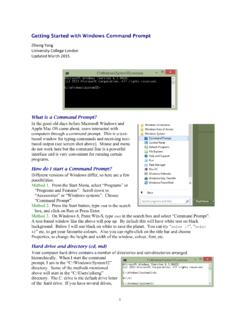
Getting Started with Windows Command Prompt
Use backslash / on Mac OSX or UNIX. b) Commands and file and directory names are case-insensitive on Windows (MS-DOS), while they are case-sensitive on Mac OSX or UNIX. c) You can type the first few letters of a file or directory name and then hit the Tab key so that the OS will complete the name automatically. At the command line, you can use ...
Download Getting Started with Windows Command Prompt

Information
Domain:
Source:
Link to this page:
Documents from same domain
Unix Basics
abacus.gene.ucl.ac.ukUnix Basics History The first version of Unix was developed by Bell Labs (part of AT&T) in 1969, making it more than forty years old and one of the few cases of a computer technology that has survived more than a

MCMCTree tutorials - Ziheng Yang
abacus.gene.ucl.ac.ukcalibration restricts the common ancestor of human-chimp to be between 6-8 Myr ago. Calibration bounds in MCMCTree are soft, and there is a small probability (0.025 by default) that the bounds may be violated. Note that the tree does not have a fossil calibration at the root. MCMCTree always 1

PAML: Phylogenetic Analysis by Maximum Likelihood
abacus.gene.ucl.ac.ukbaseml or codeml as user trees. baseml and codeml. The program baseml is for maximum likelihood analysis of nucleotide sequences. The program codeml is formed by merging two old programs: codonml, which implements the codon substitution model of Goldman and Yang (1994) for protein-coding
Related documents

Adobe Acrobat 9.0 Troubleshooting
helpx.adobe.comAdobe Acrobat 9.0 Troubleshooting ... 9

Epson iProjection Operation Guide (Windows/Mac) - English
files.support.epson.com15 Requirement Windows Mac Operating system Windows 7 • Ultimate (32- and 64-bit) • Enterprise (32- and 64-bit) • Professional (32- and 64-bit)

Installation of LTspice on Windows and Mac
www.columbia.eduMay 22, 2019 · We use this approach since the Mac version of LTspice is not user friendly and some features are even missing. Step 1: Install WineBottler This is a software used to run some windows softwares on Mac without having a windows license, which is required when using a virtual machine. It will be used here to run LTspice on Mac OSX. 1. Go to the ...
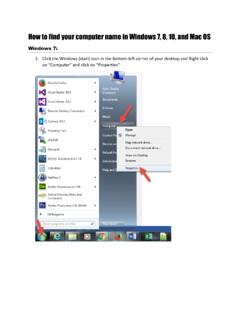
How to find your computer name in Windows 7, 8, 10, and …
www.uab.eduHow to find your computer name in Windows 7, 8, 10, and Mac OS Windows 7: 1. Click the Windows (start) icon in the bottom-left corner of your desktop and Right click on ^Computer _ and click on Properties. 2. Your computer name will be listed in this panel. Windows 8: 1. Press the Windows key (between the left ctrl and alt keys) and E ...

Consumer Use Return - Nevada
tax.nv.govTitle: Consumer Use Return Author: Taxation State of Nevada Subject: Introduced Graduated Penalty and Interest Rates.\r\nForm is only valid starting 04-30-07
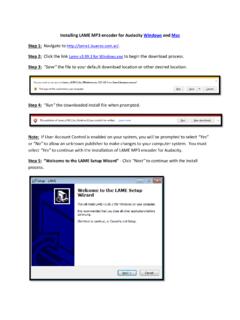
Installing LAME MP3 encoder for Audacity Windows and …
www.calu.eduStep 8: “Ready to Install” – Click the “Install” option as indicated below. Step 9: “Completing the LAME Setup Wizard” – Select “Finish” to complete the installation. Step 10: The LAME install has been successfully completed and you can save your audio file(s) created in Audacity as MP3(s).

Microsoft Information Protection (MIP) User Guide
www.itsc.cuhk.edu.hkFor Mac OS X: Download the “RMS Sharing” app from App Store. For iOS and Android OS: Download the “Azure Information Protection” app from Apple Store (iOS) and Google Play (Android OS). AIP Client Installation 2.3.1. In Windows Steps: 1. Close all Office applications and all instances of File Explorer. 2.

Microsoft Azure for Linux and Mac Users
www.microsoft.comarticle we introduce you to some Microsoft Azure fundamentals and show you how you can use Linux or Mac OS to: Set up a Microsoft Azure account. Download the correct SDK for your preferred development language. Use the Microsoft Azure Management Portal Use the command line interface (CLI) to perform basic VM operations.