
How to Select Text Using Keyboard Shortcuts
Select one word by placing your cursor at one end of the word. Hold down the "Ctrl" key and the "Shift" key. Press the right arrow key to select the word to the right, or press the left arrow key to select the word to the left. o Select one character at a time by holding down the "Shift" key and and using either arrow key (right or left).
Download How to Select Text Using Keyboard Shortcuts

Information
Domain:
Source:
Link to this page:
Documents from same domain

Heat Illness Prevention Program - University of California ...
ehs.ucsc.eduHeat Illness Prevention Program. Training Have employees received documented Heat Illness Training? If no, ensure employees receive Heat ... Supervisor Heat Illness training? If no, ensure supervisors receive documented Supervisor Heat Illness training (available through EHS). Heat Illness Prevention Measures Have employees been given time to ...

UC SANTA CRUZ HEAT ILLNESS PREVENTION PLAN
ehs.ucsc.eduUC SANTA CRUZ HEAT ILLNESS PREVENTION PLAN Introduction California employers with any outdoor places of employment must comply with the Heat Illness Prevention Standard, T8 CCR 3395. ... (e.g. via training, meeting), and how it will be ascertained that these company instructions and procedures are followed.

Office Ergonomics Matching Funds Program
ehs.ucsc.eduevaluations and support through this program must first complete UCSC online computer workstation ergonomic training class and provide a self-assessment of their own workstation as part of the evaluation process. 2. Ergonomic Assessment. ... The DEA will complete the computer workstation assessment form with the specific recommendations ...
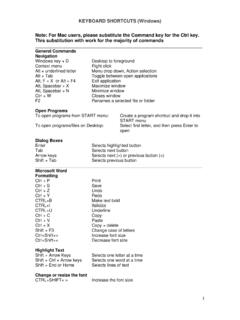
Keyboard Shortcuts (Windows)
ehs.ucsc.eduCtrl+Shift+> Increase font size . Ctrl+Shift+< Decrease font size . Highlight Text . Shift + Arrow Keys Selects one letter at a time . Shift + Ctrl + Arrow keys Selects one word at a time . Shift + End or Home Selects lines of text . Change or resize …
Related documents
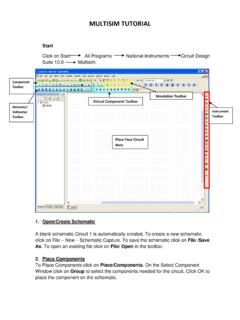
MULTISIM TUTORIAL
www.ece.mtu.eduFigure 1: Select Resistor Figure 2: Select DC voltage For example to select resistors and the DC source shown in Figure 3 click on Place/ Components.In Group select Basic scroll down to Resistors and select the value of the resistor needed to construct the circuit, for this example select 1k.

uick start Microsoft Edge
compass.microsoft.comTo change settings, select More in the upper-right corner, select Settings, scroll to the Reading section and play with the options. uick start Microsoft Edge If you don’t always have internet access, add webpages that you want to read later to your Reading List and you’ll be

How to Choose Replacement Capacitors and Resistors when re…
www.condoraudio.com$0.15 – that's right, about 15cents. The same type/value capacitor from one of the high-quality Japanese or European manufacturers mentioned below, costs about $1.30. Now, when a given appliance may have tens or hundreds of capacitors inside, you can understand

HOW TO SELECT THE RIGHT PELLON INTERFACING
www.joann.comHOW TO SELECT THE RIGHT PELLON ® INTERFACING: Interfacing shapes, supports & stabilizes detail areas of a garment, such as collars, facings & waistbands. Choosing the right interfacing is key to a garment’s appearance & performance. This guide is designed to help identify the best choices for your project.

The Right to Health - OHCHR | Home
www.ohchr.orgthe right to health and to take steps in that direction without delay. Notwithstanding resource constraints, some obligations have an immediate effect, such as the undertaking to guarantee the right to health in a non-discriminatory manner, to develop specific legislation and plans of action, or other similar steps towards the

Chapter 13 THE RIGHT TO EQUALITY OF JUSTICE
www.un.org2. Selected Universal Legal Provisions Guaranteeing the Right to Equality before the Law and the Right to Non-discrimination 2.1 Universal Declaration of Human Rights, 1948