
How to Switch Birth Control Methods
switching. You can stop taking your pill at any point in the pack. If you are switching to pills, you should start by taking the first pill in the pack. You may have changes in your period after switching. This is normal and safe.
Download How to Switch Birth Control Methods

Information
Domain:
Source:
Link to this page:
Documents from same domain

Coding For Inserting And Removing Progestin …
www.reproductiveaccess.orgAugust 2016 / www.reproductiveaccess.org Coding For Inserting And Removing Progestin Implants In an outpatient setting The following codes can be used when inserting and removing contraceptive implants in an outpatient
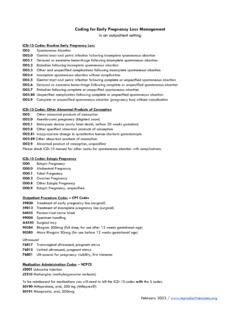
CODING FOR MISCARRIAGE CARE (EARLY PREGNANCY …
www.reproductiveaccess.orgCODING FOR MISCARRIAGE CARE (EARLY PREGNANCY LOSS) In an outpatient setting January 2016 / www.reproductiveaccess.org ICD-10 Diagnosis Codes O03.9 Complete or unspecified spontaneous abortion without complication O03.4 Incomplete spontaneous abortion without complication O02.1 Missed abortion O02.0 Threatened abortion
Coding For Inserting And Removing Progestin Implants In …
www.reproductiveaccess.org11981 Insertion, non-biodegradable drug delivery implant 11982 Removal, non-biodegradable drug delivery implant 11983 Removal, with reinsertion, non-biodegradable drug delivery implant 81025 Pregnancy test Medication Administration Codes – HCPCS J7307 Etonogestrel (contraceptive) implant system, including implant and supplies.
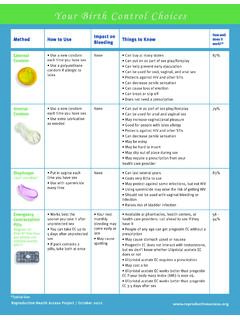
Your Birth Control Choices - Reproductive Health Access ...
www.reproductiveaccess.orgVaginal Spermicide Cream, gel, sponge, foam, inserts, film • Insert spermicide each time you have sex. None • Can buy at many stores • Can be put in as part of sex play/foreplay • Comes in many forms: cream, gel, sponge, foam, inserts, film • May raise the risk of getting HIV • May irritate vagina, penis • Cream, gel, and foam can ...

THE PILL - Reproductive Health Access Project
www.reproductiveaccess.org• Although some people who take testosterone may prefer to avoid estrogen, the pill is safe to use. HOW WILL I FEEL ON THE PILL? • You will feel about the same. In the first 2-3 months you may have nausea, bleeding between periods, weight change, and/or breast pain. These problems often go away after 2-3 months.

Tus Opciones Anticonceptivas
www.reproductiveaccess.org*Typical Use Método Cómo usarlo ¿Causa sangrado? Cosas que saber Efectividad Uso típico DIU con hormonas Liletta®, Mirena®, Skyla® and others • El prestador de servicios médicos

Coding for Inserting and Removing IUDs
www.reproductiveaccess.orgFor further guidance on coding complex cases with IUDs see, Beyond the Pill’s LARC Quick Coding Guide Supplement. For specific clinical scenarios, see The LARC Quick Coding Guide by ACOG’s LARC Program. Out-Patient Procedure Codes – CPT Codes 58300 Insertion, intrauterine device 58301 Removal, intrauterine device 81025 Pregnancy test

2021-08 Depo User Guide - Reproductive Health Access Project
www.reproductiveaccess.org• Some people who take testosterone prefer to avoid methods that contain estrogen, and Depo only contains the hormone progestin. • The shot lowers your risk of cancer of the uterus.
Related documents
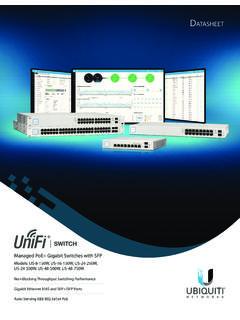
UniFi PoE Switch Datasheet
dl.ubnt.comBuild and expand your network with Ubiquiti Networks® UniFi® Switch, part of the UniFi line of products. The UniFi Switch is a fully managed, PoE+ Gigabit switch, delivering robust performance and intelligent switching for growing networks. Switching Performance The UniFi Switch offers the forwarding capacity to simultaneously process

Dell Wireless Mouse and Keyboard KM717
downloads.dell.com1 Slide the connection-mode switch on your keyboard to select the third-Bluetooth connection. 2 In Windows Search, type Bluetooth. 3 From the list that appears, click Bluetooth Settings. 4 Ensure that Bluetooth is enabled. 5 From the list of devices, click Dell WK717 → Pair. NOTE: If Dell WK717 is not listed, press the Bluetooth-pairing ...

Virtual Workspace Services Portal
portal.bankofamerica.comOnce your HVD is migrated to VMware Horizon, you will connect by using the Chrome browser to navigate to portal.corporateofamerica.com and open your Horizon HVD resource, but your HVD session will automatically switch to use the VMware Horizon Client on your non-corporate-owned Chrome OS device instead of Citrix Workspace. 3. The first time you

DGS-1100 Series EasySmart Switch User Manual B1 v1
support.dlink.comseconds to reset the Switch back to the default settings. The LED will light up solid amber for 2 seconds. When pressing the Reset button for longer than 10 seconds, the device will enter loader mode and the LED will light up solid green for 2 seconds. If the device cannot reboot, it will automatically enter loader mode.

Installation & Setup of your Access Networks Ruckus ...
www.accessnetworks.comHow to install your Access Networks Ruckus Wireless system 1. Connect either of the network ports on the front of your ZoneDirector to an Ethe rnet switch on your wired network, and power the ZoneDirector with the included AC power adapt er. The ZoneDirector will be assigned a DHCP IP address by your DHCP server (most likely your router).

Catalyst 2960-S Switch Getting Started Guide (English)
www.cisco.comStep 9 Disconnect the switch from the PC, and install the switch in your network. See the “Rack-Mounting” section on page 18. Step 10 If you changed the static IP address on your PC in Step 2, change it back to the previously configured static IP address. Step 11 You can now manage the switch by using Cisco Network Assistant, Device Manager ...
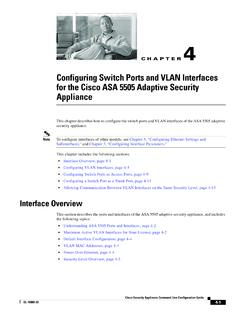
Configuring Switch Ports and VLAN Interfaces for the …
www.cisco.comInterfaces for Your License” section for more information about the maximum VLAN interfaces. VLAN interfaces let you divide your equipment in to separate VLANs, for example, home, business, and Internet VLANs. To segregate the switch ports into separate VLANs, you assign each switch port to a VLAN interface.

The all-in-one proximity sensor and limit switch.
www.emerson.comTopWorx™ GO™ Switch is the most versatile sensing solution. It detects like a proximity switch and functions like a limit switch, providing higher reliability when conventional switches fail. The all-in-one proximity sensor and limit switch. 1 A global leader in valve control and

Platinum Wireless Headset - PlayStation
www.playstation.com3 Slide the power/audio mode switch on the headset to position “1” or “2”. Using your headset with your PS4™ system The headset is compatible with PS4™ system software version 4.00 or later. More than one headset can be used with your PS4™ system. Status display When you connect your headset to your PS4™ system, and