Example: dental hygienist
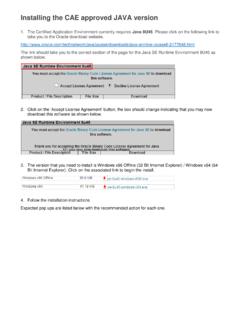
Installing the CAE approved JAVA version - Snap-on
Supporting hints and tips Pop ups you may see during the install: Click ‘Run’ Click ‘Yes’ Click ‘Install’ Untick ‘Restore Java security prompts’ and click ‘Next’
Download Installing the CAE approved JAVA version - Snap-on

Information
Domain:
Source:
Link to this page:
Documents from same domain

Installation nouvelle version JAVA
docs.snaponbusinesssolutions.com3. La version que vous devez télécharger et installé est : the Windows x86 Offline version (32 Bit Internet Explorer) / the Windows x64 version (64 Bit Internet Explorer). Cliquer sur le lien pour débuter l’installation.
Related documents

Complete Excel VBA Secrets & Tips for Professionals
goalkicker.comExcel VBA ExcelComplete Tips & Secrets for ProfessionalsComplete ® VBA Tips & Secrets for Professionals Disclaimer This is an uno …
Quickstart Guide Vodafone Mobile Broadband …
www.vodafone.comQuickstart Guide Vodafone Mobile Broadband K4203-Z USB Stick Designed by Vodafone