Interapplication Communication with the Acrobat SDK
Adobe Acrobat SDK Developing Applications Using Interapplication Communication 5 DoGoBack.....77
Download Interapplication Communication with the Acrobat SDK

Information
Domain:
Source:
Link to this page:
Documents from same domain
Developing Acrobat Applications Using JavaScript
opensource.adobe.comAdobeAcrobatDCSDK Acrobat JS Developer Guide 6 Using the comments list.....107

Adobe PDF Library Overview
opensource.adobe.comThe following table shows the commands that you can use to control the snippet runner in a command shell. The snippets (see PDF Library snippets) are arranged in a directory-like hierarchy. You can use the findsnip command to locate a snippet and the cd command to switch between directories. Note: The command names are not case-sensitive.

Developing Plug-ins and Applications - Adobe Open Source
opensource.adobe.comAdobe Acrobat SDK Developing Plug-ins and Applications 5 Migrating a PDF Library application from CodeWarrior to Xcode.....53

Guide to SDK Samples - Adobe Open Source
opensource.adobe.comTo use DocSign, change the default signature handler in Acrobat Preferences to the DocSign handler. After that, DocSign will be used through the same user interface points as the standard signature handler. ... The output PDF file works with Acrobat and Adobe Reader 7.0 or later.

JavaScript for Acrobat API Reference
opensource.adobe.comAdobe Acrobat SDK Developing Plug-ins and Applications 5 context3D.....51
Related documents

Electronic signatures with Password Protect
employee.hr.lacounty.govNote: “Protect” option is only available in Adobe Acrobat Pro version. For other versions, there may be a subscription fee to use the service Password protection for your electronic signed pdf documents Open the PDF document with Adobe Acrobat Pro/Reader DC or XI application. On the right side, click “Protect” to open the “Protect ...
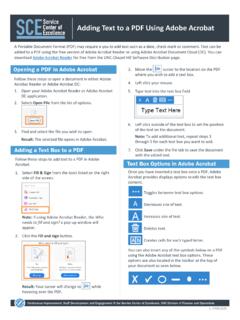
Adding Text to a PDF Using Adobe Acrobat
fo.unc.eduusing the Adobe Acrobat text box options. These options are also located in the toolbar at the top of your document as seen below. Follow these steps to open a document in either Adobe Acrobat Reader or Adobe Acrobat DC: 1. Open your Adobe Acrobat Reader or Adobe Acrobat DC application. 2. Select . Open File . from the list of options. 3.

Adobe Photoshop CS6 - pearsoncmg.com
ptgmedia.pearsoncmg.comAdobe Photoshop CS6: Learn by Video also from Adobe Press classroom in a book® BOOKSHELF CATEGORY: U GRAPHIC DESIGN / IMAGE EDITING Adobe Press books are published by Peachpit, Berkeley, CA Printed and made in the USA www.adobepress.com s $54.99 CANADA $57.99 Adobe® Photoshop® CS6 Note to reader: This hardcover version is …

Accessing PDF Documents with Assistive Technology - …
www.adobe.comfor Adobe Reader to correctly extract all characters to text, the document is considered inaccessible. Adobe Reader Accessibility Features Adobe Reader is compatible with assistive technology, including screen readers, and it offers several tools and features to enhance your reading and viewing experience. Using the Accessibility Setup Assistant
U.S. Guide to Electronic Signatures - Adobe Inc.
www.adobe.comAdobe Subject: This guide provides an overview of U.S. electronic signature laws and some recommended practices for implementing electronic signatures in your organization. Keywords: adobe sign; e-signatures; electronic signatures Created Date: 6/8/2020 9:17:52 AM
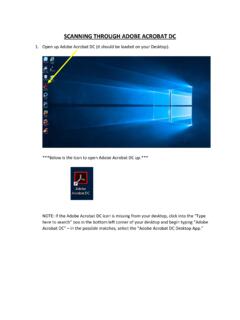
SCANNING THROUGH ADOBE ACROBAT DC
www.una.eduSCANNING THROUGH ADOBE ACROBAT DC 1. Open up Adobe Acrobat DC (it should be loaded on your Desktop). ***Below is the Icon to open Adobe Acrobat DC up.*** NOTE: If the Adobe Acrobat DC icon is missing from your desktop, click into the “Type here to search” box in the bottom left corner of your desktop and begin typing “Adobe

Using a Signature Image to Sign a PDF
www.usm.edu3. Open the PDF in Adobe Acrobat Reader. 4. Sign a clean piece of white paper, take a picture of the signature with your phone and email it to your @usm.edu address, then save the image to your computer. 5. Click the pen image at the top of Adobe. How to Sign a PDF Form Using Adobe Acrobat Reader