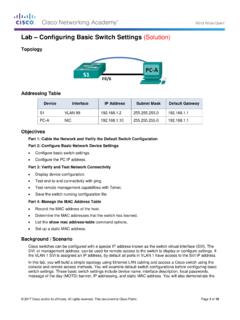
Lab Configuring Basic Switch Settings (Solution)
the VLAN 1 SVI is assigned an IP address, by default all ports in VLAN 1 have access to the SVI IP address. In this lab, you will build a simple topology using Ethernet LAN cabling and access a Cisco switch using the console and remote access methods. You will examine default switch configurations before configuring basic switch settings.
Download Lab Configuring Basic Switch Settings (Solution)

Information
Domain:
Source:
Link to this page:
Documents from same domain

Section 7.4: Exponential Growth and Decay
sites.radford.edurays converts nitrogen to a radioactive isotope of carbon, 14C, with a half life of about 5730 years. Vegetation absorbs carbon dioxide through the atmosphere and animal life assimilates 14C through food chains. When a plant or animal dies, it stops replacing its carbon and the amount of 14C begins to decrease through radioactive decay ...

Exercise 3 - Biology 105 Estimating the Size of Cells ...
sites.radford.eduClean your microscope slides with lens paper before examining. • 9. When you are finished using the microscope: a. Make sure that the stage manipulator bar is not extended out to the left. b. Unplug the microscope and coil the cord beside the microscope. c. Put the dust cover back on the microscope. d. Carefully slide the microscope back into ...

Performance Based Learning and Assessment Task Distance ...
sites.radford.eduo If the midpoint of a line is (2, 3), and one endpoint of the line is the origin find the other endpoint. Show the computations to justify your solution. o What are the endpoints of a line that has a midpoint of (-1, -3) and a distance of 8. Show the computations to justify your solution.

Fundamentals of Information Systems, Fifth Edition
sites.radford.eduFundamentals of Information Systems, Fifth Edition 19 Computer-Based Information Systems (continued) • CBIS components – Hardware: Computer equipment used to perform input, processing, and output activities – Software: Computer programs that govern the operation of the computer – Database: Organized collection of facts and

Parallel Lines Cut by a Transversal - Radford
sites.radford.eduMPE 32.a The student will use the relationships between angles formed by two lines cut by a transversal to determine whether two lines are parallel. VIRGINIA SOL: G.2a, G.4 c, f, g The student will use the relationships between angles formed by two lines cut by a transversal to determine whether two lines are parallel.

A Method of Population Estimation: Mark & Recapture
sites.radford.eduThe Mark and Recapture Technique By far the most popular way to measure the size of a population is called the Mark and Recapture Technique. This technique is commonly used by fish and wildlife managers to estimate population sizes before fishing or hunting seasons. The mark and recapture method involves marking a number of individuals in a

Area & Volume 1. Surface Area to Volume Ratio - Radford
sites.radford.eduArea & Volume 1. Surface Area to Volume Ratio For most cells, passage of all materials –gases, food molecules, water, waste products, etc. – in and out of the cell must occur through the plasma membrane. As a cell grows bigger, the internal volume increases and thereby expands the cell membrane. In turn, the volume increases more

Reaction Times and Hypothesis Testing - Radford
sites.radford.eduword cue is given, as well, after other words are spoken that should be ignored. 1 and 2. Exactly the same as in Method 1. 3. Determine a particular word as a signal to catch the dropped ruler. 4. Use a variety of words before dropping the ruler; disregard ruler catches on wrong word. 5.

Lab – Configuring IPv4 Static and Default Routes (Solution ...
sites.radford.eduStep 1: Cable the network as shown in the topology. Step 2: Initialize and reload the router and switch. Part 2: Configure Basic Device Settings and Verify Connectivity In Part 2, you will configure basic settings, such as the interface IP addresses, device access, and passwords. You will verify LAN connectivity and identify routes listed in ...
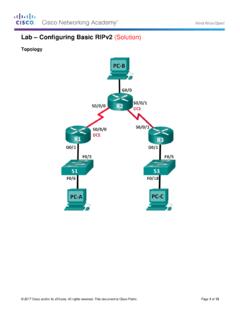
Lab – Configuring Basic RIPv2 (Solution)
sites.radford.eduIn Part 1, you will set up the network topology and configure basic settings. Step 1: Cable the network as shown in the topology. Step 2: Initialize and reload the router and switch.
Related documents
N300 Wireless Gigabit Router Setup Manual - Netgear
www.downloads.netgear.com• A yellow Ethernet cable • NETGEAR Installation Guide • The Resource CD, which includes: – The Smart Wizard (Autorun.exe) – A PDF version of this manual – A link to the online User Manual After your router is installed and you have Internet access, you can access the online User Manual by clicking Documentation on the main menu.
Aruba 310 Series Wireless Access Points Data Sheet
www.arubanetworks.com• The AP supports direct DC power and Power over Ethernet (POE) • When both power sources are available, DC power takes priority over POE • Power sources are sold separately • Direct DC source: 12Vdc nominal, +/- 5%- Interface accepts 2.1/5.5 …

SLC 500 EtherNet/IP Adapter - Rockwell Automation
literature.rockwellautomation.comControlLogix controller communicating through an EtherNet/IP router in the Logix backplane, across EtherNet/IP, and into the 1747-AENTR gateway. As a gateway between the SLC backplane and EtherNet/IP, the 1747-AENTR module is a CIP™ server (for both Explicit Messaging and I/O) on the Ethernet port, and an SLC host on the 1746 backplane.
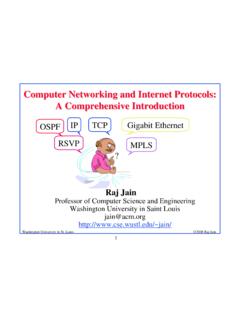
Computer Networking and Internet Protocols: A ...
www.cse.wustl.eduEthernet! Carrier Sense Multiple Access with Collision Detection (CSMA/CD)! IEEE 802 Address Format! ... Net 2 Deliver Direct Net 3 Deliver Direct Net 4 Forward to R3 ... Type of service (8 bits): Reliability, precedence, delay, and throughput!

Data Sheet QFX5100 ETHERNET SWITCH Description
www.juniper.netaccess switch that is ideal for deployments with a high degree of application redundancy. The highly efficient QFX5100-96S offers 96 ports of native 10GbE for server connectivity and eight 40GbE ports for uplink connectivity, providing very low oversubscription of …
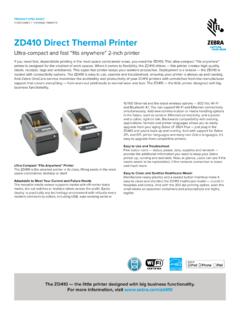
ZD410 Direct Thermal Printer - Zebra Technologies
www.zebra.com10/100 Ethernet and the latest wireless options — 802.11ac Wi-Fi and Bluetooth 4.1. You can support Wi-Fi and Ethernet connectivity simultaneously. Add new communication or media handling options in the future, such as serial or Ethernet connectivity, and a peeler and a cutter, right on site. Backwards compatibility with existing

Verizon Internet Gateway
scache.vzw.com5.7.3 Access Control 46 5.8 NAT Forwarding 48 5.8.1 DMZ 49 5.8.2 UPnP 50 5.8.3 ALG 51 ... - Keep the router away from metal obstructions and away from direct sunlight. - Keep the router away from 802.11g or 20MHz only Wi-Fi devices, 2.4GHz computer peripherals, Bluetooth devices, cordless phones, ... - An installed TCP/IP service - Web browser ...
LifecycleIQ Services TM Select Option 3 Direct Dial Numbers 1
literature.rockwellautomation.comDeviceNet, ControlNet, EtherNet/IP and Associated RSNetWorx™ Software 300 RSLinx® Classic, RSLinx® Enterprise and FactoryTalk Linx 301 1784 Communications Cards, Remote Access Dial in Modems, 9300-USBS 302 Stratix® Network Switches, 9300-ENA 303 MOTION ControlLogix Motion, Interface Cards and Associated Software 400
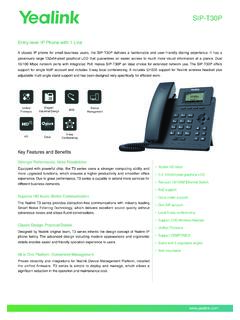
SIP-T30P - Yealink
www.yealink.comgenerously large 132x64-pixel graphical LCD that guarantees an easier access to much more visual information at a glance. Dual 10/100 Mbps network ports with integrated PoE makes SIP-T30P an ideal choice for extended network use. The SIP-T30P offers support for single VoIP account and includes 5-way local conferencing.