
NIST RMF Quick Start Guide
Prepare Step Fundamentals FAQs ... • Facilitating organization-wide identification of common controls and the development of organizationally tailored control baselines, reducing the workload on individual system owners and the cost of system development and asset protection
Download NIST RMF Quick Start Guide

Information
Domain:
Source:
Link to this page:
Documents from same domain
ITL Bulletin Guidelines for Securing Wireless Local …
csrc.nist.govWireless networks, like other communications networks, ... NIST SP 800-153, Guidelines for Securing Wireless Local Area Networks (WLANs), was
Windows 7 BitLocker FIPS Security Policy - NIST
csrc.nist.govWindows 7 BitLocker™ Drive Encryption is a data protection feature available in Windows® 7 Enterprise and Ultimate for client computers and in Windows Server 2008 R2. BitLocker is Microsoft’s response to one of our
An information exchange For Information Security and ...
csrc.nist.govIdentity, Credential, and Access Management ICAM ICAM represents the intersection of digital identities, credentials, and access control into one comprehensive approach.
A Random Zoo: Sloth, Unicorn and trx - NIST
csrc.nist.govsloth, described in Section 3 (and pronounced “slow th”), a new approach to public randomness selection, unicorn, is proposed in Section 4: unicorn results in a

Port Authority Series PA111-SA CDI 01-03-0912B
csrc.nist.govThe Port Authority is designed primarily to protect firewall/router console port access. The device was designed to overcome the weaknesses of RADIUS and TACACS+ for remote access authentication. The problem of the firewall/router not being able to contact
HikSSL Cryptographic Module version 1.0.0 FIPS 140-2 Non ...
csrc.nist.govHangzhou Hikvision Digital Technology Co., Ltd. affirms that the module runs correctly on the following network camera and NVR models: • Network Cameras: model names starting with DS-2CD2.
A Method for Quantitative Risk Analysis - NIST
csrc.nist.govIt does, however, present its results in a management-friendly form of monetary values, percentages, and probabilities. Since the Office of Management and ... A Method for Quantitative Risk Analysis James W. Meritt. There are two primary methods of risk analysis: Analysis.
20 Most Important Controls For Continuous Cyber Security ...
csrc.nist.govTopics • Background • Philosophy and Approach for the “20 Most Important Security Controls” • Control Examples and List of Controls
J) of SP 800 - NIST Computer Security Resource Center
csrc.nist.govbetween SP 800-53, Revision 4 and the Initial Public Draft of SP 800- 53, Revision 5. The changes to the control baselines are reflected in a separate document.
Publication Number: NIST Special Publication (SP) 800-53 ...
csrc.nist.govThe Special Publication 800-series reports on ITL’s research, guidelines, and outreach efforts in information system security, and its collaborative activities …
Related documents
Ten steps to GS1 barcode implementation
www.gs1.orgcalled GS1 Identification Keys. The first step in assigning a GS1 Identification Key is to obtain a GS1 Company Prefix from a GS1 Member Organisation. The GS1 Company Prefix provides a way for companies to create identification keys for trade items, logistic units, locations, parties, assets, coupons, etc. which are unique all around the world.

swagelok.com Thread and End Connection
www.swagelok.comIdentification Tables Tapered Straight Introduction Appendix Fig. 1 Measuring Crest-to-Crest Thread Diameters Last 4th 1st Step-by-Step Identification Procedure for Threads and End Connections Step 1: Determine if the thread is tapered or straight (parallel) . Step 2: Measure the thread diameter . Step 3: Determine the thread pitch .

Basic Cardiac Rhythms Identification and Response
utmc.utoledo.eduStep 1 – Heart Rate Methods to determine heart rate The 6 second method Denotes a 6 second interval on EKG strip Strip is marked by 3 or 6 second tick marks on the top or bottom of the graph paper Count the number of QRS complexes occurring within the 6 second interval, and then multiply that number by 10

DISCHARGER’S GUIDE TO THE STORM WATER MULTIPLE …
www.waterboards.ca.goviii. Once all applicable application(s) are added, click “Go to Step 4.” d. Step 4 - Select Yes or No to link the user to any future applications started for this Organization. NOTE: “Yes” = system will automatically link the user to any new Notice of Intent applications started in the future.

Hazard Identification and Control - OSHAcademy
www.oshatrain.orgidentification and control is partly responsible for this success story. Identifying and controlling workplace hazards involves many processes. It’s more than simply ... Step 6 - _____ Gather information Analyze the facts Implement Solutions Secure …

Personnel-General Army Identification Tags
armypubs.army.milSteps for processing identification tag applications Step Work center Required action : 1 Unit or individual Request ID tags 2 Unit Verify data accuracy 3 Issuing office Verify data accuracy (name spelling, DOD ID, blood type and religion) in the personnel system; emboss two ID tags ...
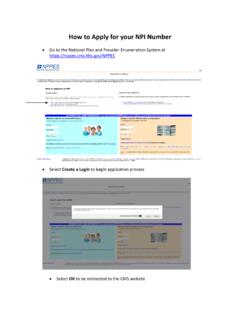
How to Apply for your NPI Number - NATA
www.nata.orgHow to Apply for your NPI Number Go to the National Plan and Provider Enumeration System at https://nppes.cms.hhs.gov/NPPES Select Create a Login to begin application process Select OK to be redirected to the CMS website