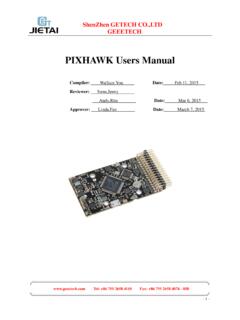
PIXHAWK Users Manual - Geeetech
3) Install Mission Planner and open it. 3-7 . Step1. Choose the correct COM port from the drop-down menu for . PX4 FMU and set the Baud rate as 115200. Step2 Click connect icon. If the connection failed, please check if you cheese the correct COM port, please power off the board and reconnect it.
Download PIXHAWK Users Manual - Geeetech

Information
Domain:
Source:
Link to this page:
Documents from same domain

3DTouch Auto Leveling Sensor User Manual - Geeetech
www.geeetech.com3DTouch Auto Leveling Sensor User Manual 1. Introduction ... is below 15mA on average, whereas on working state, while the pin is moving in sudden about 100ms, under 300mA flows in the device. ... them goes down/up 3 times and ends up the LED on solid. Continuous flashing means that there is an obstruction or fault.

Users Manual of GT2560 - Geeetech
www.geeetech.comGEEETECH www.geeetech.com Tel: +86 755 2658 4110 Fax: +86 755 2658 4074 -858 - 4 - 1 Introduction GT2560 is a compact board that is integrated with the …

Geeetech Prusa I3
www.geeetech.comTitle: Geeetech Prusa I3 Author: xfinal Created Date: 2/26/2016 1:55:19 PM

CC3D flight control board Users Manual - Geeetech
www.geeetech.comwww.geeetech.com Tel: +86 755 2658 4110 Fax: +86 755 2658 4074 - 858 - 3 - ShenZhen GETECH CO.,LTD

Geeetech A30T 3D Printer User Manual V1
www.geeetech.com3) Secure the three sets of remote extruders to the back side of the gantry top profile and tighten the screws as shown in picture (5-4). (Picture 5-4) 4) Please place the filament on the roll of filament holder kit first, and then fix the kit to the top profile of the gantry frame with 2 M3 * 6 screws and 2 T-nuts M3. If you need to replace
Related documents

Sky±HD User Guide
storage.sky.comtop menu use left/right to highlight the option you want then press select Press to leave the screens and go back to what you were watching Use or up to jump back to the previous level, e.g. from the listings to the middle menu, from the middle menu to the top menu to go back… information area Press tv guide on remote

One-Week Menu Planner
images.template.netOne-Week Menu Planner ©2010, Money Saving Mom, LLC. All Rights Reserved. MoneySavingMom.com :: Helping You Be a Better Home Economist breakfast
Quick and Easy Meals - Alberta Health Services
www.albertahealthservices.caUse the Weekly Menu Planner to plan for a few days or for a week. Check your cupboards, fridge, and freezer to see what foods you already have. Use these foods when planning your menu. Include 3 meals each day, plus some snacks if you like. Plan to make simpler meals on busy days. Plan healthy meals with the Eat Well Plate: o Make ½ your

Food categories - Department of Education and Training
www.education.vic.gov.auHealthy Canteen Kit – Food Planner I e veryday The three food categories everyday select care Foods and drinks in the Select Carefully category contain some valuable nutrients, but may also include unhealthy ingredients. Schools should: 4 not let these foods and drinks dominate the canteen menu 4 serve in smaller sizes 4 limit selling times.

The Type 2 Diabetes Meal Planner
www.mydrs.comThe Type 2 Diabetes Meal Planner Good meal planning can help you better control your blood sugar Eating healthy foods and adding variety to your menus is easier than you think. Your doctor or healthcare provider can help you develop a meal plan that help s control tour blood sugar. This
Event Party Planner Services Proposal
www.proposalkit.comEvent Party Planner Services Proposal . Scroll down to read the first part of this sample. When purchased, the complete sample is ... determined by the menu selections and quantities ordered. However, please be advised that for an event such as yours with meals, catering, entertainment, ...

Troop 3 Patrol Menu Planning Worksheet - Troop 3 Ambler
www.troop3ambler.comMenu Planning: When planning a menu for your Patrol you must follow the 1st Class rank guidelines. The meals should be nutritious and not too difficult or time consuming to prepare. List every item and the quantities needed to prepare the meal (usually found in the recipe). Use the Daily Food Planner below as

Communicate: In Print - Widgit Software
www.widgit.comthat you might use with the people you work with. It might be an activity planner, shopping list, recipe or timetable. Places to find more help and information Built in Help and manual There is an excellent Help feature in Communicate in Print 2. If you click on the Help menu in the top toolbar, you’ll see that you can access the whole manual ...