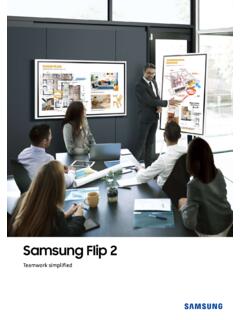
Samsung Flip 2
Samsung Flip is an intuitive and easy-to-use digital flipchart for any meeting environment, offering enhanced collaboration capabilities in an easy UI with a host of features, including brush mode, annotation on, merge to roll, and other collaboration
Download Samsung Flip 2

Information
Domain:
Source:
Link to this page:
Documents from same domain

Easy Setting Box - Samsung Display Solutions
displaysolutions.samsung.comEasy Setting Box Install/Uninstall 07 6 Click Install. 7 Click Finish to complete the installation. 8 The executable Easy Setting Box icon is created on the desktop when installation is complete. To start the program, double-click the icon.
User Manual - Samsung Display Solutions
displaysolutions.samsung.com• When installing the product on a cabinet or shelf, make sure that the bottom edge of the front of the product is not protruding. ... ‒ Contact Samsung Customer Service Center for repairs. • To move the product, first disconnect all the cables from it, including the power cable.
User Manual - Samsung Display Solutions
displaysolutions.samsung.comApr 29, 2019 · User Manual The color and the appearance may differ depending on the product, and the specifications are subject to change without prior notice to improve the performance. Recommended hours of use per day for the DBJ, QBH, QBH-N, QHH models is less than 16 hours. If the product is used for longer than 16 hours a day, the warranty may be void.

MagicInfo Player I - Samsung Display Solutions
displaysolutions.samsung.comcustomized. In formal mode, devices can be arranged based on a predefined matrix such as 2x2 and 4x4. - Matrix Switcher Matrix Switcher refers to a device that converts and sends signals from a variety of external input sources, such as HDMI, DVI and videos, to display devices. - Stream Repeater Stream Repeater refers to a program that sends

INSTALL GUIDE - Samsung Display Solutions
displaysolutions.samsung.comThis TV B2B (Business to Business) model is designed for hotels or the other hospitality businesses, supports a variety of special functions, and lets you limit some user (guest) controls. Figures and illustrations in this Install Guide are provided for reference only and may differ from the actual product appearance.

Monitor User Manual - Samsung Display Solutions
displaysolutions.samsung.comMonitor User Manual The color and the appearance may differ depending on the product, and the specifications are subject to change without ... If a gas leakage is found, do not touch the product or power plug. Also, ventilate the area immediately. • Sparks can cause an explosion or fire.

Samsung SMART Signage
displaysolutions.samsung.comThe Samsung SMART Signage Platform (SSSP) is an open-source, all-in-one solution embedded in Samsung SMART signage that simplifi es installation and maintenance. With SSSP, there is no need for any external devices to communicate with the server or play digital media enjoying easy development, reinforced capability with
Curved Monitor - displaysolutions.samsung.com
displaysolutions.samsung.com‒ Dust accumulation combined with heat can cause a fire, electric shock or electric leakage. • Use the product at the recommended resolution and frequency. ‒ Your eyesight may deteriorate. • Do not put AC/DC adapters together. • Remove the plastic …

User Manual - Main | Samsung Display Solutions
displaysolutions.samsung.comAug 16, 2018 · Leaving the screen fixed on a stationary image for an extended period of time may cause ... " If dust or dirt from the supplied pen remains on the protective glass, clean it referring to the instructions below. Cleaning the exterior and display Wipe the surface with a slightly wet, soft cloth, and then wipe with a dry cloth. ...

2020 Samsung Display Solutions
displaysolutions.samsung.comcally adjusts the brightness based on the external lighting environment. Unsurpassable visibility day and night Featuring high brightness and contrast ratio, Samsung’s window displays remain bright and clear, delivering an uncompromised picture that will capture the attention of potential customers - even in direct sunlight.
Related documents

A Programmer’s Perspective
csapp.cs.cmu.eduThe graph on the front cover is a “memory mountain” that shows the measured read throughput of an Intel Core i7 processor ... 4.2.3 Word-Level Combinational Circuits and HCL Integer Expressions 376

028-2010: When Best to Use the %LET Statement, the …
support.sas.comprocessor. The tokens that prompt the word scanner that the subsequent codes are macro languages are called macro triggers, such as %LET followed by a name token and & followed by a name token. Once the macro triggers are detected by the word scanner, the word scanner passes the tokens to the macro processor.

Introduction to LATEX
web.mit.eduWith a word processor, you spend valuable time agonizing over what font size to make the section headings. With LATEX, you just tell it to start a new section. With a word processor, changing the formatting means you have to change each instance individually. With LATEX, you just rede ne the relevant commands.

Financial Reporting (FR)
www.accaglobal.comword processor, spreadsheets and presentation slides - not only enabling students to demonstrate their technical and professional skills but also their use of the ... The main areas of the syllabus cover the reporting of financial information for single

Dell Vostro 270s Owner s Manual
downloads.dell.com1. Place the fan shroud over the processor fan and heat-sink assembly. 2. Press the fan shroud until the tabs on the fan shroud snap into place. 3. Install the cover. 4. Follow the procedures in After Working Inside Your Computer. Removing the Drive Cage 1. Follow the procedures in Before Working Inside Your Computer. 2. Remove: a) cover b) fan ...