Example: marketing

SCEIS Password Management
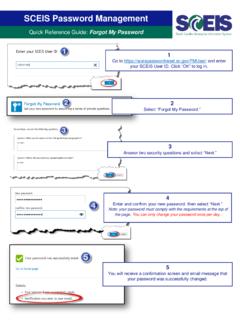
SCEIS Password Management Quick Reference Guide: Forgot My Password 1 Go to https://sceispasswordreset.sc.gov/PMUser/ and enter your SCEIS User ID. Click “OK” to log in. 4 Enter and confirm your new password; then select “Next.” Note: your password must comply with the requirements at the top of the page.
Download SCEIS Password Management

Information
Domain:
Source:
Link to this page:
Documents from same domain
SCEIS Password Management
sceis.sc.govYour password was successfully reset Go to home page Details Your Notification was sent to your email. To continue, answer the following questions.