
Setup Opal-RAD Workstation for viewing - Internet …
4. Restore down the browser window (so it is not full screen and you can see some of the desktop) 5. Click and drag the 2020 logo/icon to left of the address bar onto the Desktop to create a shortcut 6. Login to Opal-RAD at the login screen 7. Viewer: Click ‘Download Viewer – 2.x.x.x’ near the top right, and allow it to install
Download Setup Opal-RAD Workstation for viewing - Internet …

Information
Domain:
Source:
Link to this page:
Documents from same domain

MODEL NO. : LLX240AB01 - Digital X-Ray Systems
www.2020imaging.netVersion 1.0.2 Date: 2011. 6. 20 SAMSUNG Flat-Panel X-Ray Detector MODEL NO. : LLX240AB01 User Manual Samsung Mobile Display Co. , Ltd. This manual is provided for the installation and operation of LTX240AA01-A.

Opal-RAD User Manual Table of Contents - 20/20 Imaging
www.2020imaging.netbutton fundamentals, introduces the two main screens, the Study List and the Image Viewer, and offers a brief look at what else is available in this and other applications in the Opal-RAD suite of medical imaging tools. We will also detail the minimum hardware and software requirements to run Opal-RAD, as well as, security considerations.
Related documents

Setup Opal-RAD Workstation for viewing - Internet Explorer …
2020imaging.netSetup Opal-RAD Workstation for viewing - Internet Explorer 11+ NOTE: Internet Explorer must be used, all other web browsers are not compatible for full viewing* 1. Open Internet Explorer Browser *If using Windows 8/10, ensure you open Internet Explorer from the 'Desktop' and not the 'Start' (tile) page. 2.
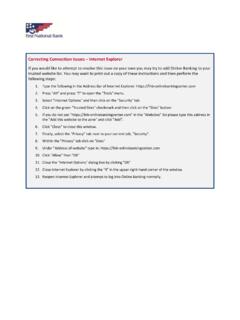
Correcting Connection Issues Internet Explorer
banking.fnb-onlinebankingcenter.comClose Internet Explorer by clicking the "X" in the upper right‐hand corner of the window. 13. Reopen Internet Explorer and attempt to log into Online Banking normally. First National Bank . Title: Microsoft Word - ConnectionIssue-IE.docx Author: …

Directions for Enabling TLS 1.0 for Internet Explorer ...
travel.state.gov3. Click on the “Advanced” icon within the Advanced window 4. Click the “Change Settings…” button 5. Click on the “Advanced” tab within the Internet Properties window 6. Scroll down in the “Settings” section and select the “TLS 1.0” checkbox 7. Click the “OK” button

2015 EXPLORER
www.fordservicecontent.com2015 EXPLORER Owner’s Manual 2015 EXPLORER Owner’s Manual September 2014 Second Printing Owner’s Manual Explorer Litho in U.S.A. fordowner.com ford.ca FL2J 19A321 AA. ... Rear-window wiper and washer.....97 2 Table of Contents 2015 Explorer (exp) Owners Guide gf, 2nd Printing, September 2014 USA (fus) Lighting 98 ...
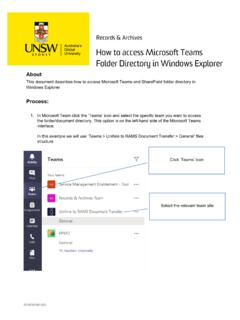
2019 35195-003 Process Document - How to access Microsoft ...
www.recordkeeping.unsw.edu.auThe Internet Explorer Security window opens. Click ‘Allow’ to proceed. Click ‘Open with Explorer’ Click ‘Allow’ 2019/35195-003 13. The team site folder and document directory opens in Window Explorer 14. From the Window Explorer view, you can navigate and select to the document you want to