Technical Support - CH Products
4. Windows will now search for and install the correct Windows drivers for your device. 5. The bubble should now state that your hardware is installed properly and is ready to be used. 6. To check for proper installation in Windows *, click Start, then Settings, then Control Panel. In the Control Panel go to Game Controllers or Gaming Options. 7.
Download Technical Support - CH Products

Information
Domain:
Source:
Link to this page:
Documents from same domain
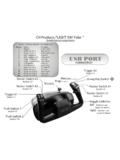
Flight Sim Yoke Button Assignments CH - CH Products
www.chproducts.comCH Products FLIGHT SIM Yoke ˜ 8-way Hat Switch Throttle Mixture (not shown) Prop (not shown) Trigger #1 (button 1) Trigger #2 (button 2) Rocker Switch #1 (button 4) Rocker Switch #1
Related documents
EW-7438RPn Quick Installation Guide - Edimax
www.edimax.comFor best results, install the extender at a location where the Signal Strength LED ( ) remains on without blinking. This indicates the extender is receiving a strong signal from the root wireless access point. Section B: Setting Up the Wi-Fi Extender with a Computer 1. First make sure that your computer is a DHCP client (it obtains its IP

LabelWriter 4XL Quick Start Guide - DYMO
download.dymo.com3 Click Install and follow the instructions in the installer. QuickBooks If you have QuickBooks 2007 or later, you will be prompted to install the DYMO Label Add-in for QuickBooks. (US Only.) To install the software on a Mac OS system 1 Insert the DYMO LabelWriter CD into the CD-ROM/DVD drive. After a few seconds, the DYMO Label Installer icon ...

PTC Creo 4.0 - Student Edition - Quick Installation Guide
apps.ptc.com10/12/2017 4. From the PTC Installation Assistant dialog box: Select Install new software and click Next. Accept the license agreement and click Next. In the Simple License Entry product code field, enter the product code BK410705EDSTUDENTUNICL and then click Install Licensing. o Enter your PTC username (your email address) and password.

BMV 712 Smart Quick installation guide Battery safety …
www.victronenergy.comQuick installation guide Battery monitor BMV contents Full manual available online BMV and mounting dimensions Front plate 4 screws Attachment flange BMV head unit Attachment sleeve BMV shunt RJ12 cable (10m) Two power cables (2m) https://ve3.nl/5x BMV712 product page. Page 2 Rev: 00 ...

This Quick Start Guide is to help you quickly install your ...
www.iaqualink.comThis Quick Start Guide is to help you quickly install your system. Be sure to read all WARNINGS in the complete installation manual. WARNING To prevent risk of electrical shock which can result in severe injury or death, ENSURE that the AquaLink® system is OFF before proceeding with installation. 1 Wire iAquaLink™ to the AquaLink Automation ...

Quick Install Guide - D-Link
support.dlink.comQuick Install Guide If any of the above items are missing, please contact your reseller. • Make sure the area that you want to plug the extender into has a solid connection to your router. Use a wireless laptop, tablet, or mobile phone in that area to test the connection to verify.