
XP3 USER GUIDE - Sonim Technologies
feature-rich user interface, which allows you to make the best use of offered functions. PHONE MODELS COVERED This user guide covers Sonim XP3 phone with the model number XP3800. SONIM SUPPORT INFORMATION For additional product and support information, visit www.sonimtech.com. OPTIONS COMMONLY USED ACROSS MENU ITEMS
Download XP3 USER GUIDE - Sonim Technologies

Information
Domain:
Source:
Link to this page:
Documents from same domain

XP3 USER GUIDE - Sonim Technologies
www.sonimtech.com• Use only a Sonim XP3800 certified battery that is designed for this phone model. • The use of other batteries may void the warranty terms of your phone and cause damage. • It is recommended to protect the battery from extreme temperature environments and moisture. • Please keep the battery away from reach of children. CHARGING THE BATTERY

XP5s USER GUIDE - Sonim Technologies
www.sonimtech.comThe Sonim XP5800 is water-proof and can be submerged to 2 meters for 30 minutes. Ensure that the audio connector and the SIM slot are properly closed. This will prevent the deposit of water droplets on the connectors, when the phone is immersed in water. Water droplets may condense under the display cover if the phone is immersed in

XP8 USER GUIDE - Sonim Technologies
www.sonimtech.comto personal medical devices, such as pacemakers and hearing aids. Use only Sonim XP8800 approved charging equipment to charge your phone and avoid damage to your phone. The symbol of the crossed-out wheeled bin indicates that this product, and any enhancements marked with this symbol, can not be disposed as unsorted waste
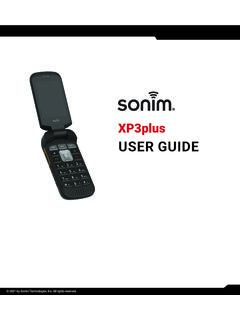
USER GUIDE - sonimtech.com
www.sonimtech.comfeature-rich user interface, which allows you to make the best use of offered functions. PHONE MODELS COVERED This user guide covers Sonim XP3plus phone with the model number XP3900. SONIM SUPPORT INFORMATION For additional product and support information, visit www.sonimtech.com or contact our Sonim Customer Experience Center at 1-833-MY-SONIM
Related documents

Tech 2 User’s Guide - auto-diagnostics.info
auto-diagnostics.info2005 Tech 2 User’s Guide I - 5 Tech 2 Overview The Tech 2 is a hand-held computer designed to aid in diagnosis and repair of automotive systems with electronic controls and interfaces. Figure I-1 External features of the Tech 2 (front view) Hardware The Tech 2 has been designed as a rugged, shop-ready tool by having: • A sturdy case

API Tech Support Guide
www.ups.comAPI Tech Support Email: uoltects@ups.com Monday-Friday, 7:30 a.m. to 9 p.m. ET Email tech support is for sending API Request/Response Pairs for analysis and detailed questions. API Tech Support Phone: 800-247-9035 (same hours as above and also for emergency outages during non-operating hours above).
Morning News Call U.S. - Thomson Reuters
share.thomsonreuters.com•Apple Inc: Some U.S.tech giants may prefer to pay a fine rather than comply with antitrust rules, the European Union's antitrust chief said, and cited Apple's fight with the Netherlands' competition authority as an example. The Dutch Authority for Consumers and Markets (ACM) imposed a 5-million-euro fine on Apple on Monday, the fifth

Oracle Java SE 17 - Licensing Information User Manual
www.oracle.comSep 14, 2021 · review the licensing information user manual for other Java SE versions to learn about your rights associated with those Java SE versions. Customers licensing any of the products listed above have access to all the features and functionality available for this release, including those designated in prior versions as “Commercial Features.”

BIGTREETECH SKR 2
cdn-3d.niceshops.comBIG TREE TECH I. Introduction to SKR Motherboard The BIGTREETECH SKR 2 motherboard is a 32-bit 3D printer motherboard designed and manufactured by the 3D printing team of Shenzhen BIQU Technology Co., Ltd. It is a successor to the SKR1.4 and SKR1.4 Turbo series of motherboards and adds many features that we are sure the community will love.
LogMeIn Rescue Technician Console User Guide
secure.logmeinrescue.com6 LogMeIn Rescue Technician Console User Guide. About Rescue in a Multilingual Environment Supported Languages The LogMeIn Rescue web site, Technician Console, Administration Center, Command Center, Mobile BlackBerry Applet, and the www.LogMeIn123.com PIN code entry form are available in the following

Discovery kit with STM32F407VG MCU - User manual
www.st.com4. Press user button B1 to enable the ST ME MS sensor, move the board and observe the four LEDs blinking according to the motion direction and speed. (If a second USB cable ‘Type-A to Micro-B’ is connected between the PC and CN5 connector, then the board is recognized as a standard mouse and its motion will also control the PC cursor). 5.
Assistive Technology for Students with Autism Spectrum ...
www.naset.orgThe Mayer-Johnson software program, Boardmaker, is a user-friendly program for both adults and children (18). The program offers a 3,000 Picture Communication Symbol (PCS) library in either black/white or color, and can be accompanied by any written word/message. The symbols can be made in any size, and tend to be universally understood.

Techstreet Enterprise user guide
images.prod-techstreet.comuser guide Techstreet Enterprise™ provides easy online access to the standards important to you and your work. Search for and download the standards you need, create lists of related standards, and set up alerts to keep track of document updates in your account.