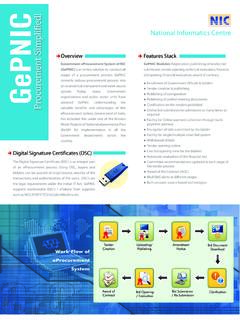
Transcription of Government eProcurement System of NIC (GePNIC ...
1 Government eProcurement System of NIC (GePNIC ). Guidelines for hassle free Bid Submission Non submission of bids due to any reasons within due date / time following due process prevalent at that time in the portal for which bidder shall be held solely responsible. Neither National Informatics Centre nor concerned Procuring Entity will be held responsible for the same in any manner. The following information helps bidders in overcoming last minute hassles and guide towards successful bid submission. 1. System readiness: are advised to keep ready well in advance, their computer System in order like Original Operating System having sufficient RAM, high speed internet connectivity like broad band, with net work providing static IP (avoid using mobile data/network), right internet browser, right Java Runtime Environment, un restricted access to the eProcurement portal from the bidder computer System . Bidders are also advised to procure and keep ready well in advance valid Digital Signature Certificate (Signing) of Class III issued by CA under CCA india .
2 Know about prevalent System requirements, portal enrollment and online bidding and other procedures, bidders can avail Help Desk facility. Bidders are also advised to refer FAQs, Bidder Manual Kit, System Malfunction Procedure available on the portal in addition to the instructions provided in the Tender. 2. Portal Enrollment/registration: Bidders are advised to complete well in advance online enrollment / registration in the portal by following due process prevalent at that time. 3. Bid Submission: The server time (which is displayed on the bidders' dash board) shall be considered as the standard time for referencing the deadlines for submission of the document by the bidders. Bidder, in advance, should go through the notice inviting tender / advertisement, tender &. its related document(s) carefully to understand the requirements of the tender and various documents that are required to be submitted as part of the bid. In case of any clarifications pertaining to the tender, bidders are advised to check with concerned procuring authority in advance so that they can participate in the tender well within scheduled due date/time.
3 Regarding any clarifications on the technical related matter in using the portal, same may kindly be get clarified from help desk facility or any other established technical support mechanism prevalent at that time. Bidder, in advance should get ready with the required bid document(s) having correct file format / acceptable file name / optimal file size that are acceptable for online bid submission. Generally, the permitted file format in the portal are pdf / xls / rar/ dwf/ jpg formats. File name should not contain special characters like &,comma etc. File size of the bid documents can be reduced by scanning of bid documents with 100 dpi with black and white option and also some time it may require to increase local Java Runtime Environment memory at bidder end computer, while uploading bid document having huge size. Mail/SMSs alerts are in-built in the eProcurement portal as an additional feature to inform procuring entities as well as bidders on various events that are happening in the portal.
4 However, delivery of such mail/sms to concerned individual will always depends on the configuration of individual account in the portal, receiver's mail / sms server, mail box / mobile capacity and other factors. Hence, bidders are also advised to visit the website/portal regularly till bid submission due date/time to keep themselves updated and to act upon with respect to changes/modification deemed fit in any manner carried out in the tender by concerned procuring authority. As bidder have been provided with the facility to submit bid documents at any time and also resubmit any number of times till bid submission due date/time, bidders are advised to submit their bid complete in all respect (free from virus/uncorrupted file/ correct file format/ right file size capable enough to upload from the bidder System ) well in advance before the last date/time of the bid submission to avoid the last minute hassles. Most importantly bidders are advised to get an acknowledgement containing Bid ID along with other vital information indicating successful submission of bids from the portal by following due process (like Freezing of Bid).
5 If a bidder withdraws their already submitted bid against a tender in the portal, then the bidder will not be allowed to participate in the same tender once again. The bid documents submitted by the bidders are encrypted using PKI Technology involving digital signature certificates of pre-designated bid openers of the procuring entity to ensure the secrecy of the data. The encrypted bids are stored safely and securely in the server. Only designated bid openers shall be able to decrypt and open the bid on or after the pre-defined bid opening date/time. These assure bidders that their bids are kept confidential, safe and secure. Bidders are advised to complete the online payment (if applicable) for Tender Fee, EMD. and other fees well in advance at least one day in advance prior to the bid submission due date/time. In case exemption is claimed on account of Tender Fee/EMD/others, then the bidders are advised to doubly check all entries and ensure exemption details are correctly entered.
6 The exemption details cannot be changed once it is confirmed by clicking on Confirm button or any process prevalent at that time and leaving that page. As the banker of the bidder will take their own time for payment processing / clearing, the bidder can use the Payment Verification button or any other process prevalent at that time to check the completion of the online payment process from the bank to the eProcurement portal. Only upon successful receipt of online payment, bidder can able to freeze / finally submit their bid to the procuring entity and get bid acknowledgment regarding successful bid submission. All users have to note that after logging into the portal, if the user is not doing anything in the portal idle for more than 20 minutes continuously then the System will automatically logout the user and they will have to login again to carry out any activity in the portal. **.