Transcription of Aruba Instant On 1930 Installation and Getting Started Guide
1 Aruba Instant On 1930 Installationand Getting Started GuidePart Number: 5200-5878 Published: May 2020 Edition: 1 Copyright , 2020 Hewlett Packard Enterprise Development LPNoticesThe information contained herein is subject to change without notice. The only warranties for HewlettPackard Enterprise products and services are set forth in the express warranty statements accompanyingsuch products and services. Nothing herein should be construed as constituting an additional Packard Enterprise shall not be liable for technical or editorial errors or omissions contained computer software.
2 Valid license from Hewlett Packard Enterprise required for possession, use,or copying. Consistent with FAR and , Commercial Computer Software, Computer SoftwareDocumentation, and Technical Data for Commercial Items are licensed to the Government undervendor's standard commercial to third-party websites take you outside the Hewlett Packard Enterprise website. Hewlett PackardEnterprise has no control over and is not responsible for information outside the Hewlett Packard and Windows are either registered trademarks or trademarks of Microsoft Corporation in theUnited States and/or other and Acrobat are trademarks of Adobe Systems and Oracle are registered trademarks of Oracle and/or its is a registered trademark of The Open 1 About this 2 hardware switch series PoE power Alliance PoE 3 Site preparation and switch Installation precautions and the Installation space 4
3 Installation design on some switch Prepare the Installation Verify the switch passes self Mount the or cabinet surface Connect the switch to a power Connect the network Installing or removing the SFPs:..35 Removing the cables to Installation 5 Initial the IP to go from 6 troubleshooting with the patterns for General Switch Patterns for PoE the switch by resetting to Factory 7 and Technology Information Distance 8 Support Instant On 1930 Installation and Getting StartedGuideThis document is intended for network administrators and support.
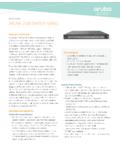
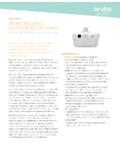
4 The web interface pages illustrated in this document are examples and might not matchyour particular switch or switch and accessory drawings in this document are for illustration only, and may notmatch your particular switch and accessory productsAruba Instant On 1930 8G 2 SFP Switch JL680 AAC Power Adapter:1 13W External AC Adapter (5066-5562) 13W External AC Adapter (5184-5864) 13W External AC Adapter (5300-1005) 15W External AC Adapter (5066-5563) Aruba Instant On 1930 8G Class 4 PoE2 SFP 124W SwitchJL681 AAruba Instant On 1930 24G 4 SFP/SFP+SwitchJL682 AAruba Instant On 1930 24G Class 4 PoE4 SFP/SFP+ 195W SwitchJL683 AAruba Instant On 1930 24G Class 4 PoE4 SFP/SFP+ 370W SwitchJL684 AAruba Instant On 1930 48G 4 SFP/SFP+SwitchJL685 AAruba Instant On 1930 48G Class 4 PoE4 SFP/SFP+ 370W SwitchJL686A1 Used with the JL680A Aruba Instant On 1930 8G 2 SFP Switch.
5 All other Aruba Instant On 1930 switches operate withinternal power publications Aruba Instant On 1930 Switch Series Quick Setup Guide and Safety/Regulatory Information Aruba Instant On 1930 8G/24G/48G Switch Series Management and Configuration Guide Aruba Instant On User Guide ArubaOS-Switch Transceiver GuideTo access the above publications, visit 1 About this document5 About this documentThe Aruba Instant On 1930 Switch series are designed to meet the needs of small business networkenvironments - simple to setup and manage, secure and reliable. Aruba Instant On deployments can bemanaged through a Mobile App supported on iOS and Android, a cloud portal that is accessible through aweb browser, or a local web switches are intended for indoor use only.
6 The switches comply with the safety standard IEC 60950-1,2nd Edition and IEC 62368-1 2nd Edition. A tool is required to remove the top cover; however, the product isnot considered serviceable by an operator. These switches can be directly connected to computers, printers,and servers to provide dedicated bandwidth to those devices, and you can build a switched networkinfrastructure by connecting the switch to hubs, other switches, or routers. In addition, these switches offernetwork management hardware featuresFigure 1: JL680 AItemDescription11 GbE RJ45 ports with Link/Status LED per port21 GbE SFP port with Link/Status LED3 Cloud Status LED4 Global Status LED5 UID LED6 Speed Mode LEDT able Continued6 Aruba Instant On 1930 Installation and Getting StartedGuide OverviewItemDescription7 Reset pushbutton (recessed)8 LED Mode pushbuttonFigure 2.
7 JL681 AItemDescription11 GbE RJ45 ports with Link/Status LED per port21 GbE SFP port with Link/Status LED3 Cloud Status LED4 Global Status LED5 UID LED6 PoE Mode LED7 Speed Mode LED8 Reset pushbutton (recessed)9 LED Mode pushbuttonFigure 3: JL682 AChapter 2 Overview7 ItemDescription11 GbE RJ45 ports with Link/Status LED per port210 GbE SFP+ port with Link/Status LED3 Cloud Status LED4 Global Status LED5 UID LED6 Speed Mode LED7 Reset pushbutton (recessed)8 LED Mode pushbuttonFigure 4: JL683 AItemDescription11 GbE RJ45 ports with Link/Status LED per port210 GbE SFP+ port with Link/Status LED3 Cloud Status LED4 Global Status LED5 UID LED6 PoE Mode LED7 Speed Mode LEDT able Continued8 Aruba Instant On 1930 Installation and Getting StartedGuideItemDescription8 Reset pushbutton (recessed)9 LED Mode pushbuttonFigure 5.
8 JL684 AItemDescription11 GbE RJ45 ports with Link/Status LED per port210 GbE SFP+ port with Link/Status LED3 Cloud Status LED4 Global Status LED5 UID LED6 PoE Mode LED7 Speed Mode LED8 Reset pushbutton (recessed)9 LED Mode pushbuttonFigure 6: JL685 AChapter 2 Overview9 ItemDescription11 GbE RJ45 ports with Link/Status LED per port210 GbE SFP port with Link/Status LED3 Cloud Status LED4 Global Status LED5 UID LED6 Speed Mode LED7 Reset pushbutton (recessed)8 LED Mode pushbuttonFigure 7: JL686 AItemDescription11 GbE RJ45 ports with Link/Status LED per port210 GbE SFP port with Link/Status LED3 Cloud Status LED4 Global Status LED5 UID LED6 PoE Mode LED7 Speed Mode LED8 Reset pushbutton (recessed)9 LED Mode pushbuttonNetwork ports Auto-sensing 10/100/1000 BASE-T ports:These ports have the Auto-MDIX feature, which means that you can use either straight-through orcrossover twisted-pair cables to connect any network devices to the switch.
9 Power-over-Ethernet (PoE) ports:10 Aruba Instant On 1930 Installation and Getting StartedGuideThe 1930 PoE Class 4 switches support the IEEE standard, which allows IP telephones, wirelessLAN Access Points, and other appliances to receive power as well as data over existing LAN cabling. Forfurther information regarding PoE power, see the Hewlett Packard Enterprise Web site at SFP slots for fiber or copper uplinks:Using Aruba SFPs, these products support optional network connectivity with the following speeds andtechnologies:NOTE: Transceivers not on the 1930 approved list are used at your own risk and may voidsupport and Form-Factor and ConnectorSpeedTechnologyCablingSFP Connector1 Gbps1000-TCopper (twisted-pair)RJ-451000-SXFiber (multimode)LC1000-LXFiber (multimode orsingle mode)LC10 Gbps10000-SRFiber (multimode OM3/OM4)LC10000-LRFiber (single mode)LC10000-CRCopper (fixed)Direct AttachNOTE: SFP+ only supported on JL682A.
10 JL683A, JL684A, JL685A, JL686 APoE Power1930 switch series PoE power deliveryPower Over Ethernet (PoE) functionality is supported on certain 1930 models, known as power sourceequipment (PSE) ports which provide power to connected devices. The devices receiving power through PoEare referred to as powered devices (PDs). The switch automatically detects the presence of a PD on a PSEport, and the switch uses physical layer classification to assign initial power to the PD. After the PD haspowered up, the switch can refine the assigned power using LLDP communication messages from the PoE software supports two power modes to allocate power by Usage (default) or Class.