Transcription of NOTICE TO THE PROFESSION AND PUBLIC GUIDE TO …
1 THE PROVINCIAL COURT OF BRITISH COLUMBIA Page 1 of 16 Effective Date: 16 December 2020 NP 21 NOTICE TO THE PROFESSION AND PUBLIC GUIDE TO virtual PROCEEDINGS Purpose In light of the extraordinary circumstances during the current PUBLIC health emergency, and as described in NP 19 Court Operations during COVID-19, some court proceedings will be held virtually by audioconference or videoconference until further NOTICE , unless otherwise ordered by a judge. Although the court proceeding is taking place virtually and judges, parties, lawyers, and court staff may attend by audioconference or videoconference, it remains a formal setting. This NOTICE provides information for anyone will appear before the Provincial Court for a virtual proceeding or observe a virtual hearing until further NOTICE .
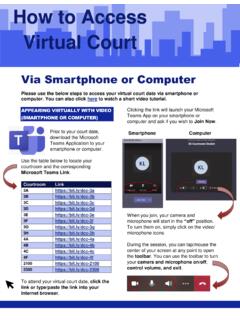
2 In this NOTICE , the term virtual proceeding means a hearing or case conference conducted by audioconference (including telephone or Microsoft Teams) or videoconference (including Microsoft Teams). A step-by-step GUIDE to appearing in a Microsoft Teams audioconference or videoconference proceeding is attached as Appendix A . It contains detailed information about connecting to and managing a Microsoft Teams audioconference or videoconference. Review the GUIDE carefully before your matter proceeds. NOTICE virtual Proceeding Etiquette In some ways, the behaviour expected of people attending and observing court virtually is the same as if they were actually in a courtroom.
3 However, conducting a proceeding fairly and effectively by audioconference or videoconference requires some modification to etiquette and behaviour. The following list is not exhaustive, but provides some guidelines for the best practices to follow during a virtual conference or hearing: Page 2 of 16 I. Parties, Counsel for Parties, Witnesses, and Other Court Participants 1. For audioconference and videoconference proceedings a. No recording: You are not permitted to audio- or video-record any portion of a virtual proceeding. Some proceedings are confidential and there may be a publication ban in effect. The BC Courts Policy on the Use of Electronic Devices sets out penalties for recording, including prosecution.
4 B. Confidentiality: The conversation between the parties, their counsel (if represented), and the judge in a case conference or pre-trial conference is private and confidential. Only parties and/or their counsel should appear at the conference and no-one else should be present, unless otherwise permitted by the conference judge. Do not forward or share the meeting link or dial up information to any unauthorized individuals. c. Location: The Court understands that you do not have the advantage of appearing in a controlled courtroom environment. You may be participating from a small, shared living space. Please make reasonable efforts to find a quiet, private space with a neutral background for your court appearance.
5 D. Mute microphone: To minimize background noise, mute your microphone when you are not speaking. If you are using a computer, close applications on your computer, such as Twitter, Facebook, and email, that are not needed so you are not interrupted during the proceeding. Also, put your cell phone to silent mode. e. Introductions: When parties are introducing themselves, or lawyers are introducing themselves, their client, witness or another individual, in virtual proceedings, they should provide the judge or justice with each person s name, title ( Jones ) and pronouns to be used in the proceeding. (See NP 24 Form of Address for Parties and Lawyers) f.
6 Speak clearly and slowly: Remember to unmute before speaking. Speak clearly and slowly enough for everyone to follow what you are saying. Pause frequently to allow the judge to ask questions and avoid speaking over the judge or other participants. This is particularly important when there is an interpreter. Mute the microphone again when done speaking. Follow the judge s directions about when to speak or ask questions. g. Objecting, responding or commenting: If you find it necessary to object to, respond to, or comment on something that an opposing party has said and it cannot wait: if on video, click on the raise hand button or raise your hand to signal to the judge that you wish to speak; and Page 3 of 16 if on audio, respectfully interrupt the conversation when appropriate to let the judge know that you have something to say.
7 H. Forms of address: A Provincial Court Judge is called Your Honour . For the other party and/or their lawyer, see NP 24 Form of Address for Parties and Lawyers. i. Time limits: Time limits may have been set in advance, or the judge may set them during the conference or hearing. You must follow them to make sure everyone has a fair chance to be heard. j. Materials: Collect and organize the documents you will need in advance, and make sure you have them with you for the hearing or conference. k. Use pen and paper: Take notes with a pen and paper. The sound of typing can be distracting, and make it hard to hear others. Avoid shuffling papers as that also can be distracting.
8 L. No food or drink: As in a courtroom, do not eat or drink anything but water during the proceeding. 2. For audioconference proceedings a. Connecting to the court proceeding: Telephone hearings are recorded by the Court. When you are connected to the court proceeding, introduce yourself by saying your first and last name. The court clerk will note the names of all the parties and lawyers attending the hearing on the court record. b. Say your name whenever you start speaking: At an audioconference proceeding, it can be hard to know which person is talking. c. Audio connection: If using a telephone, a land line works better than a cell phone. In either case, do not use the speaker phone function.
9 Instead, use a hand-held phone or use a set of headphones with a built-in mic and mute feature. If possible, avoid the use of VOIP (Voice Over Internet Protocol). 3. For videoconference proceedings a. Dress appropriately: Judges will be dressed as they would for any court proceeding to reflect the professionalism of the Court. Dress as if you are attending an in-person proceeding in a courtroom. Click on the link for more information on how to dress for court. Page 4 of 16 b. Arrive early: You should be prepared to join the videoconference proceeding at least 15 minutes before the start of the proceeding, to allow time to address any technical issues. Before the videoconference proceeding starts, you will enter a virtual waiting room and remain there until the proceeding begins.
10 C. Use your name when prompted for a screen name: When you join the videoconference proceeding, you will be asked to enter your name. The name that you enter will be displayed for all participants to see. Type your first and last name. d. Sitting and Standing: You do not need to stand when the videoconference proceeding starts or ends, and you can remain seated when addressing the judge. e. Bowing: You do not need to bow at any time during the videoconference proceeding. f. Focus on your camera: Direct eye contact is important. When speaking, look into the camera rather than at the person(s) that you are speaking to. g. Technical difficulties: If the image and sound quality is interrupted, ask whether other participants can still hear you.