Transcription of 2021-2022 Treasurer's Guide - vfwauxiliary.org
1 Updated July 2021 1 Contents SECTION ONE INTRODUCTION/BASICS .. 3 Welcome to MALTA .. 3 Creating a MALTA Login .. 4 What can I do as a Treasurer in MALTA?.. 5 Shortcuts .. 6 Important Reports Located in Reporting Center .. 6 Record Retention Guide .. 7 SECTION TWO MEMBERSHIP MANAGEMENT .. 8 Processing new member Applications .. 8 Proof of Eligibility .. 9 Notification and Obligation-New members .. 9 members in Good Standing .. 9 Cancellation Requested by Member .. 10 Removing Ineligible members .. 10 Membership Information .. 11 Membership Summary Form .. 11 Annual Member Dues Renewal Reminders .. 12 Processing Dues .. 13 Dues Payment Flowchart .. 16 How to Become a Life 17 Life Membership Fee Schedule .. 17 Updated July 2021 2 Annual Member Converting to Life Member .. 18 Life Membership Per Capita Payout .. 19 Department members At Large.
2 19 Transfers .. 20 Membership Change/Update Form .. 22 How to Make Changes/Corrections to Member Contact Information & Report Deceased 23 Replacing a Lost or Damaged Membership Card .. 24 Continuous Membership Pins .. 24 SECTION THREE FINANCIAL REPORTING .. 25 Duties of the Treasurer .. 25 Types of Accounts .. 26 Relief Fund 27 Accountable Officers Bonds .. 27 Tax Information .. 31 IRS Form 8822-B .. 31 Tax Return Form 990-N e-postcard .. 32 Exemption from State Sales Tax .. 34 Payroll Taxes .. 35 auxiliary Audits .. 35 Direct Deposit/ACH .. 35 Donations Cheat Sheet (VFW auxiliary ) .. 37 Updated July 2021 3 SECTION ONE INTRODUCTION/BASICS Welcome to MALTA Here is a sampling of what you can do in MALTA: Configure or change the auxiliary s dues amount Update the auxiliary s banking information View and/or save a copy of the auxiliary s bond Print member address labels Update member information: name, address, phone, email.
3 Date of birth must be updated by National Headquarters. Pay continuous membership dues Make a gift to the VFW auxiliary National Organization, such as Health & Happiness, Cancer Aid & Research and Patriotic Art View deposits, withdrawals, and electronic transactions to and from National Headquarters Register members for national events Order replacement cards for members or print a paper version. And much more! Activate your account today and begin using MALTA. Updated July 2021 4 Creating a MALTA Login 1) Go to and click on MALTA Member Login 2) Click on Activate Account 3) Enter required information a) Member ID b) First and Last Name as shown on Membership Card c) Primary Address Zip Code 4) Follow the onscreen instructions to create your password. Make sure your password meets the requirements: 8-15 characters, (1) upper case letter, (1) lower case letter, (1) number, and (1) symbol.
4 Updated July 2021 5 What can I do as a Treasurer in MALTA? Once you ve created your login and have logged in to MALTA, your personal dashboard will appear. This gives you information about your auxiliary . Individual members will have the same dashboard. Officers at all levels have an additional Duties field in the menu bar at the top. If you hold multiple offices on multiple levels of the organization, you may have multiple tabs. Dashboard Duties Updated July 2021 6 Shortcuts This screen gives you multiple shortcut icons Important Reports Located in Reporting Center Available only to President, Secretary and Treasurer. Click on Duties in MALTA. In the Shortcuts area at the top, click on the Reports icon. Check regularly for new reports. Feel free to suggest a report you would find helpful. Please forward suggestions via PLEASE NOTE: Access will NOT be granted if your auxiliary officers are not on file with National Headquarters.
5 Also, Officers will not have access to the features of MALTA if they are not a member in good standing. Updated July 2021 7 Record Retention Guide Please reference the RECORD RETENTION Guide in the VFW auxiliary Podium Edition: Bylaws and Ritual, Booklet of Instructions (yellow pages), for detailed information including a list of applicable records and their suggested minimum retention period. Updated July 2021 8 SECTION TWO MEMBERSHIP MANAGEMENT *Please Note: Treasurer forms including membership application, instructions and training materials are available in Treasurer Resources area in MALTA. Click on Duties tab in MALTA, choose the Treasurer role, under the area of Manage auxiliary (District, or Department), choose the Treasurer Resources hyperlink. Processing new member Applications See Bylaws, Sec. 102 The Applicant must: 1.
6 Complete Membership Application (It MUST be legible) in its entirety. 2. Provide proof of eligibility 3. Pay admission fee (if required by the auxiliary ) and membership dues (Annual or Life Member) directly to local auxiliary . The auxiliary must: 1. Investigate eligibility and vote to accept or reject application. 2. Record Member s information in auxiliary records. 3. Transmit Membership Summary Form, member s fully completed application and check for payment of National and Department portion of dues or Life Membership fees to the Department Treasurer. 4. Provide a receipt for dues payment to the member as proof of membership until a membership card is issued by National Headquarters. Updated July 2021 9 Proof of Eligibility See Bylaws, Sec. 101 Proof of service to establish eligibility for membership rests with the applicant. A detailed Guide to determining eligibility is available in the Bylaws, Sec.
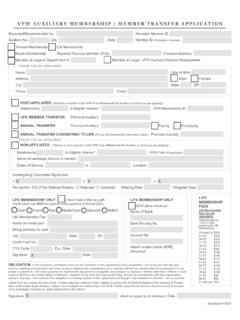
7 101. Notification and Obligation-New members See Bylaws, Sec. 103 Please refer to the Bylaws for procedure for both accepted and rejected members . new member Application (See page 21 for full application document) members in Good Standing See Bylaws, Sec. 104 How do I know if a member is in good standing? 1) Membership Year of the auxiliary is from January 1 to December 31. 2) A member paid through December 31 is in good standing. Updated July 2021 10 3) A member ceases to be in good standing on January 1 immediately following the year for which his/her dues are paid. 4) A member will not be in good standing until his/her dues are paid for the current year. 5) A member who is not in good standing cannot attend meetings nor hold an office and is not eligible for a Cancer Grant. 6) Dues must be paid by June 30 to remain a continuous member. 7) If a member does not pay his/her current dues (processed in the MALTA system by June 30), he/she ceases to be a member and must rejoin the organization.
8 Cancellation Requested by Member 1) Member must send written request directly to National Headquarters (not through auxiliary Treasurer). 2) Request must include name, address, membership ID number and daytime phone number for verification. 3) The request cannot be a form letter, pre-typed by the auxiliary Treasurer. Removing Ineligible members See Bylaws, Sec. 108 1) Eligibility must be challenged at an auxiliary meeting of the level to which the member belongs by motion made and passed. 2) Must send a copy of the member s application, a copy of the service record of the veteran under whom the member joined and a copy of the minutes from the meeting where the motion was taken to your Department. PLEASE NOTE: A member remains eligible and in good standing until a Special Order to remove him/her has been issued by the National President. Updated July 2021 11 Membership Information To get a full listing of your members and their contact information: 1) Click on Duties.
9 2) Scroll down to the section labeled Manage members . 3) Click on View members . 4) You can search based on several criteria. Membership Summary Form This form may be found in the Treasurer Resources area in MALTA. Please refer to the top of page 8 on how to locate this area. 1) This form is used to summarize the amount of National and Department dues being transmitted to the Department Treasurer. 2) Must be completed each time annual dues and a check are transmitted to Department Treasurer. You may also use a form designated by your Department. 3) Keep a copy for your records. Updated July 2021 12 Annual Member Dues Renewal Reminders 1) Treasurer and Membership Committee should contact all annual members to collect current dues. 2) Personal contact is important. 3) Send a more personal letter to unpaid annual members . 4) Run the Dues Renewal report in MALTA and print them out, ready to mail.
10 Additional instructions may be found in the Treasurer Resources area in MALTA. Please refer to the top of page 8 on how to locate this area. Updated July 2021 13 Processing Dues Please note: If a member s address is marked as a Bad Address , the address must be corrected before processing dues. Continuous Annual members Dues should be input into MALTA or transmitted to your Department Treasurer when received from the member. Dues should NOT be held for any reason. Fully completed and legible applications for NEW and REJOINING members must be sent to the Department Treasurer for processing. The following steps are required, not optional. Follow each step listed below. 1) Receive check, cash or money order from member for payment of annual dues. 2) A receipt must be provided to member for any type of payment. This receipt is proof of eligibility until the member receives a membership card from National Headquarters.