Transcription of NOBTS/LEAVELL COLLEGE MANUAL OF FORM & STYLE
1 NOBTS/LEAVELL COLLEGE . MANUAL OF FORM & STYLE . Prepared by Dr. Eddie Campbell August 2019. Contents 1. FORM ATTING THE 1. TITLE 1. Margins/ Spacing ..1. Font ..1. Other Important Matters Concerning the Title Page ..2. CONTENTS PAGE .. 3. Headings ..3. Margins/ Spacing ..3. Alignment and Page Numbers ..3. TEXT OF THE PAPER .. 4. Introduction Heading ..4. Margins/ Spacing ..4. Pagination ..4. Footnotes ..5. Headings for Sections and Subsections ..6. Block Quotations ..6. Widows and Orphans ..7. SELECTED 8. Headings ..8. Margins/ Spacing ..8. Bibliographic Entries ..9. 2. SAM PLE FOOTNOTES AND BIBLIOGRAPHY ENTRIES .. 10. BOOKS .. 10. One Author ..10. Two Authors ..10. Three Authors ..10. Four or More Authors ..11. Editor(s) or Translator(s) instead of Author ..11. Editor(s) in addition to Author ..11. PARTS OF 11. Prefaces and Forewords ..11. Individual Chapters ..12. INDIVIDUAL VOLUMES IN M ULTIVOLUME 13.
2 BOOKS IN A 14. COM 14. Unnumbered Commentary Series (Individual volumes have no volume number.) ..15. Numbered Commentary Series (Each volume has a volume number.) ..15. Other Types of Commentaries ..16. REFERENCE WORKS (DICTIONARIES, ENCYCLOPEDIAS, AND LEXICONS) .. 17. General Reference Works ..17. Specialized Reference Works ..17. JOURNAL ARTICLES .. 18. Journal Articles in Print ..18. Online Journal M AGAZINE 19. Magazine Articles in Print ..19. Online Magazine Articles ..19. DISSERTATIONS. THESES, AND DM i n PROJECTS .. 19. PAPERS PRESENTED AT MEETINGS OR CONFERENCES .. 20. BAPTIST FAITH AND M ESSAGE .. 20. ELECTRONIC BOOKS .. 20. WEBSITES .. 21. 22. ONLINE 22. PODCASTS .. 22. SCRIPTURE 23. Option 1: Citing Scripture in a Footnote ..23. Option 2: Citing the Scripture Reference within the Text ..23. SECONDARY SOURCE OF A QUOTATION .. 24. CITING FROM A SOURCE PREVIOUSLY CITED IN THE TEXT.
3 24. Using Ibid. (with no intervening references) ..24. Using Shortened Notes ..25. 3. FREQUENTLY ASKED QUESTIONS .. 26. FOOTNOTES AND 26. PUNCTUATION .. 28. TITLES OF WORKS .. 29. NUM BERS .. 29. CAPITALIZATION .. 30. 4. M ATTERS OF STYLE .. 30. WEAK 30. Avoiding It Is ..30. Avoiding There Is/ are ..31. Avoiding This Is ..32. SEM INARY PREFERENCES .. 32. The Active Voice ..32. Tense ..33. Third Person Point of View ..34. 5. DOCUMENTING THE PAPER .. 34. USING QUOTATIONS AND PARAPHRASES .. 34. Introducing Quotations ..34. Introducing Paraphrases ..35. AVOIDING PLAGIARISM .. 36. Definition of Plagiarism .. 36. Forms of Plagiarism .. 37. APPENDIX: BASIC turabian HELPS FOR MICROSOFT WORD USERS .. 38. PREPARING TO WRITE .. 38. SETTING UP THE PAGE TEM PLATE .. 38. ON FOOTNOTES AND SEPARATORS .. 39. PERFECTING PAGE NUM 43. N O B T S / L E A V E L L CO L L E G E M A N U A L O F F O RM & S T YL E | 1.
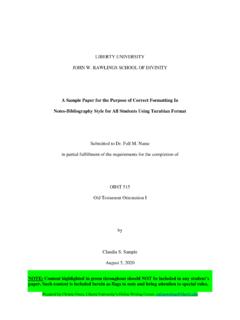
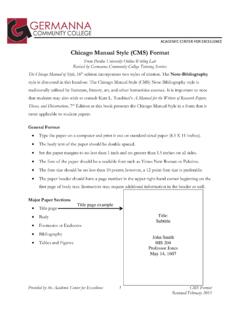
4 1. FORMATTING THE PAPER. TITLE PAGE. Note to Doctoral Students: See the title page guidelines provided by your program. Capitalization Us e all capital letters in the title of the paper. Us e headline s tyle in the remaining s ections . Capitalize the firs t word of each s ection along with all other words except articles and prepos itions . Margins/ Spacing Center each line, leaving s ide margins of at leas t 1 . If the title of the paper is longer than four inches , divide it into a double- s paced inverted pyramid. Top margin (A) = 1 . Bottom margin (A1 ) =. 1 . Spaces B and B1 s hould be equal. The center s pacing (C) may vary, but try to keep clos e to B and B1 . Font Us e a twelve-point Times New Roman font for the entire paper, including notes and page numbers . Note that s ome profes s ors in the graduate program allow a ten-point Times New Roman font in footnotes.
5 Instructions are continued on the next page. 2 | N OBTS / LEAVELL COLLEGE MANUAL OF F ORM & S TYLE. Other Important Matters Concerning the Title Page Graduate s tudents s hould replace in Leavell COLLEGE with the divis ion to which the cours e belongs , as in the following: in Theological and His torica l Studies .. Us e your full name with middle initia l and period after middle initial. If you have a COLLEGE degree, abbreviate the degree, spell out the COLLEGE 's name, and give the year you graduated. Rule gives a list of abbreviations for academic degrees. The abbreviations have no periods or spaces. If you have more than one degree, you will type each on a separate line with a double space before and a double space after. Note that if you have no COLLEGE degree, type the date you submit the paper on the same line. The title page counts as page i of the paper, but do not type the number on the page.
6 Insert a blank page between the title page and the contents page. The blank page counts as page ii of the paper, but no number should appear on this page as well. Staple the paper in the top left corner only. N O B T S / L E A V E L L CO L L E G E M A N U A L O F F O RM & S T YL E | 3. CONTENTS PAGE. Headings Type the heading CONTENTS 1 from the top of the page. Papers in Leavell COLLEGE and the mas ter's program are too s hort to include chapters . Ins tead of chapter headings , us e firs t-level s ubheads for the major s ections . If you further divide the major s ections , s ee rule regarding lower-level s ubheads . Type the headings CONTENTS and SELECTED. BIBLIOGRAPHY in all caps with neither bold nor italics . See The numbers before the s ections are optional. If you us e them on the contents page, you mus t us e them before the s ectional headings in the text.
7 Margins/ Spacing Page margins s hould be 1 on top and s ides . The bottom margin varies according to the number of headings on the page and will be at leas t 1 . The page number of the contents page will be iii centered from the bottom edge of the page, according to the Word default ( ). Alignment and Page Numbers Triple-s pace between the headings CONTENTS and Section, leaving two blank lines . Align the firs t-level s ubheads , including the introduction and conclus ion, flus h left. Als o, align the heading SELECTED BIBLIOGRAPHY flus h left with the s ubheads . Double s pace between s ubheads on the contents page, leaving one blank line. Single s pace any run-over line of a heading ( in the 8th and in the 9th). Instructions continued on next page. 4 | N OBTS / LEAVELL COLLEGE MANUAL OF F ORM & S TYLE. Indent a lower-level s ubhead one tab s top to the right of the previous level.
8 Align the page numbers for s ections of the paper on the right. The ones column s hould fall in a s traight line. Although the period dot leaders are optional in turabian 8 and 9, using them aids the reader in matching the page number to the appropriate section of the paper. TEXT OF THE PAPER. Introduction Heading Papers in Leavell COLLEGE and the master's program are too short to include chapters. Instead of being a chapter heading, the introduction requires a first-level subhead. It should be centered, typed in bold or italics, but not both. Margins/ Spacing All margins=1 from the edge of the paper to the text ( and fig. ). Due to headings and footnotes, the bottom margin may be slightly more than 1 . Leave one blank line between the heading and the text that follows . Double-s pace text. Separate paragraphs with only one blank line. Indentation Indent paragraphs a cons is tent meas ure ( ).
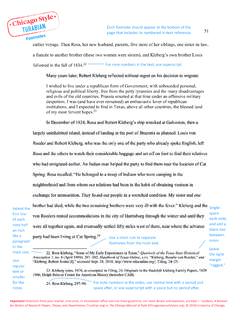
9 One tab s top is a good dis tance. Indent footnotes the s ame dis tance as paragraphs ( ). Pagination The firs t page of the introduction is arabic 1. The number s hould be centered 1 from the bottom of the page (Word default). Continued on next page. N O B T S / L E A V E L L CO L L E G E M A N U A L O F F O RM & S T YL E | 5. Beginning with page 2, the page numbers of the remaining pages of the text should be at the top of the page. As page 3 of the sample paper shows, the page number may be from the top of the page and 1 from the right edge of the page. Another option is to center the number from the top of the page. See The text will begin 1 . from the top edge of the paper. Footnotes According to , to indicate you have cited a source, place an arabic superscript at the end of a quotation or paraphrase in the text. Number notes consecutively beginning with arabic 1 ( ).
10 Also according to , beneath the text you should cite the source of the information the text in a correspondingly numbered note that provides information about the source (author, title, and facts of publication) plus relevant page numbers.. Separate the footnotes from the text with a short separator line of consistent length ( ). The default length is 2 and the line is to appear immediately below the text rather than at the bottom of the page. See pages 39-42 of the appendix of this MANUAL . turabian prefers the note number typed on the line followed by a period and the footnote (See ). However, turabian also allows the superscript numbers shown here. The superscript number of the footnote is to be followed by a blank space and then the note ( ). Many professors prefer the superscript numbers, which are the default in Word. You may use either STYLE ; just be consistent.