Example: stock market

AKO White Pages LDAP - Common Access Card …

Configuring Mac Address Book to search AKO White Pages (revised 21 FEB 11 by Mike Danberry) The following method outlines a way in which you can configure the built in Address Book function on your Mac to Search the AKO White Pages Directory. In my tests, it works great on Snow Leopard ( ), but did not work in Leopard ( ) 1. Open Address Book (Finder - Applications - Address Book) 2. Select the Address Book drop down menu and click on Preferences. 3. Snow Leopard: Select the Accounts Tab from the top bar. 4. Click the + button on the lower left side of the screen. 5. Select the Account Type Drop down and select ldap . Enter into the Server Address: field the following string: 6. Select the Server Options drop down and check the Use SSL Box. Click Continue 7. Enter the following information into the designated field: - Description: AKO White Pages - Search Base: ou=people,ou=army,ou=dod,o= Government,c=US - Scope: Subtree - Authentication: Simple - Username: cn= ,ou=people,ou=army,ou=dod,o= Government,c=US NOTE: is your AKO username - Password: your AKO Password Click Create 8.

Configuring Mac Address Book to search AKO White Pages (revised 21 FEB 11 by Mike Danberry) The following method outlines a way in which you can configure the …

Tags:

  Access, Card, Pages, Common, White, Ldap, Common access card, Ako white pages ldap

Information

Domain:

Source:

Link to this page:

Please notify us if you found a problem with this document:

Other abuse

Advertisement

Transcription of AKO White Pages LDAP - Common Access Card …

1 Configuring Mac Address Book to search AKO White Pages (revised 21 FEB 11 by Mike Danberry) The following method outlines a way in which you can configure the built in Address Book function on your Mac to Search the AKO White Pages Directory. In my tests, it works great on Snow Leopard ( ), but did not work in Leopard ( ) 1. Open Address Book (Finder - Applications - Address Book) 2. Select the Address Book drop down menu and click on Preferences. 3. Snow Leopard: Select the Accounts Tab from the top bar. 4. Click the + button on the lower left side of the screen. 5. Select the Account Type Drop down and select ldap . Enter into the Server Address: field the following string: 6. Select the Server Options drop down and check the Use SSL Box. Click Continue 7. Enter the following information into the designated field: - Description: AKO White Pages - Search Base: ou=people,ou=army,ou=dod,o= Government,c=US - Scope: Subtree - Authentication: Simple - Username: cn= ,ou=people,ou=army,ou=dod,o= Government,c=US NOTE: is your AKO username - Password: your AKO Password Click Create 8.

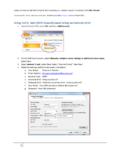
2 Your Accounts Tab should now look like the below image. Close the Accounts window. 9. Snow Leopard: You should now be able select the AKO White Pages address book, enter a Last name, First name string into the search field, hit enter, and the results will be displayed in the name field. When a name is selected it will open in the right pane.

Related search queries