Transcription of All AXIS bank payment modes require a minimum …
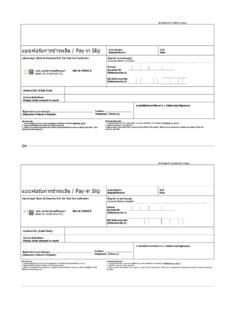
1 Portal Charges payment through axis bank Portal charges payment procedure for (n)Procure through axis bank Cash Management Service (CMS) All axis bank payment modes require a minimum of 48 hours for clearance (excluding days for the clearance of cheque) 1. Collect the deposit slips from nearest axis bank branch (CMS Centre) or LRA office of (n)Code solutions. 2. Fill-up the deposit slips correctly & deposit the same in nearest CMS branch of axis bank . 3. Deposit Slips are to be filled in Quadruplicate. 4. The details on all the four copies of the set must be the same and legible. 5. Please mention the account details in CMS slip as mentioned bellow: Client Code: N-CODE 6. Fill up all the details in the Deposit Slip-Instrument No., Instrument Date, Name of the Drawer, Deposit Location and other additional fields.
2 The bank will not accept incomplete Deposit Slip. 7. Ensure that the bank official returns the last two copies of the Deposit Slip after affixing the Received for Clearing stamp with the date of receipt. 8. The Client (Customer) Name must be mentioned correctly on all deposit slips. 9. In the case of deposition by cheque, bank will take deposition into consideration only after the clearance of cheque. For such cases kindly keep time margin for clearance of cheque. 10. For cheque / DD payment mode, instrument number is required to be filled up at the time of website registration process along with transaction date and CMS slip number. 11. CMS slip number is to be filled up at the time of website registration for all type of offline payment modes . 12. Please preserve the copy of Demand Draft /CMS slip as the same needs to be produced for our verification in case of any discrepancy.
3 Furnish the registration process through new user link on Select Off-line payment mode if you wish to pay portal charges by depositing Cash / Cheque / DD in CMS Branch of axis bank . - CMS Location list is available on Quick Link section on a. After confirmation of payment from axis bank user can activate their account through Pay Portal Charges link on b. User manual for (n)Procure payment Gateway is available in Quick Link section of Portal Charges payment through axis bank In case bidders need any clarifications or if training is required for participating in online tender, they can contact (n)Procure Support team:- (n)code Solutions-A division of GNFC Ltd., (n)Procure Cell 403, GNFC Infotower, Road, Bodakdev, Ahmedabad 380054 (Gujarat) Contact Details Phone Airtel : +91-79-40007501, 40007512, 40007516,40007517,40007525 BSNL : +91-79-26854511, 26854512, 26854513 (EXT: 501, 512, 516,517,525) Reliance : +91-79-30181689 Fax : +91-79-26857321, 40007533 E-mail : TOLL FREE NUMBER: 1-800-233-1010 (EXT: 501, 512, 516,517, 525)