Example: bachelor of science

ASSOCIATE KIOSK @ HOME: FORGOTTEN PASSWORD

ASSOCIATE KIOSK @ home : FORGOTTEN PASSWORD You can reset your JCPenney PASSWORD using this link: :8443/sspr/public/forgottenpassword Step 1: Enter your 9-digit Employee ID. Page 1 Page 2 Step 2: Answer your Security Questions. If you do not have Security Questions setup, contact 1-800- 870-1111 and follow the prompts 2 then 1. Step 3: Agree to the terms and click Continue. Page 3 Step 4: Enter your new PASSWORD and select Change PASSWORD . Step 5: Return to and click ASSOCIATE KIOSK @ home . Login with your 9-digit Employee ID and the PASSWORD you just created.
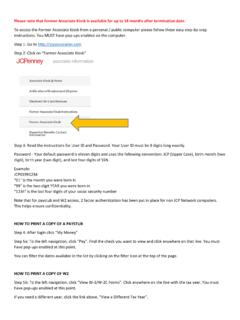
Step 5: Return to jcpassociates.com and click Associate Kiosk @ Home. Login with your 9-digit Employee ID and the password you just created. Self Service Password Reset Forgotten Password If you have forgotten your password, follow the prompts to reset your password. Employee # Search

Tags:

  Associate, Home, Password, Forgotten, Kiosks, Associate kiosk home, Forgotten password

Information

Domain:

Source:

Link to this page:

Please notify us if you found a problem with this document:

Other abuse

Advertisement

Transcription of ASSOCIATE KIOSK @ HOME: FORGOTTEN PASSWORD

1 ASSOCIATE KIOSK @ home : FORGOTTEN PASSWORD You can reset your JCPenney PASSWORD using this link: :8443/sspr/public/forgottenpassword Step 1: Enter your 9-digit Employee ID. Page 1 Page 2 Step 2: Answer your Security Questions. If you do not have Security Questions setup, contact 1-800- 870-1111 and follow the prompts 2 then 1. Step 3: Agree to the terms and click Continue. Page 3 Step 4: Enter your new PASSWORD and select Change PASSWORD . Step 5: Return to and click ASSOCIATE KIOSK @ home . Login with your 9-digit Employee ID and the PASSWORD you just created.


Related search queries