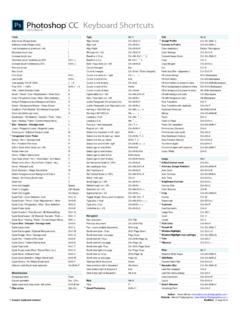
Transcription of C Arbitrary (Image Rotation) Brightness/Contrast Crop ...
1 Tools File Alt+F Image Alt+I. C. Add mode (Shape tools) + Browse in Bridge Ctrl+Alt+O 8 Bits/Channel mode Ctrl+Alt+ , Subtract mode (Shape tools) - Close Ctrl+W / Ctrl+F4 C. Arbitrary (Image Rotation) Ctrl+Alt+Shift+R. Lock transparency pixels (on / off) / Close All Ctrl+Alt+W / Ctrl+Shift+F4 Auto Color Ctrl+Shift+B. Decrease brush size [ Close and Go To Bridge Ctrl+Shift+W Auto Contrast Ctrl+Alt+Shift+L. Increase brush size ] Exit Ctrl+Q Auto Tone Ctrl+Shift+L. Decrease brush hardness by 25% Shift+ [ File Info Ctrl+Alt+Shift+ I C. Brightness/Contrast Ctrl+Shift+ - Increase brush hardness by 25% Shift+ ] New Document Ctrl+N Canvas Size Ctrl+Alt+C. Previous brush , New Document (last settings) Ctrl+Alt+N Color Balance Ctrl+B. C. Next brush . Open Ctrl+O Crop Ctrl+Alt+Shift+H.
2 First brush Shift+ , Open As Ctrl+Alt+Shift+O Curves Ctrl+M. C. Last brush Shift+ . Place Embedded Ctrl+Shift+O Desaturate Ctrl+Shift+U. C. Tool opacity 10% 100% 1 0 Print Ctrl+P Duplicate Ctrl+Alt+P. Flow 10% 100% Shift+1 0 Print One Copy Ctrl+Alt+Shift+P Hue/Saturation Ctrl+U. Path / Direct Selection tools A Revert F12 Image Size Ctrl+Alt+I. Brush / Pencil / Color Replacement / Mixer tools B Save Ctrl+S Invert Ctrl+ I. Crop / Perspective Crop / Slice / Slice Selection C Save As Ctrl+Shift+S Levels Ctrl+L. C. Default Foreground and Background Colors D Save As Copy Ctrl+Alt+S Reveal All Ctrl+Alt+Shift+Y. C. Eraser / Background Eraser / Magic Eraser E Save for Web Ctrl+Alt+Shift+S RGB mode Ctrl+ , C. Gradient / Paint Bucket / 3D Material Drop tools G Shadow/Highlight Ctrl+Shift+Q.
3 C. Hand tool (bird's eye view) H Edit Alt+E Shadow/Highlight (last settings) Ctrl+Alt+Shift+Q. C C. Eyedropper / 3D Material / Sampler / Ruler / Note I Assign Profile Ctrl+Alt+Shift+ [ Trim Ctrl+Alt+Y. C C. Spot / Healing / Patch / Red Eye / Content-Aware J Convert to Profile Ctrl+Alt+Shift+ ] Vibrance Ctrl+Shift+ +. C. Blur / Sharpen / Smudge tools K Clear (selection) Delete / Backspace Lasso / Polygonal Lasso / Magnetic Lasso L Color Settings Ctrl+Shift+K Layer Alt+L. Rectangular / Elliptical Marquee tools M Content-Aware Scale Ctrl+Alt+Shift+C Add-select layers to bottom layer Alt+Shift+ , C. Foreground Color Picker N Copy Ctrl+C Add-select layers to top layer Alt+Shift+ . Dodge / Burn / Sponge tools O Copy Merged Ctrl+Shift+C Add-select next layer Alt+Shift+ ].
4 Pen / Freeform Pen tools P Cut Ctrl+X Add-select previous layer Alt+Shift+ [. C. Edit in Quick Mask Mode (on / off) Q Fade (last filter / adjustment) Ctrl+Shift+F Black & White layer Ctrl+Alt+Shift+B. C. Rotate View tool R Fill (show dialog) Shift+Backspace Blending Options Ctrl+Alt+ /. Clone / Pattern Stamp tools S Fill from history Ctrl+Alt+Backspace C. Brightness/Contrast layer Ctrl+Alt+Shift+ - Type tools (Horiz / Vert / Horiz Mask / Vert Mask) T Fill from history & preserve trans. Ctrl+Alt+Shift+Backspace Bring Forward Ctrl+ ]. Shape tools (Rect / Round Rect / Ellipse / etc.) U Fill w/ background & preserve trans. Ctrl+Shift+Backspace Bring to Front Ctrl+Shift+ ]. C. Move tool V Fill w/ foreground & preserve trans. Alt+Shift+Backspace Color Balance layer Ctrl+Alt+B.
5 C. Quick Selection / Magic Wand tools W Fill with background color Ctrl+Backspace Convert to Smart Object Ctrl+Alt+Shift+D. Switch Foreground and Background Colors X Fill with foreground color Alt+Backspace Create / Release Clipping Mask Ctrl+Alt+G. C. History / Art History Brush tools Y Free Transform Ctrl+T Curves layer Ctrl+Alt+M. Zoom tool Z Free Transform with duplicate Ctrl+Alt+T Delete Layers (Groups) Backspace / Delete C. Hand tool (toggle) Space Keyboard Shortcuts Alt+Shift+Ctrl+K Duplicate Layers (Groups) Ctrl+Shift+ /. C. Zoom In (toggle) Ctrl+Space Menus Ctrl+Alt+Shift+M Duplicate Layers (Groups) (no dialog) Ctrl+Alt+Shift+ /. C. Zoom Out (toggle) Alt+Space Paste Ctrl+V Flatten Image Ctrl+Alt+Shift+X. Cycle Path / Direct Selection tools Shift+A Paste in Place Ctrl+Shift+V Group Layers Ctrl+G.
6 C. Cycle Brush / Pencil / Color Replacement / Mixer Shift+B Paste Into (selection) Ctrl+Alt+Shift+V Hue/Saturation layer Ctrl+Alt+U. Cycle Crop / Perspective / Slice / Slice Selection Shift+C Preferences (General) Ctrl+K Layer opacity 10% 100% 1 0. C. Cycle Eraser tools Shift+E Preferences (last used) Ctrl+Alt+K Levels layer Ctrl+Alt+L. C. Cycle Gradient / Paint Bucket / 3D Material Drop Shift+G Purge All Ctrl+Shift+ ' Merge Layers Ctrl+E. C. Cycle Eyedropper / 3D Material / Sampler / Ruler Shift+ I Purge All (no dialog) Ctrl+Alt+Shift+ ' Merge Visible Ctrl+Shift+E. Cycle Spot / Healing / Patch / Red Eye / etc. Shift+J Step Backward (history) Ctrl+Alt+Z New Layer Ctrl+Shift+N. C. Cycle Blur / Sharpen / Smudge tools Shift+K Step Forward (history) Ctrl+Shift+Z New Layer (no dialog) Ctrl+Alt+Shift+N.
7 Cycle Lasso tools Shift+L Transform Again Ctrl+Shift+T New Layer via Copy Ctrl+J. Cycle Rectangular / Elliptical Marquee tools Shift+M Transform Again with duplicate Ctrl+Alt+Shift+T New Layer via Copy (show dialog) Ctrl+Alt+J. Cycle Dodge / Burn / Sponge tools Shift+O Undo / Redo Ctrl+Z New Layer via Cut Ctrl+Shift+J. Cycle Pen / Freeform Pen tools Shift+P New Layer via Cut (show dialog) Ctrl+Alt+Shift+J. C. Cycle Clone / Pattern Stamp tools Shift+S Channels Rename Layer (Group) F2 / Ctrl+ /. Cycle Type tools Shift+T Add composite selection Ctrl+Alt+Shift+2 Select bottom layer Alt+ , Cycle Shape tools (Rect / Round Rect / etc.) Shift+U Add layer mask selection Ctrl+Alt+Shift+ \ Select next layer Alt+ ]. Cycle Quick Selection / Magic Wand tools Shift+W Add selection channel 1 7 Ctrl+Alt+Shift+3 9 Select previous layer Alt+ [.
8 Cycle History / Art History Brush tools Shift+Y Alpha / composite channel (toggle) ` (back tick) Select top layer Alt+ . Airbrush (with Brush tools selected) Alt+Shift+P Layer mask as rubylith (on / off) \ Send Backward Ctrl+ [. Load composite as selection Ctrl+Alt+2 Send to Back Ctrl+Shift+ [. Miscellaneous Load layer mask as selection Ctrl+Alt+ \ Show/Hide Layer (Group) Ctrl+Alt+H. Accept operation Enter Load selection channel 1 7 Ctrl+Alt+3 9 Stamp Down Ctrl+Alt+E. Cancel operation Esc / Ctrl+ . Select channel 1 7 Ctrl+3 9 Stamp Visible Ctrl+Alt+Shift+E. Apply zoom and keep zoom field active Shift+Enter Select composite channel Ctrl+2 Ungroup Layers Ctrl+Shift+G. C C. Play action Ctrl+Alt+ . Select layer mask (channel) Ctrl+ \ Vibrance layer Ctrl+Alt+Shift+ +.]]
9 C Custom keyboard shortcut Author: Trevor Morris ( ). Website: Morris Photographics ( ). Modified: 9-Mar-2014. View Alt+V Type Alt+Y Filter Alt+T. Actual Pixels (view 100%) Ctrl+1 / Ctrl+Alt+0 Align Center Ctrl+Shift+C Adaptive Wide Angle Ctrl+Alt+Shift+A. C C. Clear Guides Ctrl+Alt+Shift+ ; Align Left Ctrl+Shift+L Add Noise Ctrl+Alt+Shift+Z. Cycle canvas color forward Space+F Align Right Ctrl+Shift+R Camera Raw Filter Ctrl+Shift+A. C. Cycle canvas color backward Space+Shift+F All Caps (on / off) Ctrl+Shift+K Gaussian Blur Ctrl+Alt+Shift+G. Cycle screen modes forward F Baseline 10 pt Ctrl+Alt+Shift+ , Last filter (reapply) Ctrl+F. Cycle screen modes backward Shift+F Baseline 2 pt Alt+Shift+ , Last filter (show dialog) Ctrl+Alt+F. Extras (show / hide) Ctrl+H Bold / Faux Bold (on / off) Ctrl+Shift+B Lens Correction Ctrl+Shift+R.
10 Fit on Screen Ctrl+0 Cancel changes Esc Liquify Ctrl+Shift+X. C. Gamut Warning (on / off) Ctrl+Shift+Y Commit changes Ctrl+Enter / Enter (Keypad) Smart Sharpen Ctrl+Alt+Shift+W. Grid (show / hide) Ctrl+ ' Cursor one word left / right Ctrl+ , Vanishing Point Ctrl+Alt+V. Guides (lock / unlock) Ctrl+Alt+ ; Cursor to end of line End Guides (show / hide) Ctrl+ ; Cursor to end of story Ctrl+End Blending Modes C. New Guide Ctrl+Alt+ ' Cursor to start of line Home Cycle blending modes forward Shift+ +. Proof Colors (on / off) Ctrl+Y Cursor to start of story Ctrl+Home Cycle blending modes backward Shift+ - Rulers (show / hide) Ctrl+R Hyphenation (on / off) Ctrl+Alt+Shift+H Behind (Brush tool) Alt+Shift+Q. C. Smart Guides (on / off) Ctrl+Alt+Q Italic / Faux Italic (on / off) Ctrl+Shift+I Clear (Brush tool) Alt+Shift+R.