Transcription of Catalog - ELECTRICAS BOGOTA
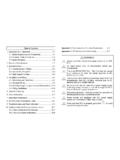
1 OP series display Catalog Chapter 1 Summary of the 1-1 Function .. 3. 1-2 General 5. 1-3 Product 6. 1-4 Each part's name .. 7. 1-4-1 OP320/OP320-S .. 7. 1-4-2 OP320-A/OP320-A-S .. 10. 1-5 Interface definition and connection 16. 1-5-1 OP320 .. 16. 1-5-2 17. 1-5-3 OP320-A .. 18. 1-5-4 OP320-A-S .. 19. 1-6 Sizes and installing methods .. 21. Chapter 2 Editor Software 2-1 Basic summary of OP20 .. 23. 2-1-1 About the project and the 23. 2-1-2 The content of screen .. 23. 2-1-3 The use flow of OP20 .. 24. 2-2 Edit the user's screen .. 25. 2-2-1 Create a project .. 25. 2-2-2 Make a basic screen .. 27. 2-2-3 The system parameter of 28. 2-2-4 Text .. 30. 2-2-5 Function key (screen jump) .. 32. 2-2-6 Data display window .. 36. 2-2-7 Data set window .. 40. 2-2-8 Indicate lamps .. 43. 2-2-9 Function key (switch quantity operation) .. 49. 2-2-10 F old-line 50. 2-2-11 Bar 51. 2-2-12 Gra ph 52. 2-2-13 Dyna mic 53. 2-2-14 Alarm list.
2 56. 2-3 Save a project .. 59. 2-4 Download the 59. 1. Chapter 3 Operation methods of OP320 ..61. 3-1 Online communication .. 61. 3-2 Shift the 61. 3-3 System's password .. 62. 3-4 Modify the data .. 63. 3-5 Switch value operating .. 64. Chapter 4 New addition function of OP520 .. 66. 4-1-2 Screen jump function .. 68. 4-1-3 Advanced function .. 69. 4-2 Status indicate lamp .. 70. 4-3 Application examples of global function key and button indicate lamp .. 71. 4-4 inside clock (optional).. 74. Chapter 5 Application examples of 5-2 Analysis a project .. 77. 5-3 Make a 78. Chapter 6 OP320 -S, OP320-A ..93. OP320-A/OP320-A-S ..93. Chapter 7 PLC' s connection method ..94. 7-1 xinje FC series PLC .. 94. 7-2 Mitsubishi FX series PLC .. 95. 7-3 Siemens S7-200 series PLC .. 96. 7-4 Omron C series PLC .. 97. 7-5 Koyo S series PLC .. 98. 7-6 Schneider NEZA series 99. 7-7 DELTA DVP series PLC .. 100. 7-8 LG Master-K series 101.
3 7-9 Matsushita FP series PLC .. 102. 7-10 FACON FB series PLC .. 103. 7-11 Kenyence series PLC .. 105. 2. Chapter 1 Summary of the products 1-1 Function OP series is a mini human machine interface of programmable controller, which monitor and modifies the value and status of register or relay inside PLC, in this way the operator can control the machine easily. OP series displays has the specialties as following: Draw pictures on the computer by edit software OP20, input Chinese characters and set PLC addresses freely, use serial port communication to download screen Download both communication protocol and screen's data to the display, need no PLC. to compile communication programs Correspond wide PLC types, including Mitsubishi FX series Omron C series Siemens S7-200 series Koyo SG series etc. Has function of password protection Has clock inside (optional). Has function of alarm list display the current alarm information each line and real time Button can be defined as function key, and can substitute some machine keys on the control ark LCD display with backlight STN.
4 The display's surface is made of IP65, waterproof and oil-proof. Can display bit graphs. OP320 display has the specialties as the following: The communication port is RS232/RS422. Seven keys can be defined as function keys, and they can substitute some machine keys on the control table LCD display with backlight STN. It can display 24 characters 4 lines, 12 Chinese characters 4 lines. 3. OP320-S display has the specialties as follows: The communication port is RS232/RS422, whichever is ok. LCD display with backlight STN. It can display 24 characters 4 lines, 12 Chinese characters 4 lines. OP320-A display has the specialties as follows: 20 keys can be defined as function keys (12 of them can be defined as digital keys and for other use), and they can substitute some machine buttons on the control table Choose the communication format freely, RS232/RS422. LCD display with backlight STN. It can display 24 characters 4 lines, 12 Chinese characters 4 lines.
5 OP320-A-S display has the specialties as follows: Choosing the communication format freely, RS232/RS422. OP520 display has the specialties as follows: 42 film buttons: 10 number keys, 32 function keys, in these function keys 16 can be defined freely with the card which can be drawn out. There are 16 button indicate lamps on the panel, which can be used to indicate PLC's status Choose the communication format freely, anyone of RS232/RS422/RS485 is ok. LCD display with backlight STN. The distinguish ratio is 320 240. It can display 40. characters 15 lines, 20 Chinese characters 15 lines. 4. 1-2 General specification 1. Electric specification Input voltage DC20V DC28V. Power consumption Less than 4W( ). Allow momentary power-cut Less than 20ms Voltage endurance AC1000V-10MA 1 minute (betw een si gnal and earth). Insulation resistance DC500V- about 10M (between signal and earth). 2. Environment condition Ambient operating temperature 0 50 , with no condensate Storage temperature -20 60.
6 Environment temperature 20-85%, with no condensate Vibration Resistance 10-25Hz (2G per 3 0min in X , Y, Z dir ection each). Interfere immunity Voltage noise:1000Vp-p, pulse width 1 s,1. min Ambient atmosphere With no corrosive air Protect configuration Fit the IP65. 5. 1-3 Product types According to the differences of the keys and the size, OP series products can be classified to the following types: Products classification OP series OP320 OP320-S OP320-A OP320-A-S OP520. The number of 7 20 42. keys Size of the . screen The LED CCFL. background lamps The display Monochrome color Communication RS232/ RS232/ RS232/ RS232/ RS232/RS422/. port RS422 RS485 RS422 RS485 RS485. Shape and size 172W 94H 30D 284W 194H 50D. 6. 1-4 Each part's name 1-4-1 OP320/OP320-S. On the face of OP320(OP320-S), there is not only LCD display window, but also 7 machine buttons, it feels good to touch and be with long life safe and dependable.
7 The seven buttons has not only the basic functions but also can be set to be special function keys, directly finish screen jump and on-off set and other function. All the 7 keys can be defined to have special function. Such as bit set, bit reset and screen jumping etc. It can only execute the basic function if it has not been defined as special function. The basic functions include set register values, reset the initial screen, jump to the between the former or next screen. 7. Button Basic function(These keys are not used as function keys). [ ] No matter whic h sta te t he disp lay is, o nce press th is but ton, ret urn to t he system's initial screen. The system's initial screen is appointed by the user when designing the screen (The default value is the number 1 screen). Normally set the main menu or the screen which is used most often to be the system's initial screen. [ ] When modifying the register's data, sh ift the modified data bit to the left, t hat is: flicker displayed number shift a bit to the left.
8 [ ] When modifying the register's data, shift the modified data bit to the right, that is: flicker displayed number shift a bit to the right. [ ] Turn the screen to the for mer page , the former page's ID is appointed by the user in the screen's property (the default value is the current screen's No. minus 1). If in the status of data setting the modified data bit plus 1 the increase range . 0 9 0. [ ] Turn the screen to the next page, the next page's ID is app ointed by the user in the screen's property (the default value is the current screen's No. plus 1). If in the status of data setting the modified data bit minus 1 the increase range . 9 0 9. [SET ] Press this ke y to st art m odifying reg ister's value , t he reg ister w indow being modified currently display in the obverse color and the modified bit display in flicker. If the current screen has no register set window component then execute a no operation.
9 Press [SET] key before press [ENT] key, then the current modify operation is cancelled and continue to modify the next data register. [ENT] Write the modified data to the register and then continue to modify the next data register. When the current screen's last register is being modified, exit the state of modifying register 8. At the back of OP320 (OP320-S), there are power terminal, communication socket and contrast adjusting potentiometer. On the left of European-style terminal table is the exterior-connect DC power terminal, on the right is the connection interface of RS485 communication port. RS232 and RS485. communication ports are placed in the DB9 socket. When downloading the screen data, connect the 9 pin communication port of OP320 and that of the personal computer with communication cable OP-SYS-CAB. When communicating with PLC, make sure the communication port's connect format according to the PLC type.
10 During debugging, if you find that the contrast ratio of the LCD screen is not proper, you can screw the potentiometer in the back of the display with a small screwdriver till you find the contrast ratio be proper. OP320 display has background lamp itself, as long as there is a button operation, the lamp will turn on, and it will auto turn off if there is no operation for three minutes continuously. 9. 1-4-2 OP320-A/OP320-A-S. On the face of OP320-A (OP320-A-S), there is not only LCD display window, but also 8. film buttons, 12 number buttons and other function buttons. The 20 buttons can realize screen jump, switch function and special function. You can refer to OP520 for detail button definition. 7 8 9. 4 5 6. 1 2 3. 0 +/ - CLR. ESC ALM SET ENT. 10. Table of keys' basic function: Key Basic function No matter which status the display is, once press this key (When the key is not set as a function key), return to the system's initial screen.