Transcription of CONTENTS MAIN FEATURES - ساعات الفجر
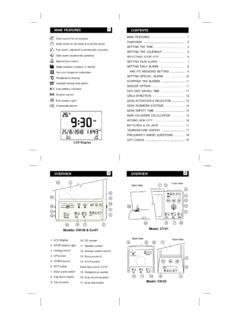
1 Model:CT-01 SET1210 SET131228796542132196543131287 OVERVIEWQ ibla direction (relative to North)Hijri and Gregorian calendarsTemperature displaySpecial extra alarmDaily alarm (weekends optional)Azan times for all cities around the worldFajr alarm, adjusted automatically everydaySnooze optionLow Batery indictorDaylight saving time optionCrescendo alarmsFull screen LightModel:CS-03 main FEATURES1 Azan sound for all prayers (with volume control)LCD DisplayZuhrAMWedCONTENTSMAIN ..SETTING THE CALENDAR ..SELECTING YOUR CITY ..SETTING FAJR ALARM ..SETTING DAILYALARM ..AND ITS WEEKEND SETTING ..SETTING SPECIALALARM ..STOPPING THEALARMS ..SNOOZE OPTION ..DAYLIGHT SAVING TIME ..QIBLA DIRECTION ..AZAN SOUNDACTIVATION ..AZAN SAFETY TIME ..AZAN TAQWEEM SYSTEMS ..HIJRI CALANDER CALCULATION.
2 BATTERIES & DC-JACK ..ADDING NEW CITY ..FREQUENTLYASKED QUESTIONS ..CITY CODES ..1245678910111112121313141515161718 OVERVIEW1. LCD display2. STOP button/Light3. Setting switch4. UP button5. DOWN button6. SET button7. Daily alarm switch8. Fajr alarm switch9. City selector10. DC socket11. Speaker socket12. Volume control switch13. Snooze switch14. STOP button1114 Model:CW-053196547810123 Setting the time, the calendars and the three alarmsare almost the same. Note that when setting andnumber in the clock, that number will be set the time, follow the steps below:SETTING THE TIMEW henever minutes are changed (in step 3),the seconds will be reset to00 SELECTING YOUR CITYTo select a city, look up the telephone code of your city(see page 18) , and follow the steps below.*If azan times are not correct, make sure tocorrectly set: Gregorian calendar, city code,DST option, and a suitable taqweem systemfor your city (see page 14).
3 *If your city is not listed, follow the steps on page 16 direction and anglewill appear (see page 12).SEWN1)Press the city select button,inmodelsCS-03& model CT-01, first move thecity dialer and then return itbackto(OtherCities) )Movethesetting switchto2) Use orto adjust thehours, thenpress4) Switch back to ) Use orto adjust theminutes, thenpress(Notice the AM/PM icons)2)Use orto adjust thecitycode, thenpressThe clock displays the Hijri or Gregorian calendar. Totoggle between the two calendars, pressTo set the Gregorian (or Hijri) calendar, first makesure that the desired calendar is displayed, thenfollow the steps below:SETTING THE CALENDARA fter setting the Gregorian calendar, the Hijricalendar will be re-calculated according tothe moon sighting at Makkah for that , changing the Hijri calendar, does notaffect the Gregorian calendar.
4 51) Move the setting switch toand presstwice.,2) Use orto adjust thedays, thenpress5) Switch back to unique feature allows you to wake up exactly atthe same time relative to fajr azan example, suppose you set this alarm to 5:10 AMand the fajr azan is at 5:00. If fajr azan becomes5:01 in the next day, then automatically the fajralarm will change to 5:11 AM. This way, the alarmwill always ring 10 minutes after fajr azan set this alarm, lookup the current fajr azan timefrom the clock and decide your desired wake uptime, then follow the steps below:SETTING FAJR ALARM5)Turn the alarm iconwill be Fajr alarm is set to ring exactly at Fajr azantime, the sound of azan will be ) Use orto adjust themonths, thenpress4) Use orto adjust theyear, thenpress1)Movethesetting switchto2) Use orto adjust thehours, thenpress4) Switch back to ) Use or to adjust theminutes, thenpressThe daily alarm is a regular alarm that rings at thesame time everyday.
5 Moreover, this alarm can be setto ring only on weekdays (see next page).Setting the daily alarm is shown below:SETTING DAILY ALARMSETTING SPECIAL ALARMIn addition to fajr and daily alarms, this clock alsoinclude an extra alarm (special alarm) for one timeappointment. When this alarm is set, the other twoalarmsettings are steps belowillustrate thesetting of this setting this alarm, the iconwillappear on the screen. To cancel this alarm,press and hold thebutton for fewseconds; you will hear a soft beep, and theiconwill stop any alarm, you may pressbutton (rather than turning OFF the alarmswitch).STOP5)Turn the alarm iconwill be )Movethesetting switchto2) Use or to adjust thehours, thenpress4) Switch back to ) Use orto adjust theminutes, thenpress1)Movethesetting switchto2) Use or to adjust thehours, thenpress4) Switch back to ) Use orto adjust theminutes, thenpressThe daily alarm can be automatically disabled onweekends, as per the following options:rings everyday except Saturday and Sundayrings everyday except Sundayrings everyday except Friday and Saturdayrings everyday (no icon, or blank)To set the daily alarm to ring everydayexcept Sunday,Example:follow the steps below.
6 If the weekend in the selected city is onThursday and Friday,means this alarmdoesn't rings on Thursday and Fridayand means it does not ring on ) Useorto select thesymbol thenpressTheselecteddays willbeflashing3) Switch back ) Turn the alarm iconwill be SETTING9 When theswitch is turned ON, the clock will bein snooze mode (and theicon will be displayed).In this case, after stopping the alarm (by pressing thebutton), the alarm will ring again after fiveminutes . (Notice that theicon will be flashing ).To completely stop the alarm, press and hold thebutton for few seconds until you hear the beep.(Notice now thaticon is not flashing).snzsnzsnzSTOPSTOPS imply press thebutton to stop any alarm (inthis case, the alarm will ring again on next day).Alarms can also be stopped by turning off the alarmswitch (but in this case, the alarm will not ring again onthe next day).
7 STOPNote: To cancel any alarm in the coming 20minutes, press and hold thebuttonuntil you hear the THE ALARMSSNOOZE OPTION111) Move the setting switch toand presstwice.,DAYLIGHT SAVING TIMETo set Daylight Saving Time (DST) for any city (exceptcities in theArabian peninsula), press and hold thebutton for few seconds. You will hear a soft beep andwill notice that the current time and the azan times areincreased by one hour. The iconwill also appearon the get back to standard time, press and hold buttonfor few seconds. Theicon will disappear and thecurrent time and azan times will decrease by one hour.,QIBLA DIRECTIONSEWNA fter selecting your city code, the qibla direction willappear on the screen. The exact qibla anglehe angle is between 0 and 360degrees, clockwise from selecting London's city code "44-207",the clock will display the qibla direction (South East)and qibla angle (119 degrees, clockwise from North),as follows:will alsobe displayed.
8 TExample:QiblaAngleQiblaDirectionAZAN TAQWEEM SYSTEMSFajr and Isha times are calculated by either an angleof the sun below the horizon or by an interval of clock is programmed to use the local taqweem orthe most widely used system for your city. Also, youcan change to another system, as follows:Press and holdand move the switch to the .position, then releaseUse or to select .(which means Hanafi) or which means regular Asrtime. Notice that Asr azan time will be flashing (andchanging) during Hanafi setting and hold and move the setting switch to thepositionthen release and press or to select the desired system asfollows:Local taqweemMuslim LeagueIslamic Society of NorthAmerica (ISNA)Islamic Scientific University (Hanafi)Egypt taqweemUm Alqura taqweemFajr azan ishours before Shuroq andIsha azan ishours after Hanafi AsrAzan:Selecting Taqweem System ( for Fajr & Isha).
9 1412 After re-selecting a city, the clock will bereset to use the city s default SOUND ACTIVATIONThe sound of the complete azan can be played atevery azan the volume level can be adjustedusing the volume the azan sound is turned , the iconwilldisappear from the screen, and three beeps will soundat the time of each CW-05 clock also include a speaker jack whichcan be connected to an external an alarm is set at the time of anyazan, that azan sound will be clock is powered by size alkaline batteries whenicon appearon screen. You may notice that azan sound becomesweakor screen batteries can last more than six months whenazan is played regularly with maximum CT-01 and CW-05 also have DC jack. You canuse a (Nokia phone) charger. You may also use anyother 6 Volt adapter with at least 500 mA.
10 Note thatpolarity should be positive to inside and negative & DC-JACKAZAN SAFETY TIMEAs needed, any azan time can be adjusted forward orbackwardbyafixednumberofminutes,as follows:PressandholdMovetheswitchto position,then releaseUseorto set the safety time for fajr adjustShuroqsafetytime,.. position. HIJRI CALANDER CALCULATIONThe Hijri calendar in this clock is calculated based onthe astronomical moon sighting at , It is re-calculated after setting theGregorian unique feature helps to determine the Gregoriandates for the corresponding Hijri-based Islamic example, to know Eid Al-Fitr in the year 1430, setthe Gregorian date to 20/9/2009, then check whetherthe calculated Hijri date is 1/10/1430 or BATA fter selecting another city, all safety timesare reset, and need be re-adjusted if can be used anywherearound the can select your city directly by selecting its citycode, see page your location is not one of the major listed cities onpage 18, your location can be added to the list of citiesas NEW CITY using (999-999)city to.