Transcription of How to Get an Authorization Code - supraekey.com
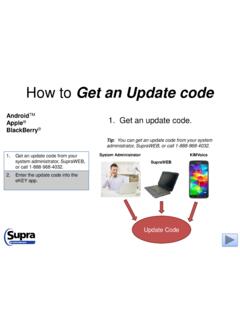
1 How to Get an Authorization code from a Mobile Device 1. Tap SupraWEB. SupraWEB on the eKEY app menu or navigate to the key serial number and your PIN. your association or organization from the drop-down and tap Login. Authorization code . your email for the code . the code into the eKEY app. Note: These general instructions may vary between products, manufacturers, and service providers. The SupraWEB menu options are dynamic and only those that apply to your eKEY service type are displayed. For existing customers only How to Get an Authorization code from a Mobile Device 2. Enter the key serial number and PIN. SupraWEB on the eKEY app menu or navigate to the key serial number and your PIN. your association or organization from the drop-down and tap Login. Authorization code . your email for the code . the code into the eKEY app. How to Get an Authorization code from a Mobile Device 3.
2 Choose your association and tap Login. SupraWEB on the eKEY app menu or navigate to the key serial number and your PIN. your association or organization from the drop-down and tap Login. Authorization code . your email for the code . the code into the eKEY app. How to Get an Authorization code from a Mobile Device 4. Tap Authorization code . SupraWEB on the eKEY app menu or navigate to the key serial number and your PIN. your association or organization from the drop-down and tap Login. Authorization code . your email for the code . the code into the eKEY app. How to Get an Authorization code from a Mobile Device 5. Check your email. SupraWEB on the eKEY app menu or navigate to the key serial number and your PIN. your association or organization from the drop-down and tap Login. Authorization code . your email for the code .
3 The code into the eKEY app. Your email Your current email address must be on file with your organization. How to Get an Authorization code from a Mobile Device 6. Enter the code into the eKEY app. SupraWEB on the eKEY app menu or navigate to the key serial number and your PIN. your association or organization from the drop-down and tap Login. Authorization code . your email for the code . the code into the eKEY app. Note: For more information on how to enter the Authorization code , see How to Reset the eKEY App Authorization code on our website. For the latest information, visit us at and Tap the Customer Support tab. For more information on compatible phones and tablets, Tap the Compatible eKEY Devices List button on the home page. 2016 United Technologies Corporation. All rights reserved. Supra is a part of UTC Climate, Controls & Security (CCS), and a unit of United Technologies Corporation.
4 Supra and eKEY are registered trademarks of United Technologies Corporation. Other brand and product names are or may be the trademarks of, and are used to identify products or services of, their respective owners. User experience may vary depending on the device manufacturer, cellular reception, data plan, and other variables beyond Supra s control.