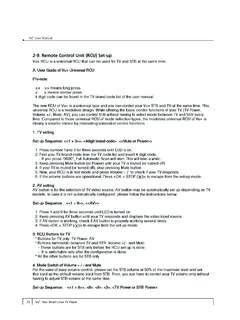
Transcription of Installing/Replacing Batteries Text/SHIFT Remote …
1 Installing/Replacing Batteries following instructions in sequence. In case of a mistake, the process screen, release the button. This may take up to 5 minutes to can be exited at any point by pressing and holding the Text/SHIFT happen. 1. Slide the battery housing cover downwards to remove. button and then at the same time pressing the STOP button. The Remote Control User Guide 2. Insert 2 x AAA Batteries observing the correct polarity. Remote control will revert to normal operation and no TV brand code 4. Press and hold the Text/SHIFT button and then at the same time press the STOP button to finish setting up the TV control mode. will be stored. 3. Replace the battery housing cover. The TV standby button will go out. The TV control function is now 1. Determine the manufacturer of your TV set. programmed into the Remote control. Remote Control Layout 2. Look up the 4-digit manufacturer code supplied on the reverse If the TV brand is not successfully found by the Remote control, the NOTE: Some button functionality ( DVR) may not be available side of this sheet and make a note of this code.
2 TV standby button will flash rapidly and the Remote control will on specific models of STB and may vary with the TV service revert to normal operation. No TV brand code will be stored. available in your area. 3. Make sure your TV set is turned on. (The set-top box does not need to be turned on to perform this programming feature). If Auto Search also fails to successfully setup operation of the TV. IR window set, the Remote cannot be used to control this particular TV set. TV AV Source 4. Press and hold both the 1 and the 3 buttons at the same time Select button on the Remote control for approximately 3 seconds until the TV. STB Standby standby button remains lit, then release both buttons. TV Shift functionality TV Standby button button 5. Now enter the 4 digit manufacturer code for your TV set. On each When a TV brand has successfully been programmed into the STB DVR digit entry the TV standby button will flash.
3 On entry of the 4th Remote control with the above steps, the following additional Transport buttons digit the TV standby button will flash then remain lit. buttons may also control the TV set. These can be accessed by Stop button 6. Point the Remote control at the TV set and press and hold down pressing and holding the Text/SHIFT button on the Remote control Color Navigation and at the same time pressing: buttons the TV Standby button or the Mute button on the Remote control. STB Menu button 7. When the TV either turns off or brings up the MUTE symbol Digit buttons 0 9, Left, Right, Up, Down, OK, Channel Up, Information Channel Down, the 4 color keys DVR button on screen, release the button. This may take a few minutes to button happen. Operation of these buttons is not guaranteed to control the Back button Navigation and Important Information about using Batteries OK buttons 8.
4 Press and hold the Text/SHIFT button and then at the same time normally expected functionality of the TV set. Do not mix different types of Batteries or old with new Batteries . Do not use rechargeable Batteries with the Remote control. press the STOP button to finish setting up the TV control mode. Electronic Program Exit button Guide button Remove the Batteries from the Remote control if you are not going The TV standby button will go out. The TV control function is now Key Fix to use it for several weeks, to avoid the risk of leakage. programmed into the Remote control. Page Up and Page If not all the previously mentioned buttons operate the TV set, a KEY. Volume Up and Down buttons Please respect your environment and any local regulations and dispose of old Batteries in a responsible manner. The following buttons should now operate the TV set: TV Standby, FIX operation can be performed as follows: Down buttons Channel Up and AV source select, Volume Up, Volume Down, Mute.
5 1. Press and hold the 1 and 9 buttons simultaneously for Mute button Channel Down Do not attempt to recharge the Batteries approximately 3 seconds until the TV standby button is lit. buttons If all the above mentioned buttons do not operate the TV set, a KEY. Immediately remove any leaking Batteries . Take care when handling FIX operation can be performed. (See Key Fix section). leaking Batteries as they may cause burns to the skin or eyes, or 2. Try all the above mentioned TV buttons. Previous Channel Select button other physical injuries. Should the TV model be changed and the Remote control requires 3. If the TV does not respond to a button, hold that button down re-programming, repeat the above setup procedure with the new TV. and wait for the Remote control to step through alternative Channel Select settings. When the TV responds correctly, release that button.
6 Buttons and If the TV brand is not successfully found by the Remote control, the Teletext button (press and release). text entry Operation TV standby button will flash rapidly and the Remote control will 4. Repeat this procedure for other buttons if necessary. revert to normal operation. No TV brand code will be stored. and TV SHIFT Subtitles button When the Remote control is first operated all buttons transmit function (press 5. Once finished, press the Text/SHIFT button and the STOP. and hold). commands for the set-top box. The exact button function will button at the same time. depend on your specific service provider. Point the Remote control TV control setup: Auto Search towards the front of the set-top box when pressing a Remote control If the TV brand is not successfully found by the previous Brand Removing TV functionality button to ensure correct operation.
7 Do not cover the IR window at Search, the Auto Search method can be used. the front of the Remote . To reset the Remote control and erase the TV functionality: Notice: this process may take a long time to find your TV code (in When a button on the Remote is pressed either the set-top box cases up to 5 minutes). 1. Press and hold the 1 and 6 buttons simultaneously for standby button will flash (or TV standby button if a TV brand has approximately 3 seconds until the TV standby button is lit. Copyright Notice been entered) depending on which product is being controlled by Make sure your TV set is turned on. (The set-top box does not need Amino Communications Ltd. All rights reserved. Amino and AmiNET are the Remote control. to be turned on to perform this programming feature). 2. Enter the following key sequence in the correct order 9 9 6. trademarks of Amino Communications Ltd.
8 All other product or brand names as they appear are trademarks or registered trademarks of their respective holders. If a button is pressed for more than 30 seconds, the Remote control 1. Press and hold both the 1 and the 3 buttons at the same time 3. The TV settings will be deleted from the Remote control. will stop transmitting commands in order to preserve battery life. on the Remote control for approximately 3 seconds until the TV. Disclaimer Amino shall not be liable for any errors contained herein nor for any damages standby button remains lit, then release both buttons. arising out of or related to this document or the information contained within it, even if the Company has been advised of the possibility of such damages. This TV control setup: Brand Search 2. Point the Remote control at the TV set and press and hold down document is intended for informational and instructional purposes only.
9 The the TV Standby button or the Mute button on the Remote control. Company reserves the right to make changes to the specifications and other The Remote control can also be programmed to operate certain information contained in this document without prior notification. functions of your TV set. To program this functionality, perform the 3. When the TV either turns off or brings up the MUTE symbol on Amino Remote Control TV Setup Codes Brand Code Brand Code Brand Code Brand Code Brand Code Brand Code Brand Code Brand Code Brand Code Brand Code Brand Code Brand Code Brand Code Brand Code Systems 0012 Bastide 0327 Clarion 0575 Electrograph 0889 GPX 1150 Innova 1359 Lenoir 1617 Monivision 1872 Palladium 2145 Remotec 2377 Sogera 2649 Technol Ace 2875 Videotechnic 3173 ELECTRO TECH 3531. Abex 0014 Baur 0331 Clarivox 0576 Electrohome 0890 Gradiente 1151 Innovation 1360 Lesa 1622 Morgan's 1875 Palsonic 2147 Reoc 2379 Solavox 2654 Technosonic 2878 Videoton 3174 HiLine 3533.
10 ABS 0016 Baysonic 0333 Clatronic 0581 Elektra 0896 Graetz 1152 Inotech 1364 Lexsor 1626 Motion 1877 Panama 2149 Revox 2383 Sole 2655 Techview 2883 Vidikron 3178 Interactive 3534. Accent 0019 Bazin 0335 Clayton 0582 Elfunk 0899 Granada 1154 Insignia 1368 Leyco 1627 Motorola 1878 Panasonic 2153 Rex 2385 Sonawa 2663 Techwood 2884 Vidtech 3179 Kamosonic 3535. Acer 0028 Beaumark 0340 CMS 0590 ELG 0900 Grandin 1156 Inteq 1373 LG 1628 MTC 1889 Panavision 2154 RFT 2386 Soniko 2669 Tecnimagen 2885 Viewsonic 3186 LG/Goldstar 3536. Acoustic Solutions 0032 Beijing 0345 CMS Hightec 0591 Elin 0902 Gronic 1160 Interbuy 1376 Liesenk & Tter 1630 MTEC 1890 Panda 2155 Rhapsody 2387 Sonitron 2671 Teco 2886 Viking 3188 Liesenk 3537. Action 0033 Beko 0346 Coby 0597 Elite 0903 Grundig 1162 Interfunk 1377 Liesenkotter 1631 MTlogic 1892 Pathe Cinema 2168 Ricavision 2388 Sonneclair 2673 Tedelex 2889 Viore 3192 Life 3538.