Transcription of INSTRUCTION MANUAL
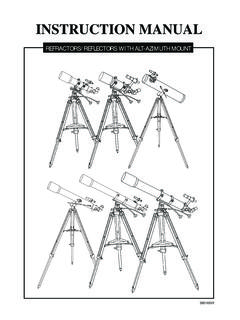
1 INSTRUCTION MANUAL . FOR ALT-AZIMUTH MOUNT. AZ1 & AZ2 MOUNTS. Refractor/AZ2. B. C. D. AZ2. F E A. G A. Dust Cap / Mask (Remove before Viewing). H B. Dew Cap / Sun Shade C. Objective lens I 5 D. Telescope Main Tube E. Finderscope F. Finderscope Bracket 4 Reflector/AZ1 G. Alignment Screws H. Focus Locking Screw 2 3. I. Eyepiece J. Diagonal 1 K. Focus Tube J K L. E F L. Focus Knob D 1. Altitude fine-adjustment control a G 2. Azimuth Lock C 3. Yoke Mount H 4. Altitude Lock Knob B 5. Yoke Locking Knob I. a. Accessory Tray b b. Tripod Leg c. Height Adjustment Clamp A. c 5. J. 4. 3 2 1. a AZ1. A. Secondary Mirror Position b B. Dust Cap / Mask (Remove before Viewing). C. Focus Tube D. Finderscope Bracket E. Finderscope F. Finderscope Adjustment Screws G. Eyepiece H. Focus Knob I.
2 Telescope Main Tube J. Primary Mirror Position 1. Yoke Locking Knob 2. Altitude Lock Knob 3. Azimuth Lock Knob c 4. Yoke 5. Altitude Fine Adjustment Control a. Accessory Tray b. Tripod Leg c. Height Adjustment Clamp 2. AZ3 MOUNTS. AZ3. B. C. A D F A. Dust Cap / Mask G (Remove before Viewing). E B. Dew Cap / Sun Shade H C. Objective lens D. Piggyback Bracket E. Telescope Main Body F. Finderscope I G. Finderscope Bracket H. Alignment Screws I. Focus Tube J j. Eyepiece K. Diagonal 4 L. Focus Knob K. 1. Azimuth Flexible Control Cable L 2. Altitude Flexible Control Cable 3. Yoke Mount a. Accessory Tray b. Tripod Leg 1 c. Height Adjustment Clamp 2. a b c Optional Multi-function Plate 3. TABLE OF CONTENTS. Assembling Your Telescope 5. For AZ1 & AZ2. Tripod Set up 5. Telescope Assembly 5.
3 Finderscope Assembly 6. Eyepiece Assembly 6. For AZ3. Tripod Set up 7. Telescope Assembly 7. Finderscope Assembly 8. Eyepiece Assembly 8. Operating Your Telescope 9. Aligning the Finderscope 9. Operating the AZ1 Mount 9. Operating the AZ2 Mount 9. Operating the AZ3 Mount 10. Using the Barlow lens 10. Focusing 10. Using the Camera Adapter Tube 11. Pointing Your Telescope 11. Calculating the Magnification (power) 12. Calculating the Field of View 12. Calculating the Exit Pupil 12. Observing the Sky 13. Sky Conditions 13. Selecting an Observing Site 13. Choosing the Best Time to Observe 13. Chooling the Telescope 13. Using Your Eyes 13. Proper Care for Your Telescope 14. Collimating a Newtonian 14. Cleaning Your Telescope 15. Suggested Reading 16. Before you begin Caution!
4 This INSTRUCTION MANUAL is applicable to all the Never use your telescope to look directly at the sun. models listed on the cover. Take a moment to Permanent eye damage will result. Use a proper solar find the model closest to your telescope on filter for viewing the sun. When observing the sun, and Follow the instructions for your specific place a dust cap over your finderscope to protect it model in the MANUAL . Read the entire instructions from exposure. Never use an eyepiece-type solar filter carefully before beginning. Your telesope should and never use your telescope to project sunlight onto be assembled during daylight hours. Choose a another surface, the internal heat build-up will damage large, open area to work to allow room for all the telescope optical elements.
5 Parts to be unpackaged. FOR AZ1 & AZ2. TRIPOD SET UP. ASSEMBLING TRIPOD LEGS ( ). 1) Gently push middle section of each tripod leg at the top so that the pointed foot protrudes below the tripod clamp. 2) Insert tripod lock screws into the thread holes on the side of the tripod and clamp without over-tightening. Fig. 2. ATTACHING MOUNT TO TRIPOD LEGS (Fig. 2). 3) Fasten the top of each tripod leg to the bottom of the yoke mount using the machine screws with the washers and wingnuts. Align each leg so that the hinge for the accessory tray faces inwards. Be careful not to over-tighten the wingnuts and damage tripod legs. ATTACHING THE ACCESSORY TRAY (Fig. 3). 1) Attach accessory tray to hinges on tripod legs using the small machine screws and wing nuts. Flange fits under accessory tray when attached.
6 Fig. 3. TELESCOPE ASSEMBLY. Fig. 4. Fig. 4. AZ1 (reflector) AZ2 (refractor). ATTACHING TELESCOPE. MAIN TUBE TO MOUNT. (Fig. 4, 5, 6, 7). 1) Unscrew the machine screw on the altitude control locking knob. Fig. 5. Fig. 5 2) Insert the micro-adjustable altitude control into the hole on the side of the altitude control locking knob. 5. TELESCOPE ASSEMBLY. Fig. 6 Fig. 6. AZ1 (reflector) AZ2 (refractor). (-continued from p. 2). 3) Slide telescope tube into slots on end of yoke mount. Secure telescope tube onto yoke mount using the yoke locking knobs Fig. 7. without overtightening. Fig. 7 4) Remove machine screw from telescope tube and use this to fasten the micro-adjustable altitude control. FINDERSCOPE ASSEMBLY. Fig. 8. Fig. 8. AZ1 (reflector) AZ2 (refractor). ATTACHING THE FINDERSCOPE.
7 (Fig. 8, 9). Fig. 9. 1) Locate finderscope optical assembly. Fig. 9 2) Remove the two knurled thumbscrews near the end of the telescope main tube. 3) Position the finderscope bracket over the screws in the telescope main body. 4) Secure the finderscope bracket with the two knurled thumbscrews. EYEPIECE ASSEMBLY. AZ1 (reflector) AZ2 (refractor). INSERTING EYEPIECE (Fig. 10). 1) Unscrew the thumbscrews on the end of the focus INSERTING EYEPIECE tube to remove the plastic endcap. (Fig. 10) 2) Insert diagonal and re-tighten thumbscrews to hold diagonal in place. Fig. 10 1) Unscrew the thumbscrews 3) Loosen the thumbscrews on the diagonal. on the end of the focus 4) Insert the desired eyepiece into diagonal tube to remove the black and secure by re-tightening plastic end-cap.
8 Thumbscrews. 2) Insert the desired eyepiece Fig. 10. and re-tighten thumb screws to hold eyepieces in place. 6. FOR AZ3. TRIPOD SET UP. ASSEMBLING TRIPOD LEGS (Fig. 1). Fig. 1. 1) Gently push middle section of each tripod leg at the top so that the pointed foot protrudes below the tripod clamp. 2) Insert tripod lock screws into the thread holes on the side of the tripod clamp without over-tightening. Fig. 2. ATTACHING MOUNT TO TRIPOD LEGS (Fig. 2). 3) Fasten the top of each tripod leg to the bottom of the yoke mount using the machine screws with the washers and wingnuts. Align each leg so that the hinge for the accessory tray faces inwards. Be careful not to over-tighten the wingnuts and damage tripod legs. ATTACHING THE ACCESSORY TRAY (Fig. 3) Fig. 3. 1) Locate tripod leg brace.
9 2) Use the screws already attached to the tripod hinges to mount the tray platform. 3) Secure the accessory tray on top of the tray platform using the thumbscrews already attached. TELESCOPE ASSEMBLY. Without multi-function plate With multi-function plate Fig. 4. Fig. 4. ATTACHING THE TUBE. ATTACHING THE TUBE RINGS TO MOUNT(Fig. 4). RINGS TO MOUNT(Fig. 4) 1) Remove the tube rings-multifunction plate assembly from telescope by 1) Remove the tube rings from releasing their thumbnuts and opening telescope by releasing their their hinges. thumb nuts and opening 2) Using one of the three threaded holes their hinges. in the multif-function pate ring-plate 2) Fasten the tube rings to the assembly to the mounting plateform. mount using the wench Turn the knurled black wheel directly provided.
10 Underneath the mounting platform on the alt-az mount while holding the tube rings in place to secure ATTACHING THE TELESCOPE the telescope in place. Fig. 5. MAIN TUBE TO TUBE RINGS (Fig. 5). ATTACHING THE TELESCOPE. 1) Find the center of balance of Fig. 5 MAIN TUBE TO TUBE. the telescope tube. Place this RINGS (Fig. 5). in between the two tube rings. 1) Remove the telescope tube from Close the hinges around the the paper covering. telescope and fasten securely 2) Place telescope tube in between by tightening the thumb nuts. the two tube rings. Close the Do not over-tighten the thumb hinges around the telescope and nuts. fasten securely by tightening the thumb nuts without over-tightening. 7. TELESCOPE ASSEMBLY. Fig. 6. INSTALLING CONTROL CABLES (Fig. 6). 1) Slide the sleeve end of the cable over the nipple on the end of the worm gear.