Transcription of MF Utilities India Pvt. Ltd.
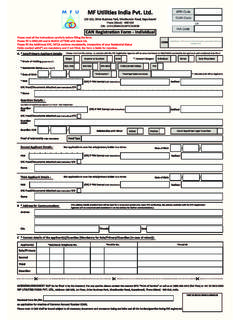
1 Please read all the instructions carefully before filling the formPlease fill in ENGLISH and in BLOCK LETTERS with black Account Details:-a. bank Mandate for PayoutPlease note, only one account can be "Set as Default" at a Mandate for PayoutPlease note, only one account can be "Set as Default" at a Mandate for PayoutPlease note, only one account can be "Set as Default" at a Mandate for PayoutPlease note, only one account can be "Set as Default" at a and Signature(s):-DD/MMM/YYYY_____MF Utilities India PVT. LTD., Address: 103-105, 1st Floor, Orion Business Park, Ghodbhunder Road, Kapurbawdi, Thane (West) - 400 610, IndiaReceived from Mr. / Ms. M/s. _____ an application for addition / deletion of bank Mandate/sSole/First Applicant / GuardianSecond ApplicantThird ApplicantACKNOWLEDGEMENT SLIP (to be filled in by the investor).
2 For any queries please contact the nearest MFU "Point of Service" or call us at 1800-266-1415 (Toll Free) or +91 22 3952 OF SERVICE STAMP & SIGNATUREI/We hereby acknowledge that I/We have read, understood and agree to the terms and conditions annexed to this form . I/We hereby declare that the details furnished herein are complete, true and correct. I/We undertake to notify MFU, immediately of any change in the above details and information given by me/us. In case any of the information is found to be false or untrue or misrepresenting, I/We am/are aware that I/We may be liable for it. I/We hereby authorise MFU sharing of the information provided by me/us on this form with its Authorised Representatives/Entities. I/We have provided all the necessary documents/annexures, wherever asked for, to substantiate the information provided by me/us in the form and agree to provide any further information if required, for the purpose of this :Place :Sign HereSign HereSign Here* Proof of Account (refer instructions)Cancelled Cheque or CopyBank Passbook bank StatementLetter from bank confirming the AccountPayout proceeds will be processed into the bank account through ELECTRONIC payment, basis arrangement of the respective Mutual Fund with its banker.
3 bank NameBranch NameCityO/DOthersplease specify* MICR* IFSCNRENROFCNRNRSRADDITIONDELETIONSET AS DEFAULT* A/c No.* A/c Type please (P)SavingsCurrentCash Credit* Proof of Account (refer instructions)Cancelled Cheque or CopyBank Passbook bank StatementLetter from bank confirming the AccountPayout proceeds will be processed into the bank account through ELECTRONIC payment, basis arrangement of the respective Mutual Fund with its banker. bank NameBranch NameCityO/DOthersplease specify* MICR* IFSCNRENROFCNRNRSRADDITIONDELETIONSET AS DEFAULT* A/c No.* A/c Type please (P)SavingsCurrentCash Credit* Proof of Account (refer instructions)Cancelled Cheque or CopyBank Passbook bank StatementLetter from bank confirming the AccountPayout proceeds will be processed into the bank account through ELECTRONIC payment, basis arrangement of the respective Mutual Fund with its banker.
4 bank NameBranch NameCityO/DOthersplease specify* MICR* IFSCNRENROFCNRNRSRADDITIONDELETIONSET AS DEFAULT* A/c No.* A/c Type please (P)SavingsCurrentCash Credit* Proof of Account (refer instructions)Cancelled Cheque or CopyBank Passbook bank StatementLetter from bank confirming the AccountPayout proceeds will be processed into the bank account through ELECTRONIC payment, basis arrangement of the respective Mutual Fund with its banker. bank NameBranch NameCityOthersplease specify* MICR* IFSCNRENROFCNRNRSR* A/c No.* A/c Type please (P)SavingsCurrentCash CreditO/DADDITIONDELETIONSET AS DEFAULTMF Utilities India Pvt. , Orion Business Park, Ghodbunder Road, KapurbawdiThane (West) - 400 610 CIN : U74120MH2013 PTC242939 CAN Service Request form - bank Mandate Addition/Deletion/Change in DefaultGORND istributor / MFU user to write the system generated reference number herePlease tick (P) anyone.
5 In the absence of indication of the option the form is liable to be rejectedUNITHOLDER INFORMATION:-Common Account Number (CAN)Name of the First/Sole Holder A1234567891011B1234567891011C12345 The request needs to be signed in accordance with your mode of operation of your CAN. If the mode of operation of your CAN is "Joint", the request needs to be signed by all unit holders. Redemptions on behalf of minors should be signed by their natural parent/legal on behalf of minors should be signed by their natural parent/legal impressions should be from the left hand for males and the right hand for females and in all cases to be attested by a Magistrate or Notary Public under his/her official case of an application through a constituted Attorney, the application form should be signed by such constituted signed by Authorized Signatories of a Non-individual investor should be affixed with the Official dividend payout entitlement / redemption proceeds would be credited to your default and primary bank mandate electronically, as per the arrangement of respective Mutual Fund with the bank .
6 Subject to availability of complete bank account details (including core-banking account number and MICR/IFSC code of your bank / branch). In addition to the account proof being submitted for the New Account being registered, account proof is also required for the Old accounts as below:(i) For the Specific OLD account being changed in case the request is for Change of bank Account;(ii) For any one of the OLD accounts under the CAN in case the request is for Addition of a bank Account;Multiple bank Account Registration:An applicant may register multiple bank accounts (up to 5 during CAN registration) for receiving redemption/ dividend proceeds etc. by providing necessary you choose to delete an account which is the default under the CAN and you have not specified another account to be the default, one of your existing bank accounts under the CAN will be randomly chosen to be the default bank account.
7 Indian Financial System Code (IFSC):IFSC is a 11 digit number given by some of the banks on the cheques. IFSC will help to secure transfer of redemption and dividend payouts via the various electronic mode of transfers that are available with the and Signatures:(i) Original bank statement reflecting the First Holder Name, bank Account Number and bank Name as specified in the application OR Cancelled original cheque leaf of the bank account (where the account number and first applicant name is printed on the face of the cheque). Applicants should without fail cancel the cheque and write 'Cancelled' on the face of it to prevent any possible misuse;(ii) Photocopy of the bank pass book or a statement of bank account with current entries not older than 3 months having the name and address of the first applicant and account number, duly attested by the bank manager with his / her full signature, name, employee code, bank seal and contact number;(iii) A letter from the bank on its letterhead duly signed by the bank manager with his / her full signature, name, employee code, bank seal and contact number, certifying that the applicant maintains an account with the bank , the bank account information like bank account number, bank branch, account type, the MICR code of the branch & IFSC Code (where available).
8 Please note the above documents shall be submitted in Original. If copies are furnished, the same must be submitted along with the Original documents at Points of Service (POS) of MFU where they will be verified with the original documents to the satisfaction of MFU. The original documents will be returned across the counter to the applicant after due verification. In case the original of any document is not produced for verification, the copies should be attested by the bank manager with his / her full signature, name, employee code, bank seal and contact number. In case the proof provided is different from the information provided, the bank account will not be registered under the CAN. However, if minor discrepancies are found between the bank Account Details furnished in the form vis-a-vis the proofs provided, MFU may at its discretion, update the bank details as appearing in the proofs provided.
9 Applications submitted without any of the above mentioned documents relating to bank account details will be treated as invalid and liable to be rejected. MFU would, based on your request and subject to the verification of the signatures of the holders, update the request and transmit the relevant changes to the AMC / RTA whose folios are mapped to the CAN. The AMC / RTA will get their records updated as per the data provided by Account Details:Using this form an applicant may add or delete a bank account or change the default bank account maintained under the CAN. If the deletion request is received for deleting the sole bank account registered under the CAN, the same will be liable to be rejected as there should be atleast one bank account registered under the provide your complete bank account details including Account Number, Account Type, bank , Branch & City.
10 Please also specifically state the MICR Code (9 Digit Number next to your cheque number) and IFSC Code (11 character code printed on your cheque leaf) to facilitate electronic payment of your dividend payout entitlement / redemption applicant is required to submit any one of following as a documentary proof alongwith the application form validating that bank account pertain to the sole / first Applicant. Information marked (*) are mandatory. Under the respective sections, all relevant details should be provided, failing which the application is liable for tick in the appropriate box for relevant options wherever applicable. Do not overwrite. For any correction / changes if made in the Application form , the Applicant(s) shall enter the correct details pursuant to cancellation of incorrect details and authenticate the corrected details by counter-signing against the changes.