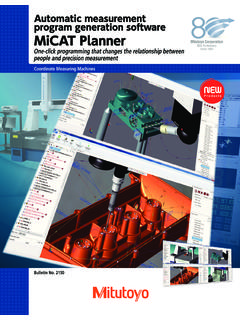
Transcription of MiCAT PLANNER - ecatalog.mitutoyo.com
1 MiCAT PLANNERCOORDINATE MEASURING MACHINESAUTOMATIC PART PROGRAM GENERATIONB ulletin No. 22212 Part programs easy, fast, automatic and , creating part programs for coordinate measuring machines is a strategic and time-consuming with conventional CMM part programming: Higher production costs. Misinterpretation of design intent may result in incorrect results leading to possible scrap. Lost productivity. Complex parts require time consuming path optimization. Lost productivity and higher production costs. The work of multiple part programmers can cause measurement discrepancies requiring investigation or possible PLANNER is the manufacturing processes need the ability to quickly adapt to meet today's challenging demands: Shorter product life cycles require rapid change to design revisions and fast programming capability.
2 Increasing machine up-time requires more efficient programs and reduced set-up 's CMM programming software, MiCAT PLANNER , meets all of these PLANNER software by mitutoyo generates CMM part programs with unprecedented PLANNER drastically reduces programming efforts in developing part programs for coordinate measuring machines. The software s automatic measuring program generator saves time while reducing : MiCAT PLANNER identifies Geometric Dimensioning and Tolerancing (GD&T) from 3D models when included in the Product and Manufacturing Information (PMI), defines the measurement plan and automatically creates a measurement program. MiCAT PLANNER 's integrated path and probe optimization function automatically selects the shortest measurement path with the fewest probe changes to measure the part in the least amount of time.
3 MiCAT PLANNER 's Rules Editor establishes consistent measurement guidelines to eliminate the variations that may occur between multiple CMM : CAD file containing GD&T : Virtual model of the CMM includes allprobe rules determine the measurement strategy automatically for each and automatic generation of measurement can benefit from MiCAT PLANNER ?The mitutoyo MiCAT PLANNER boasts amazing performance, speed and usability. So, the short answer is everyone can benefit from MiCAT only work on short or midsize runs. Is it really useful?Yes, MiCAT PLANNER will dramatically reduce your programming only inspect outsourced parts and never evaluate the same characteristics. Is MiCAT PLANNER appropriate in this case?
4 Yes, MiCAT PLANNER will assist you in easily creating part programs that include different features and production is quite stable on long runs. We rarely need to create programs for new components on our CMM. Are you sure MiCAT PLANNER can help? Yes, MiCAT PLANNER ensures that all part programs are: Safe. Continuous collision detection and avoidance ensures operator safety and equipment integrity caused by costly probe collisions. Consistent. Rules Editor maintains uniform measurement guidelines for all components being inspected on the CMM. Optimization. Part measurement path is minimized to reduce inspection time and increase have many CMM programmers, why do we need MiCAT PLANNER ?
5 MiCAT PLANNER 's Rules Editor will ensure a higher level of quality in measurement programs so you can trust the program will always be developed using the same measuring practices, regardless of personal programming of the measuring tasks, MiCAT PLANNER adds an abundance of benefits to your CAD-based CMM ConfigurationMeasurement StrategyMiCAT PLANNER utilizes the CMM configuration's created with System Manager in the CMM MCOSMOS racks and probes of the machine are graphically represented for the rack type and location on the of the main benefits of MiCAT PLANNER is the compliance to measuring rules that can be set as on the feature type, size or other criteria, you decide the number of measuring points, their distribution, and speed for touch-trigger or scanning PLANNER selects the most suitable probe configuration and measurement strategy for each feature implementing the best practices defined by User settings in the Rules virtual reality allows automatic avoidance of each rack zone.
6 Even long styli can be avoided when positioned in the rack or encroaching in the measuring volume. Several sets of rules can be applied simultaneously according to manufacturing or customer Data Information: Automatic or ManualAfter importing the CAD model, either all required features and GD&T are with the PMI data (Product Manufacturing Information), or can be manually input if the information is incomplete or not a CAD model is loaded that includes PMI data, all required features and characteristics to be evaluated are instantly displayed and available, and a part program is automatically the CAD model lacks features, characteristics or tolerances, manual inputs are easy and quick thanks to MiCAT PLANNER 's GD&T datumAdd featureDisplay resultAdd characteristic7 Automatic Part Program GenerationAfter all features and characteristics to be evaluated are validated and approved, a part program is automatically Plan View (left) shows the outline of the measurement plan, where as the Program View (right)
7 Shows the measurement path and probing details. Both the Plan and Program views are synchronized with the 3D view (center). When you select a feature or characteristic in any of the three views, MiCAT PLANNER indicates the selected item in the other required, a missing feature (not identified on the CAD model) or a missing characteristic to be evaluated can be manually added from the 3D GD&T InterpretationCAD-designed components are more and more defined by form and position symbols according to international , depending on the individual programmer skill level, it may lead to different or inconsistent interpretation in the measurement PLANNER prevents risk of misinterpretation: each GD&T symbol, tolerance and datum is automatically understood and converted in the corresponding required measurement the program view, all GD&T are shown in regards to the feature to be measured for calculating the ViewPlan View8 Cycle-Time OptimizationWhen programming manually, the programmer creates a measurement path following the required features for calculating the expected , this results in unnecessary CMM movements and inefficient probing paths.
8 Consequently, this results in longer inspection times that slow throughput and increase , MiCAT PLANNER generates the probing path according to the measurement plan, and then optimizes it according to best strategy, avoiding wasted probe changes and/or PLANNER automatically estimates the measuring cycle time according to the actual CMM configuration and settings. For example, the required time for exchanging a probe in the rack, or the specified scanning speed in your measurement rules, are considered for this time estimation. Immediately after the cycle optimization is executed, the new estimated cycle time is and much ZoneSeveral avoidance zones can be created to simulate the presence of any obstacle such as a clamp, a bracket or a column simulating a PLANNER will automatically calculate probing points and paths to avoid these areas, providing a collision-free part Measurement ControlAny feature within the CAD model can be included or excluded from the Rules Editor, allowing for exceptions to define the measurement strategy when required by production or manufacturing PLANNER will consider this as an exception for a given feature.
9 But will continue applying existing rules to all other features of this Measurement SelectionWhile MiCAT PLANNER always selects the maximum number of features available to measure, the user can include or exclude features by checking / unchecking the corresponding boxes. Drag-and-drop functionality is also available for defining the measurement Part ProgramA part program generated by MiCAT PLANNER can be managed and edited using the MCOSMOS Editor.** Requires MiCAT PLANNER RUN OPTION On InvestmentUsing MiCAT PLANNER means saving programming time, and time is money. But how much saving can you expect?Two different scenarios display your savings model without PMI Data Number of measured features = 17 Number of evaluated characteristics = 22 Programming time with MCOSMOS = 51 minutes Programming time with MiCAT PLANNER = 23 minutesCAD model with PMI Data A CAD file with PMI that contains GD&T does not proportionally increase program generation time because of the number of features and this example.
10 With MCOSMOS = 43 minuteswith MiCAT PLANNER = 3 minutesTime saving = 28 minutes 55%Time saving = 40 minutes 93%11 Supported HardwareMitutoyo CMMsCRYSTA seriesSTRATO seriesLEGEX seriesMACH-3A MACH-VProbe systemTouch-trigger probes TP200/TP20/TP2 TP7M Contact scanning probes MPP310/MPP100 SP25M SP600M/SP600Q SP80 Probe head PH10M/PH10MQ/PH10T PH6 MAuto-change racks ACR3 (4 ports/8 ports) FCR25 MCR20 SCR200 SCR600 SCR6 SCP80 Whatever your challenges are, mitutoyo supports you from start to is not only a manufacturer of top quality measuring products but one that also offers qualified support for the lifetime of the equipment, backed up by comprehensive services that ensure your staff can make the very best use of the from the basics of calibration and repair, mitutoyo offers product and metrology training, as well as IT support for the sophisticated software used in modern measuring technology.