Transcription of Model 287a Ionizer Performance Analyzer - …
1 Operator s Manual Model 287a Ionizer Performance Analyzer P/N 0340172 287a -1/100 06222017 100 Housel Ave PO Box 535 Lyndonville NY 14098 585-765-2254 fax: 585-765-9330 CONTENTS Specifications .. Section 1 .. Page 1 Specifications .. Page 1 Accessories included .. Page 1 What this instrument does .. Page 1 General Section 2 .. Page 2 Operation Getting Started, a TutorialSection 3 .. Page 3 Confidence Check Three steps to get going .. Page 3 Further familiarization .. Page 4 Test results .. Page 5 The Set-up Menu .. Page 6 Maintenance .. Section 4 .. Page 7 Precautions .. Page 7 Cleaning .. Page 7 Battery .. Page 7 Calibration .. Page 7 Glossary .. Section 5 .. Page 8 References .. Section 6 .. Page 9 Warranty and Repair Information .. Back Cover Copyright 1999 Monroe Electronics, Inc. Printed in USA Specifications and procedures subject to change without notice. Section 1 SPECIFICATIONS: Charger: 1100 volts, selectable polarity Fieldmeter: Accuracy 5% of reading, 2% typical Zero Drift < 4V in 90s, 2V typical Trip points: Fixed 1000V and 100V Charge plate: x4 ( inches periphery) Capacitance 25pF Self-discharge <10% of full scale in 200s Display: 2x16 LCD, >5 updates per second Timer maximum, resolution Fieldmeter 1250V, 1V resolution Sensors: Humidity 5% typ.
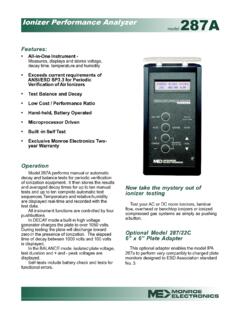
2 From 10% to 90%RH @25 C Temperature 2 C typical Oper. temp.: 25 C, 10 C Battery: 9 volt NEDA #1604A or equivalent alkaline (>40 hour life or >1300 charge cycles). Longer life may be achieved by using 9-volt lithium. Dimensions: inches (206x102x48 mm) Weight: 1lb, 6 oz. ( kg) Accessories included: Carrying case Banana patch cord Alligator clip with boot Battery This manual and a manual supplement What this instrument does Model 287a IPA meets and far exceeds the basic requirements of ESD Association (Draft) Standard Practice for the Protection of Electrostatic Discharge Susceptible Items Periodic Verification of Air Ionizers. Model 287a IPA performs manual or automatic decay and balance tests for periodic verification of ionization equipment and stores the results and averaged decay times for up to ten manual tests and up to ten complete automatic test sequences. Provides real-time measurement and display of temperature and relative humidity.
3 Performs self-tests. Battery powered and portable, sets up in seconds. 1 Section 2 GENERAL INFORMATION The IPA 287a performs manual or automatic decay and balance tests for periodic verification of ionization equipment. It then stores the results and averaged decay times for up to ten manual tests and up to ten complete automatic test sequences. Temperature and relative humidity are displayed real-time and recorded with the test data. All instrument functions are controlled by four pushbuttons. Display contrast can be adjusted via access hole in case back. In DECAY mode a built-in high voltage generator charges the plate to over 1050 volts. During the test the plate will discharge toward zero in the presence of ionization. The elapsed time of decay between 1000 volts and 100 volts is displayed. USER NOTE For very fast decay times faster than one second ZERO errors may occur. In the BALANCE mode, isolated plate voltage, test duration Min and Max voltages are displayed.
4 Self-tests include battery check and tests for functional errors. Memory is non-volatile. Setup and data are retained during battery replacement. The specifics of usage of the Model 287a for periodic verification of air ionizers are given in detail in ESD Association (Draft) Standard Practice for the Protection of Electrostatic Discharge Susceptible Items Periodic Verification of Air Ionizers. 2 Section 3 OPERATION Getting Started, a Tutorial Confidence Check Three steps to get going If you received this instrument directly from the factory, a battery was included but not installed, memory was cleared and default settings are effective. The following will familiarize you with your new Ionizer Performance Analyzer Model IPA 287a : 1) Install battery a) Remove the two crosspoint screws from the battery compartment cover. b) Carefully lift the cover off of the compartment. c) Insert the battery, refer to label for orientation.
5 D) Replace the cover. 2) Demonstrate basic functions. Pressing a single button and releasing within two seconds controls basic functions. a) Press and release ON-OFF . The display will briefly show information about the instrument and then the battery voltage. A low battery condition will present an error message. The main menu startup screen will show a blank voltage, memory usage status, relative humidity, present temperature and battery voltage. NOTE If the instrument has been used it may display the option of clearing the memory. Do so by scrolling to Y with or key then press ENTER . b) Press and release AUTO . This will start the first automatic test sequence: i) The instrument performs an autozero. ii) The floating plate is charged to >+1050 volts. iii) The plate begins to discharge. If allowed to discharge to <+1000 volts the timer will start at +1000 volts. If discharge fails to reach +1000 volts, Decay failed message will be displayed.
6 Same message will appear if the meter fails to decay to 100 volts within 200 second timer. Test will not be save and Automatic decay test will be aborted. iv) This test is the first automatic decay test. The first test in an automatic sequence is always positive. The test is labeled 11+ (Automatic Test Sequence 1, Test Number 1 [in a sequence of 6 tests], and the test voltage is + [positive]). Abort this test by pressing the AUTO button again ( CANCEL ). 3 c) Press and release + CHARGE . This will start a manual test where the test voltage is positive. (i) The instrument performs an autozero. (ii) The floating plate is charged to >+1050 volts. (iii) The plate begins to discharge. If allowed to discharge to <+1000 volts the timer will start at +1000 volts. If discharge fails to reach +1000 volts, Decay failed message will be displayed. Same message will appear if the meter fails to decay to 100 volts within 200 second timer. Test will not be saved.
7 (iv) This is a single positive manual decay test. The test is labeled M1+ (Manual, Test 1, + [positive]). Abort this test by pressing the CANCEL button. d) Use the CHARGE button similarly to perform negative manual decay tests. Up to ten manual decay tests may be run in any polarity order. The ten tests will be labeled 1 thru 0 with the polarity indicated. Thus, the 5th test might be labeled M5 . 3) Shut the instrument off (press and release ON-OFF ). You will need at least an Ionizer and a ground connection to proceed. Further familiarization In order to become more familiar with the accumulation and presentation of data we will perform two automatic test sequences and a few manual tests and then examine the results: 1. Set up the Ionizer . 2. Ground the IPA 287a . A ground jack is provided on the side of the instrument case. 3. Access the main menu. The display should show 0% values for Automatic and Manual memory usage. If a message prompts you to ClrData (clear data), a) Scroll to Y with either the or button.
8 B) Accept this by pressing ENTER . 4. Run an automatic test sequence a) Press AUTO . b) Let the test run its course. This is Test 1 . i) Six decay tests are run. These are in the order +++ or + + + depending on the current autosequence setup. ii) A balance test is run. The duration of the balance test may be any value between 10 and 90 seconds or it may be turned off in the SETUP menu. 4 iii) The test results are displayed at the end of the test. The results are displayed in three windows which may be scrolled with either the or button. The first window shows the positive and negative decay times (from 1000 volts to 100 volts) for tests number 1 and 2 in the sequence. The second window shows decay times for test number 3 and the average times for three + and three decay tests. The third window shows the + and balance peak voltages and the temperature and humidity taken during the test sequence. c) Press ENTER to return to the main menu.
9 D) Repeat a, b and c to gather a second set of data. This will be Test 2 . 5. Run manual decay tests a) Press and release + CHARGE and let the first manual decay test run its course and display a result. That manual decay test will be labeled M1+ . To return to the main menu, press ENTER . b) Press and release +CHARGE again and run the test to completion. This second manual decay test will be labeled M2+ . To abort one of these tests at any time during the test press the button that got the test started. c) Return to the main menu. Press and release CHARGE . This third manual decay test will be labeled M3 when completed. Return to the main menu. 6. Run manual balance tests a) Press and hold either the or button until Balance test is indicated on the display then release. This will start your fourth manual test. It will be labeled M4B when finished. Return to the main menu. b) Repeat for a fifth manual test. This test will be labeled M5B.
10 Note that if you hold the button down too long to start the test, the test will be nullified. Following test M5B , return to the main menu. The memory usage will be displayed as A20%M50% . You have conducted 2 out of 10 automatic sequences and 5 out of 10 manual tests. 7. At this point, you may elect to shut the equipment down and retire to a different location to contemplate the results. Test results Press and release the ON-OFF button. You will be prompted for a Y/N? response to the ClrData (clear data) question. NO!! Press ENTER to accept N . That will take you to the main menu while retaining the data. 5 To display the data, press and hold the SETUP button (same button as ON-OFF ) until the display goes past Off and shows the word Set-up , then release. If you hold the button too long the action will be nullified. To review the data, press ENTER to accept and use the or keys to scroll. Press ENTER when you are done to return to the main menu.