Transcription of Operation 6030 - ritetemp-thermostats.com
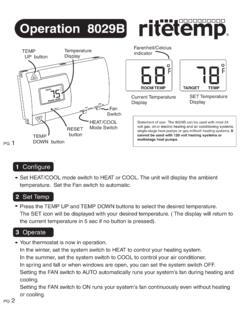
1 MENUPROGHEATCOOLOFFFANAUTOONO peration 6030 ENGLISHS tatement of use: The 6030 can be used with millivolt, 24 VAC, single and 2 stage conventional systems, gas/oil/ electric heat , 1 stage heat pumps, 2 stage heat pumps, zoned hot water (2 or 3 wire), zoned forced air, single and 2 stage cooling and hybrid systems. Using a TOUCH SCREEN Thermostat ModePG 2PG 1 DayTime of dayTouch here to change from 12 to 24hr clock SlotCurrent RoomTemperatureChirp indicatorTargetTemperatureMENUPROGHEATCO OLOFFFANAUTOONM enubuttonProgrambuttonMode SwitchFan SwitchDayTime of dayTime SlotCurrent Room TemperatureTouch ScreenThermostat ModeTargetTemperaturePlease take a moment to try out your touch screen itself.
2 To select a function on the touch screen, place your finger on the main temp display and give a short firm push. Try a "tap" of the finger or stylus. Your input must last long enough for the system to determine it is not an accidental 'bump'. Using the stylus is more comfortable for some users. Again allow the system enough time to recognize your inputs. When you are comfortable with touch inputs, Screens The MODE SWITCH of the 6030 must be in the heat or the COOL position to access all control functions. The 6030 Thermostat has 3 basic HOME screen is displayed when unit is operating your system.
3 Touching the will always return you to this screen. HOME screenOperation 6030 AMPG 3PG 4 Set DayTouch this area to set the day of the TimeTouch this area to set the time of arrow goes back, right arrow goes indicatorThis shows if you have altered thecalibration of your unitCalibration controlUse this to calibrate your LCDdisplay match to another oC -oFTouch this toset ProgramTouch for 5 sec to lock or unlockFilter Timer setChirp setTouch this to turn the audible chirp on or Swing set Return HOMESet Program DayTouch this area to set the day of the week you want to program TargetTemps Time SlotTouch this area to set the Time Slot you want to Program TimeTouch this area to set the time of day you want eachtime period to start.
4 Left arrow goes back, right arrow goes this area to copy current program to the next dayTemp Up / Temp Down arrows. Touch these to raise and lower each Target and hold for 5 sec to return to EPA Energy-Star progReviewtouch this area to auto cycle through your programReturn HOMEWhen programming is complete touch this to run your when the MENU button is when the PROGRAM button is screenPROGRAM screenAMEPAC onfigureAuto-runPress MENU to configure the thermostat (from HOME screen). Set day of the week - Touch the Day of the week area to cycle through the days of the week to select the current day.
5 Set time of day - Touch the Time of Day arrows to move the time selection forward or backward until it displays the current time. Touch and hold for faster oC -oF displayTouch the oF and it will toggle to audible chirp - Touch the the musical note icon to select the chirpor no - Touch and hold for 5 sec to return to EPA Energy-Star programReturn HOME by touching the home Thermostat comes preprogrammed with an Energy-StarTM approved program. This program is recommended by the EPA for energy strongly recommend that you Auto-Run this program for one week, and see if it works for you.
6 If it does not fit your needs you can always input a custom program. To Auto-Run the Energy-StarTM program, select heat or COOL with the mode switch. The unit is now running the Energy-StarTM program. The clock is displayed on the left. The ambient temperature is displayed in the the center of the LCD touch screen. The TIME SLOT icon indicates the TIME SLOT active in the Energy-StarTm program. The programmed temperature is shown on the lower right. For program details refer to the Energy-StarTM program chart 5PG 6 All Days 70oF 62oF 70oF MORN6:00amHEATDAY8:00amEVEN6:00pmNITE 10:00pmAll Days 78oF 85oF MORN6:00amCOOLDAY8:00amEVEN6:00pmNITE10: 00pmForwardBackwardThe Mode Switch must be in heat or COOL mode to : 60 Second Rule-During programming, if a button is not pushed in 60 seconds, the unit will return to the home screen.
7 Everything you have changed while programming will automatically be 7PG 8 Select heat with the heat /Cool MODE switch. Press PROGRAM to go to the programming the day you want to program- Touch the Day of the week area to cycle through the days of the week to select the desired day. Select the time slot you want to program - Touch the Time slot area to cycle through the 4 time slots, until it displays the desired time the time of day - Touch the Time of Day arrows to move the time selection forward or backward until it displays the desired time. Touch and hold for faster time the desired temperature - Touch the UP temp / Down temp the above procedures for each day of the week and each time slot of the day as REVIEW your program touch REVIEW.
8 Each time slot for each day or set of identical days, will be displayed every 3 HOME by touching the home COPY the program from the current day to another day -Touch COPY on the program screen. The current day will remain solid, the destination day will flash. Touch the day area to advance the day and select a copy COPY again to copy all settings to the destination program for cooling - Select COOL with the heat /Cool MODE switch and repeat the above cont. ManualTemporary OVERRIDE - At the Manual override screen, Touch the Temp Up / Temp Down arrows to select your desired temporary Target Temperature.
9 Touch HOME to return to Operation . The OVERRIDE icon will go on indicating you have modified the Target Temp for the current Time Slot only (see PG7-Time Slot).The 6030 has 3 manual override commands. These are accessed by touching the Current Temp Display at the HOME screen (center of screen).PG 9PG 10 Target TemperatureHOLDT ouch this area to seta comfortable target temp for the system to hold until you returnand remove HOMETemp Up / Temp Down arrowsTouch these to raise and lower the manual override Target Override indicatorShows TEMPORARY whenyou have modified the override screen HOLD - At the Manual override screen, Touch HOLD to initiate a hold temperature.
10 Touch the Temp Up / Temp Down arrows to select your hold temperature. Touch HOME to return to Operation . The HOLD ON icon will flash indicating you have changed the Target Temp. The system will HOLD this temperature until you return to this screen and de-select HOLD, by touching the HOLD icon Mode Switch must be in heat or COOL mode to FeaturesSpec. Featr. cont. SwingSwing setting determines the temperature difference in degrees from ON to OFF that the thermostat will command the HVAC system to run. With the MODE switch in heat or COOL, press the MENU the SWING icon and the current setting of temp swing is shown on the display (default at.)