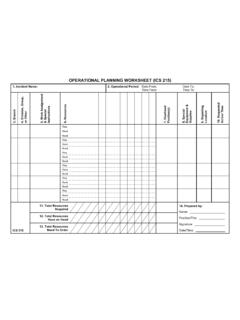
Transcription of OPERATIONAL PLANNING WORKSHEET (ICS 215)
1 OPERATIONAL PLANNING WORKSHEET (ICS 215) 1. Incident Name: 2. OPERATIONAL Period: Date From: Date To: Time From: Time To: 3. Branch 4. Division, Group, or Other 5. Work Assignment & Special Instructions 6. Resources 7. Overhead Position(s) 8. Special Equipment & Supplies 9. Reporting Location 10. Requested Arrival Time Req. Have Need Req. Have Need Req. Have Need Req. Have Need Req. Have Need Req. Have Need ICS 215 11. Total Resources Required 14. Prepared by: Name: Position/Title: Signature: Date/Time: 12 . Total Resources Have on Hand 13 . Total Resources Need To Order ICS 215 OPERATIONAL PLANNING WORKSHEET Purpose.
2 The OPERATIONAL PLANNING WORKSHEET (ICS 215) communicates the decisions made by the Operations Section Chief during the Tactics Meeting concerning resource assignments and needs for the next OPERATIONAL period. The ICS 215 is used by the Resources Unit to complete the Assignment Lists (ICS 204) and by the Logistics Section Chief for ordering resources for the incident. Preparation. The ICS 215 is initiated by the Operations Section Chief and often involves logistics personnel, the Resources Unit, and the Safety Officer. The form is shared with the rest of the Command and General Staffs during the PLANNING Meeting. It may be useful in some disciplines or jurisdictions to prefill ICS 215 copies prior to incidents. Distribution. When the Branch, Division, or Group work assignments and accompanying resource allocations are agreed upon, the form is distributed to the Resources Unit to assist in the preparation of the ICS 204.
3 The Logistics Section will use a copy of this WORKSHEET for preparing requests for resources required for the next OPERATIONAL period. Notes: This WORKSHEET can be made into a wall mount. Also available as 8 x 14 (legal size) and 11 x 17 chart. If additional pages are needed, use a blank ICS 215 and repaginate as needed. Block Number Block Title Instructions 1 Incident Name Enter the name assigned to the incident. 2 OPERATIONAL Period Date and Time From Date and Time To Enter the start date (month/day/year) and time (using the 24-hour clock) and end date and time for the OPERATIONAL period to which the form applies. 3 Branch Enter the Branch of the work assignment for the resources. 4 Division, Group, or Other Enter the Division, Group, or other location ( , Staging Area) of the work assignment for the resources. 5 Work Assignment & Special Instructions Enter the specific work assignments given to each of the Divisions/Groups and any special instructions, as required.
4 6 Resources Complete resource headings for category, kind, and type as appropriate for the incident. The use of a slash indicates a single resource in the upper portion of the slash and a Strike team or Task Force in the bottom portion of the slash. Required Enter, for the appropriate resources, the number of resources by type (engine, squad car, Advanced Life Support ambulance, etc.) required to perform the work assignment. Have Enter, for the appropriate resources, the number of resources by type (engines, crew, etc.) available to perform the work assignment. Need Enter the number of resources needed by subtracting the number in the Have row from the number in the Required row. 7 Overhead Position(s) List any supervisory and nonsupervisory ICS position(s) not directly assigned to a previously identified resource ( , Division/Group Supervisor, Assistant Safety Officer, Technical Specialist, etc.). 8 Special Equipment & Supplies List special equipment and supplies, including aviation support, used or needed.
5 This may be a useful place to monitor span of control. 9 Reporting Location Enter the specific location where the resources are to report (Staging Area, location at incident, etc.). 10 Requested Arrival Time Enter the time (24-hour clock) that resources are requested to arrive at the reporting location. Block Number Block Title Instructions 11 Total Resources Required Enter the total number of resources required by category/kind/type as preferred ( , engine, squad car, ALS ambulance, etc.). A slash can be used again to indicate total single resources in the upper portion of the slash and total Strike Teams/ Task Forces in the bottom portion of the slash. 12 Total Resources Have on Hand Enter the total number of resources on hand that are assigned to the incident for incident use. A slash can be used again to indicate total single resources in the upper portion of the slash and total Strike Teams/Task Forces in the bottom portion of the slash.
6 13 Total Resources Need To Order Enter the total number of resources needed. A slash can be used again to indicate total single resources in the upper portion of the slash and total Strike Teams/Task Forces in the bottom portion of the slash. 14 Prepared by Name Position/Title Signature Date/Time Enter the name, ICS position, and signature of the person preparing the form. Enter date (month/day/year) and time prepared (24-hour clock).