Transcription of Owner’s Manual
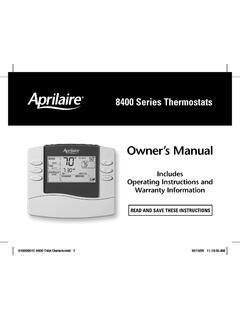
1 8400 series ThermostatsREAD AND SAVE THESE INSTRUCTIONSO wner s Manual Includes Operating Instructions and Warranty Information61000651C 8400 Tstat 110/13/09 11:13:35 AM2 Thermostat features ..3 How to identify your thermostat s model number ..3 Controls & display overview Non programmable models (8444, 8446, 8448) ..4 programmable models (8463, 8465, 8466) ..5 TAblE Of CONTENTSAbOUT yOUR NEw THERmOSTATOpERATION & pROgRAmmINg wARRANTyOperation (all models) Select system mode (HEAT/COOL) ..6 Change temperature setting ..6 Select fan setting (ON/AUTO/CIRC) ..7 Reset service reminder messages.
2 7 Battery installation and Reset Button ..7programmable models only (8463, 8465, 8466) Set time and day ..8 Understanding program schedules ..8 Progressive recovery ..9 Changing program schedules ..10 Program schedule overrides (temporary, permanent) ..11 Limited warranty ..12 Warranty registration ..1261000651C 8400 Tstat 210/13/09 11:13:35 AM3 AbOUT yOUR NEw THERmOSTATTHERmOSTAT fEATURES model 8444 Heat/Cool Non-Programmablemodel 8446 Heat Pump Non-Programmablemodel 8448 Heat/Cool or Heat Pump Multi-Stage Non-Programmablemodel 8463 Heat/Cool Programmablemodel 8465 Heat Pump Programmablemodel 8466 Heat/Cool or Heat Pump Multi-Stage ProgrammableAll 8400 series thermostats Large, clear, backlit display is easy to read even in the dark.
3 Displays room temperature, temperature setting, and optional outdoor temperature. Front battery door access for fast, easy replacement. Built in compressor protection. Circulation fan mode for air cleaning. Air filter, humidifier, dehumidifier, and HVAC service indicators. Auto backlight (activated with first button press). programmable models only (8463, 8465, 8466) Separately programmable weekday/weekend schedules. Easy to use temperature control can override program schedule at any time. Progressive TO IDENTIfy yOUR THERmOSTAT S mODEl NUmbERMODEL NUMBERTo locate the model number, remove the battery 8400 Tstat 310/13/09 11:13:36 AM4 CONTROlS & DISplAy OVERVIEw mODElS 8444, 8446, 8448 NOTE.
4 BACkLIgHT IS ACTIVATED WITH FIRST BUTTON PRESS AND AUTOMATICALLy TURNS INDOOR TEMPERATURESySTEM MODE SETTINgFAN SETTINgSySTEM MODE (PAgE 6)FAN SETTINg (PAgE 7)BATTERy DOORMESSAgE CENTERLOW BATTERy WARNINg (PAgE 7)QUICk REFERENCE CARDOUTDOOR TEMPERATURE (OPTIONAL)TEMPERATURE SETTINgEQUIPMENT STATUSEMERgENCy HEAT (RED)SySTEM FAULT (yELLOW)INDICATOR SHOWS THROUgH HOUSINgHEAT pUmp mODElS ONlyUPDOWNAbOUT yOUR NEw THERmOSTAT NON- programmable mODElS61000651C 8400 Tstat 410/13/09 11:13:36 AM5 CONTROlS & DISplAy OVERVIEw mODElS 8463, 8465, 8466 NOTE: BACkLIgHT IS ACTIVATED WITH FIRST BUTTON PRESS AND AUTOMATICALLy TURNS INDOOR TEMPERATURESySTEM MODE SETTINgFAN SETTINgSySTEM MODE (PAgE 6)FAN SETTINg (PAgE 7)BATTERy DOORMESSAgE CENTERLOW BATTERy WARNINg (PAgE 7)QUICk REFERENCE CARDOUTDOOR TEMPERATURE (OPTIONAL)TEMPERATURE SETTINgEQUIPMENT STATUSEMERgENCy HEAT (RED)SySTEM FAULT (yELLOW)INDICATOR SHOWS THROUgH HOUSINgHEAT pUmp mODElS ONlyUPDOWNPROgRAMCURRENT SCHEDULE PERIOD (PAgE 8)HOLDCURRENT TIMEAbOUT yOUR NEw THERmOSTAT programmable mODElS61000651C 8400 Tstat 510/13/09 11:13.
5 36 AM6 OpERATION All mODElSSElECT SySTEm mODE (Off/HEAT/Em-HEAT/COOl/AUTO)press to select:AUTO: Thermostat automatically selects heating or cooling depending on the indoor temperature. Off: Heating and cooling systems are : Thermostat controls only the heating : Thermostat controls only the cooling : Thermostat controls emergency/auxiliary heat. Heat pump will not operate. (Only for heat pumps with auxiliary heat on models 8446, 8465, 8448HP and 8466HP.)Applies to programmable versions (8463, 8465, 8466) when in HOLD or to adjust the current setting. In AUTO use to switch between the HEAT and COOL TEmpERATURE SETTINg61000651C 8400 Tstat 610/13/09 11:13:37 AM7 SElECT fAN SETTINg (ON/AUTO/CIRC)press to select:ON: Fan runs continuously.
6 Use this mode for maximum air circulation/air : Fan runs only when the heating or cooling system is : Same as AUTO, but if the fan has been off for 20 minutes the fan will be activated for a 10 minute cycle. Use this mode for a balance of energy savings and air All mODElSbATTERy INSTAllATION AND RESET bUTTONThe thermostat can either be AC or battery powered, or both. When wired to be AC powered, the batteries are optional and only provide backup power to the thermostat has a memory backup that saves the thermostat s settings in case of a power interruption.
7 The reset button located under the battery cover can be used to reset the thermostat back to factory BUTTONRESET SERVICE REmINDER mESSAgESpress and hold and together for three seconds to reset a service reminder 8400 Tstat 710/13/09 11:13:37 AM8 SET TImE AND DAy2 . press or to adjust the . press , the minutes flash. press or to adjust the press , the day flashes. press or to adjust press to end. DONE will thermostat will return to normal mode if no key is pressed within 3 seconds. OpERATION & pROgRAmmINg programmable mODElS ONly (8463, 8465, 8466)1.
8 Press to enter time setting mode. Hour and AM/PM are pROgRAm SCHEDUlESThe daily schedule is split into four sections:wAKE: 6am-8am Temperature you would prefer to wake up to, until you leave for the : 8am-5pm Temperature when you are away from the house during the : 5pm-10pm Temperature you would prefer to return to, until : 10pm-6am Temperature you would prefer during the times shown are the defaults. The start time and temperature of each section can be changed to fit your schedule (see page 10). 61000651C 8400 Tstat 810/13/09 11:13:38 AM9 EventEvent designatorStart timeSet tempsHeatCool1 WAkE6:00AM70 F (21 C)78 F (26 C)2 LEAVE8:00AM62 F (17 C)85 F (29 C)3 RETURN5:00PM70 F (21 C)78 F (26 C)4 SLEEP10:00PM62 F (17 C)82 F (28 C)OpERATION & pROgRAmmINg programmable mODElS ONly (8463, 8465, 8466)UNDERSTANDINg pROgRAm SCHEDUlES (CONTINUED)pROgRESSIVE RECOVERyThe Progressive Recovery feature allows the thermostat to activate the heating and cooling equipment prior to an event in order to reach the desired temperature at the start of the next scheduled.
9 Set the Wake time to 6 am, and the temperature to 70 . The heat will come on before 6 am, so the temperature is 70 by the time you wake at 8400 Tstat 910/13/09 11:13:38 AM10 CHANgINg pROgRAm SCHEDUlESOpERATION & pROgRAmmINg programmable mODElS ONly (8463, 8465, 8466)1 . press twice to enter program setting mode. Start time of the WAkE event is . press or to adjust the start time 3 . press , HEAT setting flashes. press or to adjust the heat press , COOL setting flashes. press or to adjust the cool press to advance the next event, and repeat steps 2-5 for LEAVE, RETURN and SLEEP press to change to weekend program.
10 Repeat steps 2-5 for the weekend . press to end. DONE will display. The thermostat will return to normal mode if no key is pressed in 3 seconds. 61000651C 8400 Tstat 1010/13/09 11:13:39 AM11pROgRAm SCHEDUlE OVERRIDES (TEmpORARy, pERmANENT)OpERATION & pROgRAmmINg programmable mODElS ONly (8463, 8465, 8466)Temporary program overridepress or to immediately adjust the temperature. This will temporarily override the temperature setting for the current programmed time period. The new temperature setting will be maintained until the next time period of the programmed schedule.