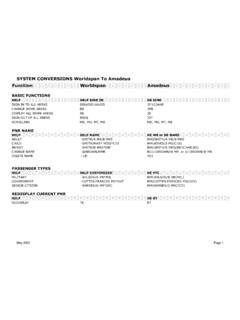
Transcription of PNR Quick Reference
1 0802 2002 worldspan , 2202 PNR Quick Reference There are four mandatory fields needed to create a basic Passenger Name Record (PNR). The first letter of these fields is an acronym for PINT. FIELD FUNCTION IDENTIFIER TYPE P-hone 9 multi-item I-tinerary 0 multi-item N-ame - multi-item T-icketing 7 single-item A sample PNR is shown below: 1P- 2 UUGJW *ADT 1 HP2017Y 24 FEB MO MCIPHX HK1 645A 833A/O $HP$ 2 HP2598Y 26 FEB WE PHXMCI HK1 1019A 149P/O $HP$ P- 891-5369-T/AGENCY TRAVEL/CASSIE T- TKG FAX-NOT PRICED FARE TYPE EX 1.
2 The first line indicates the worldspan partition (1P) and the record locator. 2. The second line shows the name field. 3. The third and fourth lines show the itinerary. 4. The fifth line shows the phone number. (P-) 5. The sixth line shows the ticketing field. (T-) 6. The last line contains pricing information provided by the system. NAME FIELD HELP NAME FUNCTION ENTRY The name field consists of a last name, slash (/), first name or initial, and optional title.
3 A period is used to separate the first name from the title, since spaces are ignored in the name field. The function identifier for the name field is the hyphen (-). - | | | | | | | | | | | Optional Title | | | | Period Separator | | | First Name | | Mandatory Slash | Last Name Function Identifier DELETE NAME HELP NAME@ FUNCTION ENTRY Delete Entire Name Field -2@ Delete Name item 3 from the fourth name field Page 2 of 4
4 2202 PNR worldspan MODIFY NAME FIELD (LAST NAME) HELP NAME@ FUNCTION ENTRY Some airlines do not allow name changes. Verify with airline its name change policy. When changing the last name, the entire name field must be modified. If the PTCs are not entered, worldspan assumes adult (ADT). -1 @ *ADT/ACC | | | | | Corrected Name | Change Symbol Name field number (optional in single name field PNR) *N Redisplays only the name field.
5 MODIFY NAME FIELD (FIRST NAME) HELP NAME@ FUNCTION ENTRY When an error is made in a passenger s first name, it can be modified without changing the entire name field. -1 @ .1 | | | | | Corrected Name | Mandatory Slash Passenger Name Item Two first names can be changed in one entry. Change name items 2 and 3 in the third name field. A first name and a PTC can be changed in one entry. PHONE FIELD HELP PHONE FUNCTION ENTRY Manual entry agency phone indicator field 9A2Z 212-459-1453-T/AGENCY TVL/ANN Automatic Subscriber ID with business phone indicator 9*212-876-9392-B Automatic Subscriber ID with home page indicator 9*212-543-7789-H AUTOMATIC FIRST PHONE FIELD HELP PHONE FUNCTION ENTRY Permits creation of a telephone number as the first phone
6 Field in a PNR 9-DIANA CANCEL/MODIFY PHONE FIELD HELP PHONE FUNCTION ENTRY Modify First Phone 91@4Z816-459-4500-T/AGENCY/SUE Modify Second Phone and Automatically Append SID 92@*816-652-5699-B Delete Second Phone Field 92@ Display Phone Field *PP TICKETING FIELD HELP 7 FUNCTION ENTRY To automatically place the PNR on a queue and category for the date the PNR is to be ticketed.
7 The example automatically places a PNR on Queue 9, Category 5 for ticketing on March 12. 7 TAW/05/12 MAR | | | | | | | | | | | Ticketing Date | | Category Number | Ticket at Will indicator Function Identifier CANCEL/MODIFY TICKETING FIELD HELP 7@ FUNCTION ENTRY Modify Ticketing Field 7@TAW/05/15 MAR-CDL Delete Ticketing Field 7@ Display Ticketing Field *TK 2202 Page 3 of 4
8 worldspan PNR REMARKS FIELD HELP 5 FUNCTION ENTRY The Remarks Field is an area of the PNR used to store general information. These remarks do not print on any document or ship in the booking message. Create Remark 5 REQUESTAISLESEAT Modify Second Remark 52@BOOKHHHOTEL Delete Second Remark 52@ Display All Remark Fields *M UNIQUE REMARKS HELP 5.
9 FUNCTION ENTRY Unique remarks are used to categorize information in a PNR. There are unique remarks for each letter of the alphabet. Unique remarks do not print on any document or ship in the booking message. Unique remarks are suppressed from view in the PNR. To view these remarks, enter: *U Create Modify @HTLGTDTOAX Delete @ OTHER SERVICE INFORMATION (OSI) HELP 3 OSI FUNCTION ENTRY Other Service Information (OSI) is used to ship information to an OAL for notification only. No action is required by the airline.
10 An OSI is stored in the General Fax field (GFAX) area of a PNR 3 OSINWTRAVELINGWITHINFANT6 MONTHS | | | | | | | Freeflow Message | | Mandatory Airline Code (Use YY for all airlines in PNR) | OSI Identifier Function Identifier for GFAX Modify 32@OSIAACTCB515-351-4722 Delete 32@ SPECIAL SERVICE REQUEST (SSR) HELP 3 SSR FUNCTION ENTRY A Special Service Request (SSR) is used to request a service and/or a reply from an airline. Each request must include a four letter SSR code.