Transcription of Reset – Initialization Procedures (User (Micro) – Factory ...
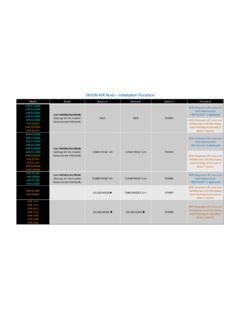
1 DENON & marantz Developed: 1/20/2017By D&M Group - Mahwah, NJD + M GroupService DepartmentTG012017E3-1 Reset Initialization Procedures (User ( micro ) Factory Network)Click here for DENONC lick here for MARANTZDENONMARANTZ MODELSUSER Reset Factory RESETDENON Model InfoPage 1 Page 2 Page 1 Page 2 NETWORK RESET3 Reset TypeModelButton AButton BButton CProcedureAVR-X7200 WAVR-X6300 HAVR-X6200 WAVR-X5200 WAVR-X4300 HAVR-X4200 WAVR-X4100 WAVR-X4000 WBACKINFOPOWERWith the power off (Zones off), press and hold buttons "A and "B" at the same time and while pressing these 2 buttons, press the power button (C) until INITIALIZED is the power off (Zones off), press and hold buttons "A and "B" at the same time and while pressing these 2 buttons, press the power button (C)
2 Until the display flashes at 1-second AVR-X3200 WAVR-X3100 WAVR-X3000 WAVR-X2300 WAVR-X2200 WAVR-X2100 WAVR-X2000 WAVR-X1300 WAVR-X1200 WAVR-X1100 WAVR-X1000 WAVR-S920W AVR-S910 WAVR-S900 WAVR-S720 WAVR-S710 WAVR-S700 WTUNER PRESET CH-TUNER PRESET CH+POWERAVR-S510 BTAVR-S500 BTSOUND MODE TUNER PRESET CH +POWERNOTE: All user settings will be lost after the set is Reset Factory RESETDENON Model InfoPage 1 Page 2 Page 1 Page 2 NETWORK RESETUser ( micro ) Reset Initialization ModePage 1 of 2 DENON user Reset (1 of 2) marantz MODELSDENON user Reset (2 of 2)4 Reset TypeModelButton AButton BButton CProcedureAVR-4810 CISTANDARDDSP SIMULATIONPOWERWith the power off (Zones off), press and hold buttons "A and "B" at the same time and while pressing these 2 buttons, press the power button (C)
3 Until the display flashes at 1-second SIMULATIONPOWERAVR-3313 CIBACKINFOPOWERAVR-3312 CIPRESET CHANNEL 2 PRESET CHANNEL 3 POWERAVR-3311 CISTANDARDDSP SIMULATIONPOWERAVR-2313 CITUNER PRESET CH-TUNER PRESET CH+POWERAVR-2312 CIPRESET CHANNEL 2 PRESET CHANNEL 3 POWERAVR-2311 CISURROUNDMODE SURROUNDMODE POWERAVR-2113 CITUNER PRESET CH-TUNER PRESET CH+POWERAVR-2112 CIPRESET CHANNEL 2 PRESET CHANNEL 3 POWERAVR-1913 SOURCE SELECT SOURCE SELECT POWERAVR-1912 PRESET CHANNEL 2 PRESET CHANNEL 3 POWERAVR-1911 SURROUNDMODE SURROUNDMODE POWERAVR-1713 SOURCE SELECT SOURCE SELECT POWERAVR-1712 DOCKCONTROL DOCK CONTROL POWERAVR-1613 SOURCE SELECT SOURCE SELECT POWERAVR-1612iPODSYSTEM iPODSYSTEM POWERAVR-1611 SURROUND MODE SURROUND MODE POWERAVR-1513 SOURCE SELECT SOURCE SELECT POWERAVR-1312 DOCKCONTROL DOCK CONTROL POWERAVR-991 AVR-891 AVR-791 AVR-591 SURROUND MODE SURROUND MODE POWERAVR-E400 SOURCE SELECT SOURCE SELECT POWERAVR-391 SURROUND MODE SURROUND MODE POWERAVR-E300 AVR-E200 SOURCE SELECT SOURCE SELECT POWERUser ( micro )
4 Reset Initialization ModePage 2 of 2 NOTE: All user settings will be lost after the set is Reset Factory RESETDENON Model InfoPage 1 Page 2 Page 1 Page 2 NETWORK RESETMARANTZ MODELS5 Reset TypeModelButton AButton BButton CProcedureAVR-X7200 WAVR-X6300 HAVR-X6200 WAVR-X5200 WAVR-X4300 HAVR-X4200 WAVR-X4100 WAVR-X4000 WCURSOR CURSOR POWERWith the poweroff (Zones off), press and hold buttons "A and "B" at the same time and while pressing these 2 buttons, press the power button (C) until the display flashes at 1-second AVR-X3200 WAVR-X3100 WAVR-X3000 WAVR-X2300 WAVR-X2200 WAVR-X2100 WAVR-X2000 WAVR-X1300 WAVR-X1200 WAVR-X1100 WAVR-X1000 WZONE2 SOURCEDIMMERPOWERAVR-S920W AVR-S910 WAVR-S900 WAVR-S720 WAVR-S710 WAVR-S700 WTUNER PRESET CH+TUNE -POWERAVR-S510 BTAVR-S500 BTFactory Resetis not available on these modelsFactory Reset Initialization ModePage 1 of 2 NOTE.
5 All user settings will be lost and the Factory settings (Including installer setup) will be restored after the set is Factory Reset (1 of 2) user Reset Factory RESETDENON Model InfoPage 1 Page 2 Page 1 Page 2 NETWORK RESETMARANTZ MODELS6 Reset TypeModelButton AButton BButton CProcedureAVR-4810 CIAVR-4520 CIAVR-4311 CIAVR-3313 CICURSOR CURSOR POWERWith the power off (Zones off), press and hold buttons "A and "B" at the same time and while pressing these 2 buttons, press the power button (C) until the display flashes at 1-second CHANNEL 1 PRESET CHANNEL 2 POWERAVR-3311 CICURSOR CURSOR POWERAVR-2313 CIZONE2/REC SOURCEDIMMERPOWERAVR-2312 CIPRESET CHANNEL 1 PRESET CHANNEL 2 POWERAVR-2311 CINAAVR-2113 CIZONE2 SOURCEDIMMERPOWERAVR-2112 CIPRESET CHANNEL 1 PRESET CHANNEL 2 POWERAVR-1913 ZONE2 SOURCEDIMMERPOWERAVR-1912 PRESET CHANNEL 1 PRESET CHANNEL 2 POWERAVR-1911 NAAVR-1713 ZONE2 SOURCEDIMMERPOWERAVR-1712 DOCKCONTROL DOCK CONTROL POWERAVR-1613 TUNER PRESET CH +DIMMERPOWERAVR-1612 NAAVR-1611 NAAVR-1513
6 NAAVR-1312 NAAVR-991 CURSOR CURSOR POWERAVR-891 AVR-791 AVR-591 NAAVR-E400 ZONE2 SOURCEDIMMERPOWERAVR-391 NAAVR-E300 TUNER PRESET CH +DIMMERPOWERAVR-E200 NAFactory Reset Initialization ModePage 2 of 2 NOTE: All user settings will be lost and the Factory settings (Including installer setup) will be restored after the set is Factory Reset (2 of 2) user Reset Factory RESETDENON Model InfoPage 1 Page 2 Page 1 Page 2 NETWORK RESETMARANTZ MODELSR esetTypeModelButton AButton BInput SourceProcedureAVR-X6300 HAVR-X4300 HCursor DimmerOnline MusicWith the power On and the input source set to Online Music , press and hold the "CURSOR " and "DIMMER buttons for more than 3 Initialization ,the display shows Network Reset andwhen done, Completed is displayed for 5 seconds before returning to the normal Initialization Mode The following items are initialized.
7 (1) Network setup(2) Friendly Name(3) Auto Update setting(4) Allow Update setting(5) Time Zone setting(6) Queue list(7) Internet Radio recently played station(8) Quick Select playback station(9) AirPlayPassword(10) Bluetooth Pairing History(11) Crestron Connected SetupOperationsWith the power is on and the input source set to Online Music , press and hold the "CURSOR " and "DIMMER buttons for more than 3 seconds. Network Reset appears on the screen followed by Completed , which is displayed for 5 seconds before returning to the normal ResetFor Models with Built-in NETWORK RESETUSER Reset Factory RESETDENON Model InfoPage 1 Page 2 Page 1 Page 2 NETWORK RESETMARANTZ MODELSMARANTZD enon ModelsUSER RESETMARANTZ Model InfoFACTORY RESETNETWORK RESET9 Reset TypeModelButton AButton BButton CProcedureSR7011 (HEOS)SR7010SR7009SR7008SR7007 GAMEINFOPOWERWith the power off (Zones off)
8 , press and hold buttons "A and "B" at the same time and while pressing these 2 buttons, press the power button (C) until INITIALIZED is the power off (Zones off), press and hold buttons "A and "B" at the same time and while pressing these 2 buttons, press the power button (C) until the display flashes at 1-second the power on, press and hold buttons A (MENU) and B ( ) for at least 3 seconds until M-CLEAR appears on the MODEAUTOPOWERSR6011SR6010SR6009SR6008SR6 007M-DAXZONE2 SOURCEPOWERSR6006SR6005 ZONE SELECTDISPLAYPOWERSURROUND MODEAUTOPOWERSR5011SR5010SR5009SR5008SR5 007M-DAXZONE2 SOURCEPOWERSR5006 ZONE SELECTDISPLAYPOWERSR5005 SURROUND MODEAUTOPOWERNR1607NR1606NR1605NR1604NR1 603M-DAXZONE2 SOURCEPOWERNR1602NR1601 ENTERRETURNPOWERNR1506M-DAXPRESET CH+POWERNR1504M-DAXPRESET CH-POWERNR1501 MENU POWERNR1403M-DAXPRESET CH-POWERNR1402 ENTERRETURNPOWERUSER ( micro )
9 RESETI nitialization ModeNOTE: All user settings will be lost after the set is ModelsUSER RESETMARANTZ Model InfoFACTORY RESETNETWORK RESET10 Reset TypeModelButton AButton BButton CProcedureSR7011 (HEOS)SR7010SR7009SR7008SR7007 MOVIE MUSICPOWERP rocedure:With the power off (Zones off), press and hold buttons "A and "B" at the same time and while pressing these 2 buttons, press the power button (C) until the display flashes at 1-second PURE DIRECTPOWERSR6011 SR6010SR6009 TUNER PRESET CH -TUNER PRESET CH +POWERSR6008SR6007 PRESET CH -PRESET CH +POWERSR6006M-DAXDISPLAYPOWERSR6005N/ASR 5011SR5010SR5009 TUNER PRESET CH -TUNER PRESET CH +POWERSR5008SR5007 PRESET CH -PRESET CH +POWERSR5006M-DAXDISPLAYPOWERSR5005N/ANR 1607NR1606NR1605NR1604NR1603 ZONE2 SOURCEINTERNET R