Example: biology

Select Internet Options Use SSL 3.0 TSL

PBUSE Security Settings 13 February 2010 From Internet Explorer, click Tools on the menu bar Select Internet Options Click on the Advanced tab Scroll down to Security The Use SSL should be unchecked, Use SSL , and all TSL versions should be checked (if using Windows 7 and IE 8 there are more TSL versions available) Users local polices may require them to have a SASMO or someone with administrative privileges make the changes for them.
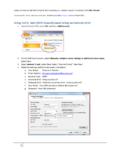

PBUSE Security Settings 13 February 2010 From Internet Explorer, click Tools on the menu bar Select Internet Options Click on the Advanced tab Scroll down to Security The Use SSL 2.0 should be unchecked, Use SSL 3.0, and all TSL versions should be checked (if using Windows 7 and IE 8 there are more TSL versions available)

Tags:

  Options, Internet, Select, Select internet options use ssl

Information

Domain:

Source:

Link to this page:

Please notify us if you found a problem with this document:

Other abuse

Advertisement

Transcription of Select Internet Options Use SSL 3.0 TSL

1 PBUSE Security Settings 13 February 2010 From Internet Explorer, click Tools on the menu bar Select Internet Options Click on the Advanced tab Scroll down to Security The Use SSL should be unchecked, Use SSL , and all TSL versions should be checked (if using Windows 7 and IE 8 there are more TSL versions available) Users local polices may require them to have a SASMO or someone with administrative privileges make the changes for them.