Example: barber

Step 1. Select Bill to Enroll

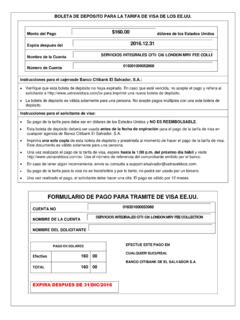
step 1. Select bill to EnrollStep 2. Confirm bill for EnrollmentMerchant is added tothe dropdown immediately after 3. Pay BillStep 3. Pay BillStep 3. Pay BillStep 3. Pay BillConfirmation Number: 00119749990801161647417 Merchant Paid: USVISAR eference Number: 12345678 (USVISA)Amount: PHP Account Number: xxxx-xxx1-45 (BPI CABET)Remarks:Thank You

Let's make it easy. Enrollment of Bills (other than Credit Cards, Loans or E-Commerce Companies) Pay your bills online. Enroll them in the Bills Payment facility.

Tags:

  Step, Bill, Select, Step 1, Select bill to enroll, Enroll

Information

Domain:

Source:

Link to this page:

Please notify us if you found a problem with this document:

Other abuse

Advertisement

Transcription of Step 1. Select Bill to Enroll

1 step 1. Select bill to EnrollStep 2. Confirm bill for EnrollmentMerchant is added tothe dropdown immediately after 3. Pay BillStep 3. Pay BillStep 3. Pay BillStep 3. Pay BillConfirmation Number: 00119749990801161647417 Merchant Paid: USVISAR eference Number: 12345678 (USVISA)Amount: PHP Account Number: xxxx-xxx1-45 (BPI CABET)Remarks:Thank You


Related search queries