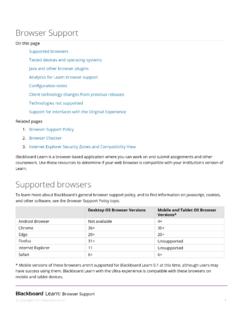
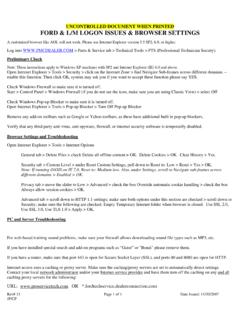
Transcription of Supported Browsers Product-Specific Browser Support …
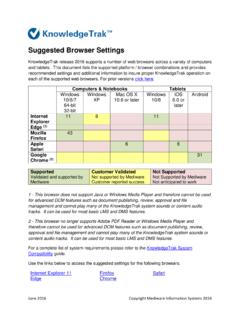
1 Page 1 of 422 July 2014 Supported Browsers Product-Specific Browser Support Doxim ECMB rowsers Comments Microsoft Internet Explorer versions If you use Internet Explorer, we recommend using the latestversion. Apply all Microsoft software , 10 & 11 Mozilla Firefox , most recent stable version By default, Firefox applies updates automatically. Doxim makesevery effort to test and Support the most recent version of Chrome , most recent stable version Google Chrome applies updates automatically; Doxim makesevery effort to test and Support the most recent version. Notethese restrictions: Adding documents to Doxim ECM via Shared Folders is not supportedApple Safari versions and on Mac OS X Apple Safari has been successfully tested in a Mac desktopenvironment with OS X and is Supported .
2 Safari for iPad iscurrently not Supported . To maximize your online experience and for your Internet security, Doxim recommends using the latestsupported Browsers . Please note that we do not Support Beta or test versions of Browsers . For any non- Supported Browsers which users may choose to use, we encourage you to report any issues to ourSupport Group via email so that we can track any known issues and look toexpand our Browser Support in future, however, in the meantime, we encourage you to use a supportedbrowser where issues la version fran aise, cliquez ici OpenAdvantage Browsers Comments Mi cros of t Inter net Expl or er ver sions 9, 10 & 11 If you use Inter net Expl or er , we rec ommend using the l atest ver sion.
3 Apply al l Mi cros of t s of tw ar e updates. Mozilla Firef ox , mos t r ec ent stable ver sion By default, Firef ox appl ies updates automati cal ly. Doxim makesevery effort to test and Support the most recent version of these restrictions: Using the Firef ox P DF Plugin may c ause pr oblems with viewing PDF documents. Adjust the settings to use Adobe Reader by default. Google Chr ome , mos t r ec ent stable ver sion Google Chr ome applies updates a utomati cally; D ox im makesevery effort to test and Support the most recent version. Notethese restrictions Issues uploading P DF documents use an alternate br owser f or uploading documents.
4 Apple Saf ar i ver sions and on Mac O S X and i Pad Apple Saf ar i has been tes ted on both iPad and desktop Macsusing OS X and is Supported . Note these restrictions: of O penAdvantage may have issues di splaying PDF susing Safari on an iPa ..Page 2 of 4 22 July 2014 MessageCentr al Browsers Comments Mi cros of t Inter net Expl or er ver sions 9, 10 & 11 If you use Inter net Expl or er , we rec ommend using the latestversion. Apply all Microsoft software updates. Note theserestrictions: Internet Explorer 8 may experience intermittent issues with displaying PDF files in the PreProdQC and PostProdQC screens The MessageCentral environment has been optimized for 1440x900 resolution.
5 Mi cros of t Silver light v 5 plugin is r equired Mozilla Firef ox , mos t r ec ent stable ver sion By default, Firef ox appl ies updates automati cal ly. Doxim makesevery effort to test and Support the most recent version of these restrictions: The MessageCentral environment has been optimized for 1440x900 resolution Mi cros of t Silver light v 5 plugin is r equired CloudConnector for Exenet Browsers Comments Mi cros of t Inter net Expl or er ver sions 9, 10 & 11 If you use Inter net Expl or er , we rec ommend using the latestversion. Apply all Microsoft software Firef ox , mos t r ec ent stable ver sion By default, Firef ox appl ies updates automati cal ly.
6 Doxim makes ev er y effort to test and Support the mos t r ec ent version of F iref ox . Google Chr ome , mos t r ec ent stable ver sion Google Chr ome applies updates a utomati cally; D ox im makes ev er y effort to test and Support the mos t r ec ent version..Apple Saf ar i ver sions and on Mac O S X and i Pad Apple Saf ar i has been tes ted on both iPad and desktop Macs us ing OS X and i s s upported. Not e thes e res tr icti ons: Page 4 of 4 22 July 2014 Addit ional B rowser R equirements: 128-Bit Secur e Sockets Layer ( SSL) Encrypti on To access Dox im applicat ions , your Browser mus t also Support 128-bit Sec ur e Sockets Layer ( SSL) encrypt ion.
7 All the Browser s w e s uppor t meet this requi rement. If yours d oesn' t, pl eas e downl oad the appropr iat e encrypt ion Support f rom your Browser 's supplier . Jav aScript To use Dox im s w eb appl icati ons , you mus t c hange your Browser a nd/or device settings to enabl e Jav aScript. For mor e i nf or mati on on enabl ing JavaScript, pleas e ref er to your br owser 's H el p s ec ti on or documentation. Har dwar e Configur ations There are no mini mum hardwar e requirements; however, c er ta in mini mum r equirements may b e specified by t he br owser you ar e using.
8 Discontinued o r L imit ed Browser S upport As of Dec. 2012, Doxim has discontinued Support for Micro soft Internet Explorer 6. Existing features that have pre viously work ed in this Browser may continue to work , however, no Support updates will be pro vided. As of April 2014, Support for Windows XP has been discontinued. As a result, Doxim will no longer Support IE bro wsers older than v9. For these versions, this means that some functions may no longer work , and Doxim Client Care will no longer investigate issues related to Intern et Explorer 7 and 8.