Transcription of Surface Pro 8
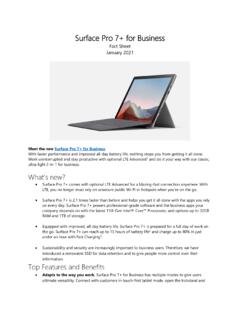
1 Surface Pro 8 Fact Sheet October 2021 Meet Surface Pro 8, designed for a Pro like you. Unlock more possibilities than ever with Surface Pro 8. Designed to light up the best of Windows 11, Surface Pro 8 combines the power of a laptop with the flexibility of a tablet, and every angle in between, with the iconic Kickstand and detachable Keyboard* with built-in slim Pen storage and Do great things with a larger 13 touchscreen, faster connections with Thunderbolt 4 ports, and extra speed when you need Features and Benefits Our most powerful Pro ever. Surface Pro 8 is over 2 times faster than Surface Pro 7. Deliveringover 40% higher sustained CPU performance and 74% faster graphics sustained performance, Surface Pro 8 will handle it Extend the ultimate desktop experience with Thunderbolt 4 ports.
2 Create your ultimateproductivity setup with multiple 4K monitors, keep large creative files on hand with an externalhard drive, or create a dream gaming setup with an external Our most advanced display in a Pro. 11% larger, higher resolution, brighter,individually calibrated and virtually edge-to-edge, immerse yourself in the high-resolution 13 PixelSense Flow touch display. Now with up to 120Hz refresh rate (60hz default) for an evensmoother pen experience and more responsive touch. Video calls come to life in HD. Full HD cameras with improved low-light performance andconsistent brightness across different lighting conditions, Studio Mics, and optimized speakers forcrystal-clear sound deliver an even better video calling experience.
3 Capture and share thatprecious moment, or effortlessly scan and sign a contract with the HD rear-facing camera with support for 4K video. The most advanced digital pen experience on a Pro. Unlock new experiences with Surface SlimPen Tactile signals is a new digital pen experience that uses the built-in haptic motor inSurface slim Pen 2 to give you the same feeling you get with pen on paper when notetaking anddrawing. Surface Pro 8 with Surface Pen 2 has greater precision and lower latency when inkingcompared to Surface slim Pen. Always charged, ready, and securely stored in Surface ProSignature Keyboard,2 take notes, sketch, and navigate in real time, any SpecificationsOperating system Surface Pro 8: Windows 11 Home Surface Pro 8 for Business: Windows 10 Pro or Windows 11 Pro Exterior Dimensions: x x Weight: lbs (891g) Mechanical features: anodized aluminum body, kickstand with full-friction multi-position hinge to 165 degrees, magnetic attach for keyboard fold stability Colors: Platinum, Graphite Display Screen: 13 PixelSense Flow Display Resolution: 2880 x 1920 (267 PPI) Up to 120Hz Refresh Rate (60Hz default) Aspect ratio: 3:2 Touch: 10-point multi-touch GPU Ink Acceleration CPU Consumer.
4 Quad-core 11th Gen Intel Core i5-1135G7 Processor Quad-core 11th Gen Intel Core i7-1185G7 Processor Designed on the Intel Evo platform Commercial: Dual-core 11th Gen Intel Core i3-1115G4 Processor (Wi-Fi) Quad-core 11th Gen Intel Core i5-1145G7 Processor (Wi-Fi or LTE3) Quad-core 11th Gen Intel Core i7-1185G7 Processor (Wi-Fi or LTE3) Designed on the Intel Evo platform (i5 and i7 processors only) Graphics Intel UHD Graphics (i3) Intel Iris Xe Graphics (i5, i7) Memory 8GB/16GB/32GB LPDDDR4x RAM Storage Removable solid-state drive (SSD) options: 128GB or 256GB (Wi-Fi or LTE3) SSD: 512GB or 1TB (Wi-Fi only) Security TPM chip for enterprise-grade security Enterprise-grade protection with Windows Hello face sign-in Network Wi-Fi 6: compatible Bluetooth Wireless technology LTE3: LTE Advanced5 with removable SIM and eSIM support Qualcomm Snapdragon X20 LTE Modem LTE bands supported.
5 1, 2, 3, 4, 5, 7, 8, 12, 13, 14, 19, 20, 25, 26, 28, 29, 30, 38, 39, 40, 41, 66 Battery Up to 16 hours of battery life4 Charge your Surface Pro 8 to 80% in just over an hour5 Cameras Windows Hello face authentication camera (front-facing) front-facing camera with 1080p full HD video rear-facing autofocus camera with 1080p HD and 4k video Audio Dual far-field Studio Mics 2W stereo speakers with Dolby Atmos 6 Dolby Vision support6 Ports 2 x USB-C with USB 4 headphone jack 1 x Surface Connect port Surface Type Cover port Compatible with Surface Dial off-screen interaction2 Sensors Accelerometer Gyroscope Magnetometer Ambient Color Sensor (brightness and color) Software Windows 11 Home Preloaded Microsoft 365 Apps7 Microsoft 365 Family 30-day trial58 Preloaded Xbox App Xbox Game Pass Ultimate one month trial9 Power Supply 60W power supply with additional 5W USB A charging Port In the Box Surface Pro 8 Power Supply Quick Start Guide Safety and warranty documents Surface slim Pen 22 4,096 pressure levels Zero force inking10 Tactile signals with Surface Pro 811 and Surface Laptop Studio9 on Windows 11 Rechargeable Lithium-Ion Battery Wireless Charging and Storage on Surface Pro Signature Keyboard Up to 15 hours of typical usage12 Keyboard Compatibility Surface Pro Signature Keyboard Warranty13 1-year limited hardware warrantyContact Information For more information, press only.
6 Rapid Response Team, WE Communications, (425) 638-7777, For more product information and images: Visit the Surface Newsroom at For more information about Surface : Visit Surface at 1 Pen storage and charging available on select Keyboards. 2 Some accessories and software sold separately. Surface slim Pen 2 sold separately. Surface Pro Signature Keyboard are sold separately. Only Surface Pro Signature Keyboard has Surface slim Pen 2 storage and charging capabilities. 3 Surface Pro 8 with LTE Advanced is coming in 2022. Visit for updates on availability in your market. Availability may vary by market and configuration. Service availability and performance subject to service provider s network. Contact your service provider for details, compatibility, pricing, SIM card, and activation.
7 See all specs and frequencies at 4 Up to 16 hours of battery life based on typical Surface device usage. Testing conducted by Microsoft in August 2021 using preproduction software and preproduction Intel 11th Gen Core i5-1135G7, 256GB, 8GB RAM device. Testing consisted of full battery discharge with a mixture of active use and modern standby. The active use portion consists of (1) a web browsing test accessing 8 popular websites over multiple open tabs, (2) a productivity test utilizing Microsoft Word, PowerPoint, Excel and Outlook, and (3) a portion of time with the device in use with idle applications. All settings were default except screen brightness was set to 150nits with Auto-Brightness and Adaptive Color disabled. Wi-Fi was connected to a network.
8 Tested with Windows Version (21H2). Battery life varies significantly with settings, usage and other factors. 5 Testing conducted at Microsoft in August 2021 using pre-production devices and Software. Tested with the inbox 24W PSU under controlled conditions. Device was powered on to desktop screen with default display brightness settings. Actual charge time will vary based on operating conditions. Measured at typical office ambient temperature of 23C. 6 Requires Dolby Atmos encoded content and audio. 7 Subscription required (sold separately). 8 Activation required. 9 Activation required for Game Pass Ultimate. 10 Zero force inking will only be work when Surface slim Pen 2 is used with Surface Pro 8, Surface Pro X, Surface Laptop Studio, and Surface Duo 2.
9 Additional compatibility details can be found at 11 Chargers, software, accessories, and devices sold separately. Availability may vary by market. 12 Battery life varies significantly based on usage, network and feature configuration, signal strength, settings and other factors. See for details. 13 Microsoft s Limited Warranty is in addition to your consumer law rights.