Transcription of System Manual - support.j2rs.com
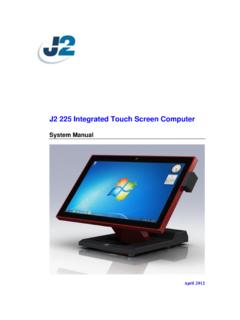
1 j2 680 Integrated Touchscreen Computer System Manual May 2012 j2 680 System Manual Version May 11, 2012 2 Copyright 2011-2012 J2 Retail Systems Ltd All rights reserved Change history Version Release May 11, 2012 j2 680 System Manual Version May 11, 2012 3 Contents Overview .. 6 Specification .. 8 Features .. 10 Intel s Desktop Processor Socket LGA 1155 .. 10 Hot Swappable RAID/ Dual Hard Drives .. 10 PoweredUSB Ports / power 10 UPS .. 11 Printer power Port .. 11 Cooling System .. 11 Fan-Off Mode .. 11 Versatility .. 11 System .. 12 Configurations .. 12 Processor Support .. 12 Processors currently supported on the 680 .. 13 I/O Ports .. 14 Off / On Button .. 14 Hard Disks .. 15 Zero Bezel Touch Screen .. 15 System Board .. 16 LCD Display .. 16 Secondary Video Port(s).
2 16 Serial ports .. 18 PoweredUSB Ports .. 19 Kensington Security Slot .. 20 Audio .. 21 Printer power Port .. 21 Cash Drawer Port .. 22 CMOS Clear .. 24 power Supply .. 24 Typical power Consumption 680 .. 25 Service .. 26 Removing the Head from the Base .. 26 Removing the power Supply .. 27 VESA Mounting .. 28 Optional Wall Mount Bracket Installation .. 29 Removing the Back Cover .. 30 Changing the System Board .. 31 Adding Memory .. 33 Changing the Processor .. 33 Accessing the HDD/SDD Drives .. 34 j2 680 System Manual Version May 11, 2012 4 BIOS Setup .. 35 Entering the BIOS Setup .. 35 Main, System Overview .. 35 Advanced Settings .. 36 Launch PXE ROM .. 36 SATA Configuration .. 37 Peripheral power and LCD Brightness Configuration .. 38 power Configure Screen .. 39 Restore on AC power Loss .. 39 Wake on LAN .. 39 RTC Configuration.
3 39 Boot Settings .. 40 Display OEM Logo .. 40 Exit Options .. 41 Driver Installation, Windows .. 42 Chipset Driver Installation .. 42 Graphics Driver Installation .. 42 Audio Driver Installation .. 43 LAN Driver Installation .. 44 Multi-Touch Projected Capacitive Touch Driver .. 47 Optional Multi-Touch Projected Capacitive Touch Driver .. 49 OPOS drivers .. 51 J2 Health .. 52 Installation .. 52 Tray Icon .. 52 Logging to File .. 53 Registry Entries .. 54 J2 Remote Monitoring Software .. 54 SMI BIOS Info Utility .. 55 Installation .. 55 Operations .. 55 Cash Drawer Test Utility .. 56 Installation .. 56 Operation .. 56 J2 Virtual Serial Ports Drivers .. 57 RAID .. 58 RAID Overview .. 58 AHCI .. 58 Enabling RAID in the BIOS .. 59 RAID Volume Creation .. 59 j2 680 System Manual Version May 11, 2012 5 F6 Installation Method .. 59 Installing the Intel Matrix Storage Manager Software.
4 60 Hot Swapping RAID 1 drives .. 60 Packing List .. 63 Standard Items .. 63 680 Optional Peripherals .. 64 MSR .. 64 Overview .. 64 Installing the 680 MSR .. 65 Customer Display .. 67 Overview .. 67 Secondary Video Display .. 67 Fingerprint Reader / MSR .. 68 iButton / MSR .. 68 680 UPS .. 68 RFID .. 68 Wall Mount Bracket .. 68 Pole Mount Options .. 68 j2 680 System Manual Version May 11, 2012 6 Overview The j2 680 is the second generation of very high performance integrated Point of Sale computer from J2. Built on the features and capabilities for the J2 650 the j2 680 offers even higher performance and expanded I/O. The j2 680 retains all the versatility of previous generation System and adds Quad core processor options, expanded I/O support with PoweredUSB, Intel remote management, HDMI video, Multi-Touch, Zero Bezel design and retains RAID and other important feature of the previous generation.
5 This integrated touch screen computer like most J2 designs features an all in the head design, which means it can be used as a counter top unit, a wall-mount or a pole-mounted computer. In this one small package you have the highest speed available intergraded or non-intergraded POS computer currently available. The j2 680 comes standard with an Intel Dual Core Sandy Bridge processor but can also be order with a number of other processors including the very high end Intel i7 Quad Core processor. The j2 680 System board uses the Intel LGA1155 socket and supports a wide range dual and quad core processors. Using the Intel Sandy Bridge processor with the Q67 chipset the j2 680 uses the latest high performance desktop solution in a very small footprint System . This solution provides for very high performance but with a very low carbon foot print.
6 The Sandy bridge chipset is design only to draw as much power as need for any given operation greatly reducing the average power consumption for this level of performance. Designed for easy machine maintenance and upgradeability, the following is a list of important 680 features: 1. Upgrades to the memory modules can be easily done by simply removing four screws on the back cover. 2. A complete motherboard upgrade can be carried out in less than 1 minute. 3. The two quick change SATA hard disk drives are easily accessible, housed on a slide-in drive bay that allows the drives to be hot swappable. 4. The footprint of the j2 680 is particularly compact making it ideal for the space conscious retailer. The 680 supports the standard Microsoft operating systems, Windows 7, POSR eady 7, Windows 7 Embedded, XP, POSR eady 2009 and XP embedded.
7 The 680 is equally proficient with the many flavors of Linux. j2 680 System Manual Version May 11, 2012 7 j2 680 System Manual Version May 11, 2012 8 Specification Main board CPU Support Intel Sandy Bridge Desktop Processors, socket LGA1155 Intel Celeron Dual Core G530 up to Quad Core i7- 2600 Chipset Q67 System Memory 2 x 240-pin DDR3 DIMM 1333/1667 MHz sockets - up to 16GB Graphic memory Share System memory 8MB~256MB BIOS AMI LCD Touch Panel LCD Size 15 TFT LCD Brightness 250 nits, adjustable in 8 steps to 25nits Resolution 1024 x 768 Touch Screen Multi-touch Project Capacitive or True Flat Resistive 5 wire Tilt Angle 0 ~ 90 Storage HDD/SSD Two inch SATA drives support for HDD or SDD RAID 0 or 1, Quick Change-hot swap 160GB HDD or 16GB SSD standard External I/O Ports USB 6 total , 5 in cable well, 1 on side.
8 3 are PoweredUSB Serial Four DB9 RS-232 with power option PoweredUSB 2 +12V PoweredUSB and 1 +24V PoweredUSB LAN 10 /100/ 1000 Intel 82579LM Controller 2nd Display One VGA port and One DisplayPort DisplayPort supports HDMI and DVI displays Cash Drawer 2 x RJ 11 24V with status power In 19 VDC amps Audio Jack One headset, one microphone-in Printer power +24 V amps, supports most 24V POS printers power LED Front bezel, green for on, amber for standby j2 680 System Manual Version May 11, 2012 9 power power Adapter 19 VDC, 180W, 100-240 VAC,50~60Hz, Optional Peripheral MSR 3 Track iButton Dallas Key iButton Fingerprint Reader USB Digital Persona Fingerprint Reader RFID 125 KHz RFID USB 2-in-1 MSR 3 track / Finger Print 2-in-1 MSR 3 track / iButton Second Display 4:3 displays, , or with or without touch 16:9 displays, or 14 with or without touch Customer Display 2x20 VFD UPS DC UPS, hours run time Mounting Standard Counter Top Base, Adjustable Viewing Angle 0-90 100mm VESA mounting point Optional Pole Mount, Adjustable angle VESA, Swing-arm Mounts, others Environment EMC & Safety FCC, Class A, CE, LVD Operating Temperature 0 ~ 40 C Storage Temperature -20 ~ 55 C Operating Humidity 20% ~ 80% RH non-condensing Storage Humidity 20% ~ 85% RH non-condensing Dimensions (W x D x H) 370 x 250 x325mm Weight OS Support Windows 7, POSR eady 7, Windows 7 Embedded, XP, POSR eady 2009, XP Embedded, version of Linux * This specification is subject to change without prior notice.
9 j2 680 System Manual Version May 11, 2012 10 Features Intel s Desktop Processor Socket LGA 1155 By using the latest generation of Intel s desktop processors and chipsets, code named Sandy Bridge, the j2 680 supports a very wide range of processors. By taking advantage of J2 company s and partners vast experience with notebook, desktop, and POS computer designs, we are able to combine features of all three for an optimal POS System design. The result is a POS System that can utilize a desktop chipset that draws very little power and generates a low amount of heat, similar to mobile chipsets and processors. Notebook quality components are used in the processor, chipset, and power supply circuit, which allows for reduced heat generation and minimal power usage. Additionally, the 680 takes full advantage of the low power features built into the Intel processor and chipset to further reduce heat.
10 Hot Swappable RAID/ Dual Hard Drives Like the J2 650, the first integrated POS System on the market to offer a hot swappable RAID feature the j2 680 also supports this feature. The two internal inch SATA hard drives can be configured as a RAID array which gives true fault tolerance to the hard drive subsystem. PoweredUSB Ports / power Port Addressing the need for additional power ports the j2 680 supports two +12V and one +24V PoweredUSB ports. The j2 680 can take advantage of growing availably or PoweredUSB products on the market. In addition to the three PoweredUSB port the j2 680 also support four powered serial ports, and VGA +12V power , a +24V printer power port and 3 standard USB ports. By using a combination of these powered ports most all additional external power supplies for devices like scales, scanner, Chip and Pin devices, scanners, secondary display and other can be eliminated.