Transcription of TM’S UniFi SERVICE
1 A1TM S UniFi SERVICETM s UniFi SERVICE offers bandwidth delivered at broadband speeds of 5 Mbps and above. This high speed bandwidth will be delivered to homes via fibre technology. Fibre technology is able to transmit data with better quality transmission at speeds far exceeding current broadband technology. With bandwidth being provided at such high speeds, UniFi will definitely bring a whole new digital lifestyle experience to Malaysians. It will open up greater opportunities and provide access to rich content like never before in entertainment, gaming, education, business, work, health, communications, services and much oF ConTEnTS PAGES1. About the SERVICE Guide 52. Abbreviations 6-73. Wiring and Networking 8-94. Customer Premises Equipment (CPE) 10-185. Complimentary services 19-296. Phone (Voice SERVICE ) 307. Value Added services (VAS) 31-378.
2 Optional CPE 38-409. Benefits 41-4210. FAQs 43-5511. Contact Us 56-5745 This UniFi SERVICE guide provides you with a summary of the UniFi residential SERVICE and the features it will deliver to your home . Please read this guide thoroughly to have a better understanding about the SERVICE . 1 ABOUT THE SERVICE GUIDE67OS Operating SystemRG Residential GatewayPOP Post Office ProtocolPSTN Public Switched Telephone NetworkSMTP Simple Mail Transfer ProtocolSTB Set-Top-BoxSSID SERVICE Set IdentifierTM Telekom Malaysia BerhadURL Uniform Resource LocatorUSB Universal Serial BusVAS Value Added ServicesVDSL2 Very High Speed Digital Subscriber Line 2 VOD Video On DemandWiFi Wireless FidelityAC Alternate CurrentBPL Broadband Power LineBTU Broadband Termination UnitCPE Customer Premises EquipmentDECT Digital Enhanced Cordless TelecommunicationsDP Distribution PointFTTH Fibre To The HomeFUP Fair Usage PolicyHDMI High Definition Multimedia InterfaceHSI High Speed InternetIPTV Internet Protocol TelevisionLAN Local Area NetworkNIC Network Interface CardONU Optical Network Unit2 ABBREVIATIONS89 The diagram illustrates the UniFi
3 Triple Play SERVICE set-up in your home . TM technicians will install a BTU inside your home at your nearest TV location. A fibre cable connection from an adjacent telephone pole or underground DP will run to the BTU. For high-rise buildings or condominiums, there are some cases where fibre cabling will terminate the building s communications room. The connection will however continue to your home using the building s existing wiring. This condition will be subject to the building owner s authorisation and the existing building INTERNAL WIRING AND NETWORKING3 WIRING AND NETWORKINGRGSTBFTTH / Broadband Termination Unit (BTU) Two types of BTU will be deployed depending on premise type: a) ONU for FTTH (landed properties) b) VDSL2 modem for VDSL2 (high-rise buildings) The BTU is a terminating unit from the Access Network (TM Network). This unit functions like a modem to facilitate Internet and data access to your home .
4 The BTU will translate the pulses of light that carry data over the fibre optic cable into electrical signals that will be recognised by your computer. As a part of the package offering, TM will provide you with therequired equipment which is to be installed in your home in order to deliver the UniFi SERVICE . The equipment provided is as follows:4 CUSTOMER PREMISES EQUIPMENTDECT PhoneResidential GatewayS et-Top -BoxBroadband Termination Unit Residential Gateway (RG) The RG, also known as a router will be the main gatekeeper for UniFi ser vice to your home . It controls access to HSI, HyppT V and other ser vices that connect through it. This capability allows users to par ticipate in real-time activities online, such as video streaming, online gaming, real-time video and much more. Important Note: Broadband access speeds will differ when connecting to a Residential Gateway via wireless (WiFi) as compared to an Ethernet cable.
5 This is primarily due to the nature of wireless technology. Broadband access speeds delivered via wireless technologies can also be affected by various factors such as the actual positioning of the Residential Gateway, interference BTU packaging will consist of: a) 1 unit ONU / VDSL2 Modem b) 1 unit 1 metre Ethernet Cable c) 1 unit 1 metre Telephone Cable d) 1 unit Power Adaptor e) 1 unit User GuideONUORVDSL2 ModemTelephone CableEthernet CablePower AdaptorUser Guide1415 RG packaging will consist of: a) 1 unit Residential Gateway b) 5 units 1 metre Ethernet Cable c) 1 unit Power Adaptor d) 1 unit User Guide from other electrical equipment in the vicinity, thickness of internal walls, etc. Our Residential Gateway is also compatible with computers that are wireless enabled. If you do not have a wireless-enabled computer, you may be able to upgrade your computer by purchasing our wireless USB adaptor.
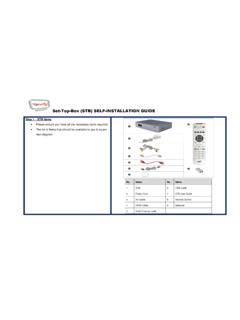
6 Other wireless USB adaptors or devices might be compatible with our Residential Gateway; however, we cannot guarantee this. The Residential Gateway has been designed solely for use with the UniFi SERVICE and includes a 1-year limited warranty against manufacturing defects only. Ethernet CableUser GuidePower AdaptorResidential Gateway1617 STB packaging will consist of: a) 1 unit Set-Top-Box b) 1 unit 1 metre Ethernet Cable c) 1 unit Power Adaptor d) 1 unit User Guide e) 1 unit HyppTV Remote Control f) 1 unit HDMI Cable (for High Definition SERVICE ) Set-Top-Box (STB) STB is a device that connects to a television to deliver the HyppTV SERVICE (IPTV). It converts the signal received into content which is then displayed on the television screen. HyppTV works on your TV with an STB that accesses channels, subscription services and Video On Demand.
7 It uses a broadband connection to the Internet for the delivery of video AdaptorSTB & HyppTV Remote ControlEthernet CableUser GuideHDMI Cable18195 .1 H y p pT V With HyppTV, you will get to watch an exciting array of TV programmes, movies and much more at your convenience. The first in Malaysia, HyppTV is a SERVICE where TV content is delivered digitally through your High Speed Broadband connection. Select your Video On Demand (VOD) movies or series and watch it anytime you like! HyppTV via UniFi will revolutionise the way you watch TV!5 COMPLIMENTARY DECT Phone DECT Phone is a portable fixed line phone set for indoor mobility. It is capable of storing phone books, ringtones of choice, last numbers dialed, redial and much more. DECT Phone packaging will consist of: a) 1 unit DECT Phone b) 1 unit Power Adaptor c) 1 unit Handset Cover d) 1 unit Charger e) 1 unit User GuideChargerUser GuideHandset coverPower AdaptorDECT PhoneNote: 1) Effective 1st September 2010 for HyppTV channels, nominal charges will be imposed for Premium Channels and Video On Demand (VOD) services .
8 2) For more details, please visit E-mail The e-mail feature will come with a 2GB storage size. However, TM at its discretion can increase your capacity to accommodate larger e-mail storage for FREE in the future. Your e-mail address is as per your Confirmation Slip. 1 e-mail address for Residential : You will have 2 options to access your UniFi e-mail account: Option 1 : Webmail : Access your e-mail via a web browser at Option 2 : Preferred E-mail Client. SEARCHSETTINGSVODSEARCHVODHyppTV Main Menu:HELPSEARCHHELPTV GUIDETV GUIDE Select your favourite channel from channel listVIDEO ON DEMANDS elect your favourite m o v i e s / s e r i e s f r o m a wide variety of genres, languages and categories and watch them anytime you likeiMODESEARCHiNTER@CTIVEiNTER@CTIVEI nteractive features that give you a new and innovative TV experienceSEARCHSEARCHSEARCHUse Search to find relevant informationSETTINGSP ersonalise your T V by utilising the Settings optionHELP Answer all your enquir ie s and concerns with the Help Streamyx ZONE Streamyx ZONE is a wireless broadband Internet access SERVICE available at public locations such as shopping malls, coffee shops, eating outlets, convention centres, hotels and other locations that allow you to connect to the Internet when you are in these premises.
9 Follow these steps to access the Internet via Streamy x ZONE: Step 1 : Just turn on your WiFi, choose the Streamyx ZONE SSID in your wireless network option. Step 2 : Open a browser (Internet Explorer is recommended) then type in any URL address. Step 3 : You will be directed to the Streamyx ZONE landing page. Step 4 : Key in your valid Streamyx ZONE ID and Password (as per Confirmation Slip). Step 5 : The terms & conditions page will appear and just click Continue to are now ready to surf the Internet for Access via Webmail Step 1 : Go to Step 2 : Key in your E-mail ID (as per Confirmation Slip) in the E-mail Address Field, then key in your Password. Step 3 : Click Login. If you forget your Password, please contact the TM UniFi Centre at 1 300 88 1221 or e-mail to Access via Preferred E-mail Client Step 1 : Go to Step 2 : Click at Learn how to receive UniFi e-mail via e-mail client and follow the account is available at RM18 per : For more information regarding the purchase of this SERVICE orfor technical support, please visit Infoblast This is a 2 way portal messaging SERVICE that is offered to customers through a single portal (using the UniFi Phone number access : 012/ 013/ 014/ 016/ 017/ 019).
10 By default, you will get ONE (1) Infoblast account once you subscribe to one of the UniFi Residential Packages. SMS charges are as follows: i. 1 to 50,000 SMS @ 12sen/SMS ii. 50,001 to 100,000 SMS @ 11sen/SMS iii. 100,001 and above SMS @ 10sen/SMS To access your infoblast, just follow these steps: Step 1 : Go to Step 2 : Key in your registered ID and Password at Member Online Guard Plus Prevail against a variety of viruses, spywares and miscellaneous threats lurking on the Internet. You need more than a basic online virus scanning tool to keep your PCs and documents safe. You can install additional Online Guard Plus on top of what is already provided in UniFi Residential Packages. Online Guard Plus consists of 5 security elements:i. Antivirus scanning & repairing (MyV3)ii. Antivirus real-time monitoring (MyV3 RTS)iii.