Transcription of Tuition & Payment Information
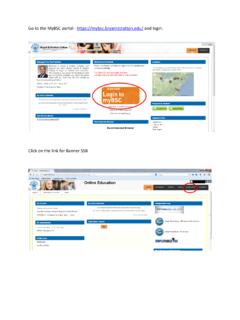
1 View and Pay your Account via Self-Service 1. Access 2. Click My Macomb (if on mobile, use the menu) and login 3. Click Self Service 4. Click Student Finance and the Account Summary will display your term balances and allow you to: Select a term to view Account Activity and statements. Note: Statements are provided online and not mailed. Enroll in, manage or pay on a Nelnet Payment Plan Review your Nelnet account after changes in classes or financial aid to ensure plan balance is updated Make a Payment for non- Payment plan balances with American Express, Visa, MasterCard, Discover or Check (US Accounts) Anticipated Financial Aid is updated daily.
2 Review your account 24 hours after adding classes or updating your program. Cashier s Office Visit Us on My Macomb: Phone: E-Mail: Locations: Center Campus G-131 or South Campus G-324 Outside Scholarship & Educational Savings Plan Checks Contact us to coordinate receipt of these payments. Make checks payable to Macomb Community College, reference student ID and name and mail to: Macomb Community College Cashier s Office SG-324 14500 E. 12 Mile Rd. Warren, MI 48088 Cash or money order is accepted at the Cashier s Office. Photo ID is required for all in person transactions. Student account Information will only be provided to the student or those authorized by the student on FERPA Release of Information Form.
3 See Page 2 for Financial Aid and Sponsored Billing Information Tuition & Payment Information Fall 2021, Winter & Spring/Summer 2022 Term Registration Date Full Payment or Nelnet Payment Plan Enrollment Due Fall 2021 3/22/21 8/3/21 8/3/21 10% Down Payment and $25 plan fee to Enroll, then 3 Equal Automatic Deductions 8/20, 9/20 & 10/20 8/4/21 8/30/21 Day of Registration 10% Down Payment and $25 plan fee to Enroll, then 2 Equal Automatic Deductions 9/20 & 10/20 8/31/21 & Forward Day of Registration No Payment Plan Available Winter 2022 3/22/21 12/7/21 12/7/21 10% Down Payment and $25 plan fee to Enroll, then 3 Equal Automatic Deductions 1/20, 2/20 & 3/20 12/8/21 1/24/22 Day of Registration 10% Down Payment and $25 plan fee to Enroll, then 2 Equal Automatic Deductions 2/20 & 3/20 1/25/22 & Forward Day of Registration No Payment Plan Available Spring/ Summer 2022 3/21/22 4/26/22 4/26/22 10% Down Payment and $30 plan fee to Enroll, then 2 Equal Automatic Deductions 5/20, 6/20 4/27/22 5/11/22 Day of Registration 10% Down Payment and $30 plan fee to Enroll, then 2 Equal Automatic Deductions 5/20, 6/20 5/12/22 & Forward Day of Registration No Payment Plan Available Tuition Smarter with Nelnet Payment Plans Payment plans are available for balances of $100 or more for a limited time each term.
4 The non-refundable plan fee and down Payment are processed at time of plan enrollment. Remaining payments are automatically deducted by Nelnet from the account provided on the scheduled dates. Early plan payments must be paid via your Nelnet account to update your plan timely and avoid duplicate payments. Payment Methods: ACH from US Bank Account or Credit/Debit Card (Visa, MasterCard, Discover or American Express) Returned payments will be assessed a $30 fee by Nelnet Review plan balance with your Nelnet account after changes in classes or financial aid to ensure plan is updated To learn more or enroll, visit My Macomb Self-Service Student Finance described below.
5 Financial Aid: Grants, Scholarships and Loans Visit us on My Macomb: Phone: E-Mail: Locations: Center Campus G-130 or South Campus G-324 Self-Service Financial Aid 1. Access 2. Click My Macomb (if on mobile, use the menu) and login 3. Click Self Service 4. Click Financial Aid and select the 2021-2022 Academic Year for Fall 2021, Winter 2022, and Spring/Summer 2022 terms. From here you can: View aid status and submit requested documents Apply for financial aid Review award terms and conditions Access Information about the financial aid process How to Pay with Financial Aid Your balance, less any anticipated financial aid, is shown on My Macomb Self-Service Student Finance.
6 See Page 1 for instructions. The Macomb OneCard is not used to pay Tuition . Anticipated Financial Aid is updated daily. Review your account 24 hours after adding classes or updating your program. For awards with a comment of Restricted Award in the Financial Aid section, contact the Financial Aid office. If your aid covers all charges, no Payment is due. If your aid has not been processed or aid does not cover all charges, you must pay the balance owed or enroll in a Payment plan by the Payment due date. If you receive aid at a later date, a refund will be issued. Financial Aid Refunds & Purchasing Books Refunds are typically issued 3-4 weeks after each course start date but may differ due to your schedule and award requirements.
7 See My Macomb Financial Aid Disbursement of Financial Aid Funds for details. Until your refund is issued, you can purchase required books and supplies at the campus bookstores during the periods listed at the right. The amount available at the bookstore will be shown as a credit balance (negative amount) for the term on My Macomb Self-Service Student Finance. Sponsored Billing: Third Party Assistance Phone: Email: Sponsored Billing is when a student s Tuition , fees, or books are billed to third party Tuition assistance programs. Submit written authorization to or the Cashier s Office each term by the Payment due date. You must pay or enroll in an approved Nelnet Payment plan for any costs not covered by the sponsor by the Payment due date.
8 Authorizations will not be accepted if sponsor is delinquent, refused to pay, if Payment is contingent on grades or employment status or any other reason deemed appropriate. Amount billed to sponsor may be reduced if assistance program will only pay for costs after financial aid. By submitting an authorization, the student grants the College permission to release necessary records to facilitate Payment , understands reimbursement may not be made until sponsor pays, and is responsible for any costs refused by the sponsor. Once processed, charges to be billed to your sponsor will be listed under Sponsorships on My Macomb Self-Service Student Finance Account Activity.
9 Sponsors are invoiced after drop/add each term. Authorizations must include: Sponsor s Name Billing Contact Name, Address, Phone & Email Student s Name Student ID Term to be covered Charges to be covered Tuition , fees, books, or supplies and dollar amount if applicable Specific courses to be covered (ex. ACCT-1080) Authorized Signature Military & Veteran Education Benefits Programs are administered by the Office of Veteran & Military Services located at South Campus G-224. For more Information , contact or Helpful Tip: Use the Account Activity statement from My Macomb Self-Service Student Finance for detail of charges for your sponsor s approval process.
10 See Page 1 for Instructions. Campus Bookstore Purchase Periods For Financial Aid & Sponsored Students Locations: Center Campus P Bldg. & South Campus K Bldg. See website for in person and online ordering instructions. Helpful Tip: Obtain your course schedule from your My Macomb Self-Service Student Finance Account Activity statement so you have the correct course codes for your bookstore order. Fall 7/12/21 11/3/21 Winter 11/29/21 3/30/22 Spring/Summer 4/11/22 6/30/22 Tuition & Payment Information Fall 2021, Winter & Spring/Summer 2022 Registration and Payment Terms and Conditions It is the student's responsibility to drop a class selection within the 100% refund period if full Payment or enrollment in an approved Nelnet Payment plan is not possible by Payment due date.