Transcription of userGUIDE ACTIV-Pro3 - AMQ Solutions
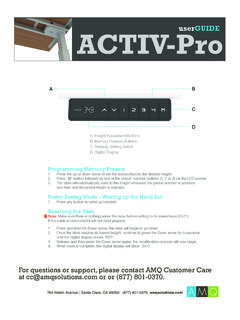
1 userGUIDE . ACTIV-Pro3 . A B. C. D. A. Height Adjustment Buttons B. Memory Position Buttons C. Memory Setting Button D. Digital Display Programming Memory Presets 1. Press the up or down arrow to set the worksurface to the desired height. 2. Press M button followed by one of the preset number buttons (1, 2 or 3) on the LED screen. 3. The table will automatically reset to this height whenever the preset number is pressed and held until the preset height is reached. Power Saving Mode - Waking up the Hand Set 1. Press any button to wake up handset. Resetting the Base ! Note: Make sure there is nothing under the base before setting to its lowest level ( ).
2 If the cable is obstructed it will not reset properly. 1. Press and hold the Down arrow; the desk will begin to go down. 2. Once the desk reaches its lowest height, continue to press the Down arrow for 5 seconds, until the digital display shows RST . 3. Release and then press the Down arrow again; the recalibration process will now begin. 4. When reset is complete, the digital display will show . For questions or support, please contact AMQ Customer Care at or or (877) 801-0370. 915 Walsh Avenue / Santa Clara, CA 95050 (877) 801-0370 userGUIDE . ACTIV-Pro3 . ! Most issues will resolve by re-setting the base See re-set instructions on previous page.
3 Note: Please make sure there is nothing under the base before setting to its lowest level ( ). If the cable is obstructed it will not reset properly. Please ensure that all connections are tight and in tact before further troubleshooting. Issue Solution ASR/RST Error Code Reset the base. No power The control box may be damaged contact us for replacement. E07/E08/E09 Error Code (legs not moving uniformly) 1. Reset the base. 2. If the issue persists, swap the connecting cables between the legs. 3. If the issue persists, contact us for a replacement. Handset has black screen The handset may be damaged contact us for replacement. Handset Display Error (eg, ) The handset may be damaged contact us for replacement.
4 H01 Error Code (controller overheat) Cut off the power for 1 minute and reconnect the handset. If your issue persists, please contact AMQ Customer Care at or (877) 801-0370. 915 Walsh Avenue / Santa Clara, CA 95050 (877) 801-0370