Transcription of WebRelay-Quad Quick Start Guide
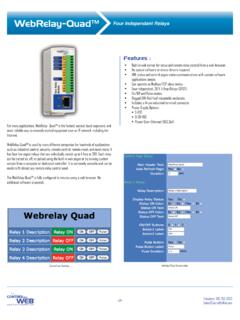
1 A division Research & Design, , Utah, USA 2011-2014 Xytronix Research and Design, Quick Start GuideBasic Setup Steps:1. Connect unit to power and Set up a computer on the same network as the module. To do this, set the IP address of the computer to with a netmask of Configure the WebRelay-Quad using a web browser. Do this by pointing browser to The username is admin and password is webrelay (all lower case).4. Set the permanent IP address in the configuration page. Restart the WebRelay-Quad (remove power, re-apply power).
2 After restarting the unit, set the computer back to its original settings and access the WebRelay-Quad at its new IP address. 5. Connect relay Users Manual may be downloaded technical support, email questions to : The WebRelay-Quad can be configured to operate at 10 Mbps or 100 Mbps. For best power savings and long term performance the 10 Mbps setting is +Vin- (Gnd)1C1NC1NO2C2NC2NO3C3NC3NO4C4NC4 NODC Power Supply Input ( + )DC Power Supply Input ( - )Relay 1 CommonRelay 1 Normally ClosedRelay 1 Normally OpenRelay 2 CommonRelay 2 Normally ClosedRelay 2 Normally OpenRelay 3 CommonRelay 3 Normally ClosedRelay 3 Normally OpenRelay 4 CommonRelay 4 Normally ClosedRelay 4 Normally OpenFactory Default Settings IP Address: Subnet Mask: Control Web Address: Setup Web Address: Setup Username: Setup Password.
3 Control (all lower case)no password set