
Dell Optimizer Version 2.0 User's Guide
Oct 10, 2020 · User's Guide. and the . Give Feedback. section. For more information about the . Give Feedback. section, see Feedback. < Takes you to the previous screen in the onboarding page. Provides suggestions to optimize the feature. The icon indicates actionable recommendations such as selecting applications for optimization, switch to a better network ...
Download Dell Optimizer Version 2.0 User's Guide

Information
Domain:
Source:
Link to this page:
Documents from same domain

Dell Docking Station WD19DCS Dual Cable User Guide
dl.dell.comStation WD19DCS to supported Dell systems, the dock button works like your system's power button and you can use it to power on/sleep/force shutdown the system. NOTE: The dock button is not functional when connected to unsupported Dell systems or non-Dell systems. 4. 8 Identifying Parts and Features

Inspiron 15-3505 Laptop Users Guide - Dell
dl.dell.comViews of Inspiron 3505. Right. 1. SD-card slot. Reads from and writes to the SD card. The computer supports the following card types: Secure Digital (SD)

Inspiron 15 7000 Gaming Setup and Specifications
dl.dell.comInspiron 15 7000 Gaming Setup and Specifications Computer Model: Inspiron 15-7567 Regulatory Model: P65F Regulatory Type: P65F001

XPS 13 9310 Re-imaging guide for Windows - Dell
dl.dell.comExpanded compatibility Fixed device issues Support for new features However, if your computer is operating normally and there are no driver issues or updates being prompted by Windows, driver updates may be unnecessary. Updating drivers unnecessarily may create new problems.

XPS 15 9510 Re-imaging guide for Windows - Dell
dl.dell.comExpanded compatibility Fixed device issues Support for new features However, if your computer is operating normally and there are no driver issues or updates being prompted by Windows, driver updates may be unnecessary. Updating drivers unnecessarily may create new problems.

Dell Wyse USB Imaging Tool
dl.dell.comsupport for Windows 10 Enterprise LTSC 2019 (64-bit) on Wyse 5070 Thin Client, Wyse 5470 Thin Client and Wyse 5470 All-in-One Thin Client. Key features USB Imaging Tool has the following key features: Provision to push an Image from a network.

Precision 3560 Setup and Specifications
dl.dell.comS4 (Hibernate) - The computer consumes the least power compared to all other sleep states. The computer is almost at an OFF state, expect for a trickle power. The context data is written to hard drive. S5 (OFF) - The computer is in a shutdown state. 10 Views of Precision 3560

Dell Precision 5560
dl.dell.comConnect the 8K display directly to a Thunderbolt port on your computer. Power on the display and than turn off the power on the display. Daisy chain two 4K monitor via WD19TB series cannot reach 4K resolution. Question. When two 4K display is connected by Daisy chain via WD19TB series docking station, it cannot reach resolution upto 4K *2 @60 ...

Dell EMC OpenManage Enterprise Release Notes
dl.dell.comOct 01, 2021 · Enterprise's system management and monitoring is best suited for enterprise LANs and is not recommended for usage over WANs. For information about supported browsers, see the OpenManage Enterprise Support Matrix available on the support site. With OpenManage Enterprise, a web-based one‑to‑many systems management application, users can:

XPS 8930 Setup and Specifications - Dell
dl.dell.comConnect to your network using a cable, or connect to a wireless network. 3. Connect the display. ... Dell Digital Delivery Download software applications, which are purchased but not pre-installed on your computer. ... The power-supply light changes to green if the power-supply unit is working fine. 10. Power port
Related documents
Onboarding in a Box
business.linkedin.comOf course, it’s hard to make a powerful first impression with limited resources, budget, and leadership support. To help you succeed, we’ve created this onboarding toolkit. From inspiring examples to practical guides, this “Onboarding in a Box” is chock full of essential resources for every stage of your new hire process.
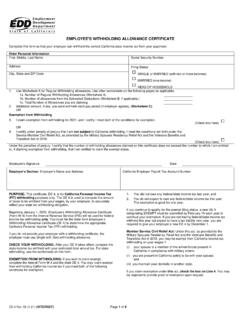
Employee's Withholding Allowance Certificate (DE 4)
media.icims.comEmployee's Signature Date Employer's Section: Employer's Name and Address , California Employer Payroll Tax Account Number PURPOSE: This certificate, DE 4, is for California Personal Income Tax (PIT) withholding purposes only. The DE 4 is used to compute the amount of taxes to be withheld from your wages, by your employer, to accurately
Ultimate client onboarding guide to QuickBooks online
quickbooks.intuit.comUltimate client onboarding guide to QuickBooks online 6 Step 2: Understand the goals. After this short interview, we should have a good idea of the software in play, the client’s experience and, of course, frustrations. Now it’s time to change the conversation and help them see there is …

Onboarding Process - External Candidates
www.albertahealthservices.camove through the onboarding process. The progress status bar will display as complete once all additional tasks/activities are done. • All of the onboarding tasks need to be completed in order to finalize the hiring process in e-People.

MYMAZDA MOBILE APP USER GUIDE
www.mazdausa.comEven if you choose to skip the onboarding experience and continue to the MyMazda app . home screen during initial setup, you can revisit the walkthrough anytime. Tap the. Menu icon, then tap . Support. to expand the . Menu. options. Tap . Onboarding Experience. to begin. See page 12 for more information on Menu options. 1 3 2 4. Select ...
New Employee Onboarding: Buddy Guidelines
www.nyu.eduNew Employee Onboarding: Buddy Guidelines What is a buddy? A buddy is someone who partners with a new employee during his/her first 2 months of employment. While primarily responsible for offering advice and guidance regarding the day-to-day aspects of working at NYU, the buddy may also offer encouragement and

PCC Onboarding Manual
www.pcc.eduInforming your team of the new employee’s arrival also permits assistance with the onboarding process. Many departments have administrative/executive assistants and/or colleagues support new employees through onboarding. This is a great best practice, as it affords the new employee the opportunity to build relationships wit h their coworkers. 2.