
DRAGON CENTER User Guide
The Priority control panel displays currently using network bandwidth applications. 1. Test and set the network speed as described previously. 2. Select the Priority control panel. 3. Use the category bar to filter the displayed applications categories. 4. Click the drop-down menu next to the application name to select the priority of the ...
Download DRAGON CENTER User Guide

Information
Domain:
Source:
Link to this page:
Documents from same domain

Optix Series - download.msi.com
download.msi.com3 Stand Base with Screw 4 Wall Mount Screws x 4 5 Stand Screws x 4 6 VESA Cover 7 Power Cord ... 15 Camera Cradle with Rotatable Ball Head * Contact your place of purchase or local distributor if any of the items is damaged or ... It doesn’t support data transmition function. 5 USB3.1 Gen1 Type B Upstream Port For USB Upstream Cable.
Optix Series - download.msi.com
download.msi.com(2014/35/EU), ErP Directive (2009/125/EC) and RoHS directive (2011/65/ EU) This product has been tested and found to comply with the harmonized standards for Information Technology Equipment published under Directives of Official Journal of
Optix Series - download.msi.com
download.msi.comto Electromagnetic Compatibility (2014/30/EU), Low-voltage Directive (2014/35/EU), ErP Directive (2009/125/EC) and RoHS directive (2011/65/ EU) This product has been tested and found to comply with the harmonized standards for Information Technology Equipment published under Directives of Official Journal of the European Union

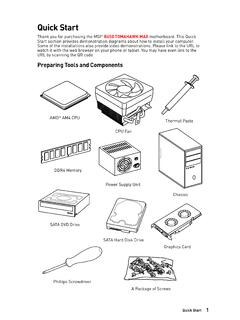
Quick Start - download.msi.com
download.msi.comAudio y Realtek® ALC892 Codec 7.1-Channel High Definition Audio Back Panel Connectors y 1x PS/2 keyboard/ mouse combo port y 2x USB 2.0 Type-A ports y 1x VGA port y 1x DVI-D port y 1x DisplayPort y 1x USB 3.1 Gen2 Type-A port y 1x USB 3.1 Gen2 Type-C port y 1x LAN (RJ45) port y 2x USB 3.1 Gen1 Type-A ports y 6x audio jacks Continued on next page
Quick Start - download.msi.com
download.msi.comInternal Connectors y 1x 24-pin ATX main power connector y 1x 8-pin ATX 12V power connector y 6x SATA 6Gb/s connectors y 2x USB 2.0 connectors (support additional 4 USB 2.0 ports) y 1x USB 3.2 Gen1 connectors (support additional 2 USB 3.2 Gen1 ports) y 1x 4-pin CPU fan connector y 1x 4-pin water-pump-fan connector y 4x 4-pin system fan connectors

Contents
download.msi.com4x USB 3.2 Gen 1 5Gbps Type-A ports on the back panel Internal Connectors ∙ 1x 24-pin ATX main power connector ∙ 1x 4-pin ATX 12V power connector ∙ 4x SATA 6Gb/s connectors ∙ 1x M.2 slots (M-Key) ∙ 1x USB 3.2 Gen 1 5Gbps connector (supports additional 2 …

Inleiding - download.msi.com
download.msi.comInleiding 4 5 1. Webcam/ Webcam-LED/ interne microfoon • Deze ingebouwde webcam kan worden gebruikt voor beeld, video-opname, conferencing, enz. • De webcam-LED indicator die zich naast de webcam bevindt, licht op wanneer de webcamfunctie wordt geactiveerd en de LED gaat uit als deze functie wordt uitgeschakeld.

Quick Start - download.msi.com
download.msi.comBIOS Features ∙ 1x 256 Mb flash ∙ UEFI AMI BIOS ∙ ACPI 6.0, SMBIOS 2.8 ∙ Multi-language Software ∙ Drivers ∙ DRAGON CENTER ∙ MSI APP Player (BlueStacks) ∙ Open Broadcaster Software (OBS) ∙ CPU-Z MSI GAMING ∙ Google Chrome™, Google Toolbar, Google Drive ∙ Norton™ Internet Security Solution Dragon Center Features ∙ ...

User's Manual
download.msi.comEuropean Union: Batteries, battery packs, and accumulators should not be disposed of as unsorted household waste. Please use the . public collection system to return, recycle, or treat …

CREATOR CENTER User Guide - download.msi.com
download.msi.comThe screenshots for the UI in this user guide are for reference only and the actual UI design may vary. Operation Panel Information Bar Display System ... Base Clock frequency (BCLK). You can also fill out the value in the input box. ... Please refer to the instructions on page 28.
Related documents

Continuity of Operations (COOP) Planning Template and ...
health.mo.govwhat can wait. A function probably shouldn’t be in the Immediate or Day category if it can wait until after a holiday. For column 3, rank the priority of each essential function within their recovery time. (e.g., Day=prioritize 1, 2, 3….; Week=prioritize 1, 2, 3… and so forth). Complete Worksheet C

Emergency Transfer Program Frequently Asked Questions
www1.nyc.govcovered under the definitions below, qualify as victim under one of the emergency transfer categories. ... how long will the tenant have to wait to ... the tenant’s transfer priority, the size of NYCHA’s waiting list, turnover rate, and the availability of vacant apartments. ...

Job Shop Scheduling
courses.washington.eduJobs 2, 4 and 5 wait a total of 6 units at machine 2. Scheduling Solutions • In Order to begin to attempt to develop solution, break the problem in categories: 1. N jobs, 1 machine 2. N jobs, 2 machines (flow shop) 3. N jobs, 2 machines (any order) 4. N jobs, 3 machines (flow shop) ... priority (w) – higher w, more important then ...
A Resource Guide for Effective Management of Elective ...
www.health.nsw.gov.ausurgery list management. It is designed to assist surgery managers to administer the policy. It does not serve as a replacement for the policy. If there is any perceived discrepancy between the information contained in this resource guide and the Elective Surgery Access Policy, the policy will always take priority. 1.
SPOTLIGHT COMMANDER'S CRITICAL INFORMATION …
www.jwc.nato.intnot be in the CCIR list. CCIRs can be sub-divided into categories concerning the enemy, the friendly forces, and the environment: Enemy or threat: Critical items of information that are required by a particular time, which can be related to other existing information and Intelligence to aid assessment and under-standing of an enemy or threat.

CADET WINGS - Civil Air Patrol
www.gocivilairpatrol.comh. Candidate Categories: i. Not Selected: Applicants do not meet eligibility criteria. They are encouraged to re-apply next year once they have accomplished tasks on the ideal candidate list, if they meet minimum age, citizenship and membership requirements. ii. Wait-Listed Candidates: Applicants have not attained majority of the ideal applicant

Transition Assistance Program (TAP) Resources Packet
macdillfss.com813-828-0145 8105 Condor Street, Bldg 18 October 25, 2021 1 Transition Assistance Program (TAP) Resources Packet Military & Family Readiness Center (M&FRC) – MacDill AFB, FL

Prioritization - Emergency Department
ed-areyouprepared.comPriority Setting Traps “Inspiration” – in this trap, individuals wait until they become “inspired” to accomplish a task. Some tasks will never be inspiring, and the wise time manager recognizes that the only thing that will complete these tasks is hard work and appropriate attention to the matter.

COVID-19 PROTOCOL FOR THE 2021-22 SEASON
media.nhl.comSep 02, 2021 · The health of Player and Club personnel remains the League’s priority for the upcoming 2021-22 Season. With this in mind, the Protocol for the 2021-22 season (including Conditioning Camps, Training Camp, Preseason, Regular Season and Playoffs) adopts a bifurcated approach for Players and Hockey Operations Club personnel (and those