Enabling Macros in Microsoft Access - USDA
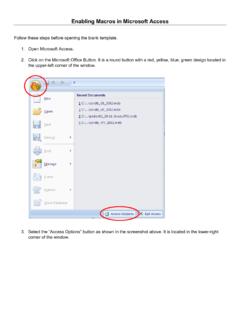
Enabling Macros in Microsoft Access . Follow these steps before opening the blank template. 1. Open Microsoft Access. 2. Click on the Microsoft Office Button. It is a round button with a red, yellow, blue, green design located in the upper-left corner of the window. 3. Select the “Access Options” button as shown in the screenshot above.
Download Enabling Macros in Microsoft Access - USDA

Information
Domain:
Source:
Link to this page:
Documents from same domain
Planting Guide - USDA
www.nrcs.usda.govPlanting Guide Plant Materials <http://plant-materials.nrcs.usda.gov/> ... The Quicksand, Kentucky Plant Materials Center has relocated to Alderson, ...
[Federal Register: August 31, 2007 (Volume 72, …
www.nrcs.usda.gov[Federal Register: August 31, 2007 (Volume 72, Number 169)] ... From the Federal Register Online via GPO Access ... DEPARTMENT OF AGRICULTURE .
Urban Hydrology for Small Watersheds - Home | …
www.nrcs.usda.govNatural Resources Conservation Service Conservation Engineering Division Technical Release 55 June 1986 Urban Hydrology for Small Watersheds TR-55
NATIONAL ENGINEERING HANDBOOK 210-VI …
www.nrcs.usda.govNATIONAL ENGINEERING HANDBOOK 210-VI STRUCTURAL ENGINEERING PART 636 AMENDMENT WY-1 SUBJECT: ENG – CHAPTER 52, “STRUCTURAL DESIGN OF FLEXIBLE CONDUITS” Purpose: To provide all field offices a copy of Chapter 52 and supplemental information

Community Garden Guide - USDA
www.nrcs.usda.gov(You will need a planting guide to determine recommended spacing, depth etc. Contact your extension office if you need a guide.) If you’ve made adjustments to the per person needs in column 2, you can estimate the amount to plant using column 4.
Tillage Equipment - USDA
www.nrcs.usda.govAbout this guide... The purpose of the guide is to help you identify commonly used farm equipment. Its color photos and line drawings will facilitate communication between NRCS and our clients by

Dealing with Difficult People - USDA
www.nrcs.usda.govDifficult People Defined and Explained The Hostile Aggressive The bully that always needs to be right. They tend to be abusive, abrupt, accusatory, intimidating,
Soil Data Viewer 6.2 User Guide - USDA
www.nrcs.usda.govSOIL DATA VIEWER OUTPUT ... relieving the user from the burden of querying the soil database, processing the data and then linking the ... After downloading this ...
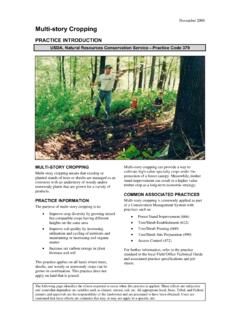
November 2008 Multi-story Cropping - USDA
www.nrcs.usda.govNovember 2008 The diagram above identifies the effects expected to occur when this practice is applied according to NRCS practice standards and specifications.
hop bush Plant Fact Sheet - USDA
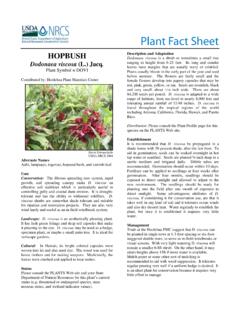
www.nrcs.usda.govbefore summer. The flowers are fairly small and the female flowers develop into papery capsules that may be red, pink, green, yellow, or tan. Seeds are roundish, black and very small; about 1/16 inch wide. There are about 84,200 seeds per pound. D. viscosa is adapted to a wide range of habitats, from sea-level to nearly 8,000 feet and
Related documents
SDCC Compiler User Guide
sdcc.sourceforge.netMar 19, 2022 · Introduction 1.1 About SDCC 7

Quick Start Guide - download.microsoft.com
download.microsoft.comMicrosoft Excel 2013 looks different from previous versions, so we created ... To record an occasional macro, you can use the Macros button on the View tab. But if you plan to routinely create or edit macros and forms, or use XML or VBA …
Programming Fundamentals In VBA (Visual Basic For ...
pages.cpsc.ucalgary.caEnabling Macros To Run (3) 4A Select ^Macro Settings _ 4 Select ^Disable all macros with notification _ 5) Exit MS-Word (close ALL documents) More secure Less secure Enabling Macros To Run (4) •The default setting for MS-Word should already be set to ^disable macros with notification but these steps will allow
Microsoft(R) Access(R) 2010 Step by Step - pearsoncmg.com
ptgmedia.pearsoncmg.comIntroducing Microsoft Access 2010 Microsoft Access 2010 is a powerful relational database program that includes hundreds of tools you can use to quickly start tracking, sharing, and reporting information, even if you are new to database development. Users have access to a large library of profes-

Contents
voiceattack.comUseful if your macros happen to be long- running. Note this will also stop any playing sounds or text-to-speech, and any keys ... Enabling the, ‘Consolidate Duplicate Log Entries’ option will cause any ... Help Document - Access the VoiceAttack help documentation that is located in the
Mach4 CNC Controller Software Installation and ...
www.machsupport.comDevelopment partners of Newfangled Solutions have access to Mach4's SDK allowing them to manufacture plugins for other devices and/or functions. The setup, ... data, ini backups, Macros, and all machine settings. This can be used later to make a test profile to allow ... The software must be restarted after enabling (((
VB Scripting for CATIA V5
www.scripting4v5.comDassault Systèmes products. It is an open development platform enabling programmers to develop and integrate their ownapplications for CATIA or other Dassault Systèmes products. CAA V5 is faster and more powerful than VB. It provides access to interfaces not available to Visual Basic butis harder to learn. C++ is the primary language.