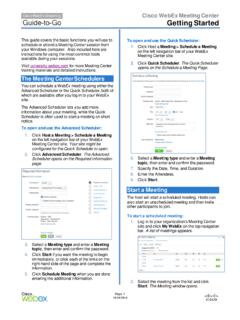
Getting Started - Cisco Webex
Recorder panel opens and recording begins. 4. Click the . Pause. button ( ) when you want to stop recording briefly, and click it again to re- start. 5. Click the . Stop. button ( ) to end the recording completely. You are prompted to confirm that you want to stop recording. Note: A new recording is created each time you stop recording and ...
Download Getting Started - Cisco Webex

Information
Domain:
Source:
Link to this page:
Documents from same domain
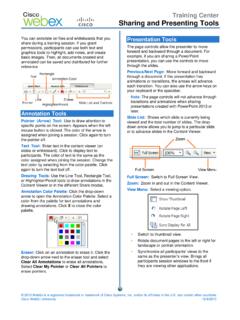
Sharing and Presenting Tools - Cisco Webex
www.webex.comtext color by selecting from the color palette. Click again to turn the text tool off. Drawing Tools: Use the Line Tool, Rectangle Tool, or Highlighter/Pencil tools to draw annotations in the Content Viewer or in the different Share modes. Annotation Color Palette: Click the drop-down arrow to open the Annotation Color Palette. Select a

Getting started with Webex Meetings.
www.webex.comRemember to take chargers for laptops or other equipment you need from your office. Make sure your computer and apps are up to date. Double check your home internet connection and update your VPN. Dedicate a workspace in your home that’s ergonomic, comfortable, and productive.

Datsheet Webex Desk Hub
www.webex.comexperiences to deliver a modernized, clutter-free safe environment for the hybrid worker. experiences designed for Hot Desking, Hoteling, and advanced Collaboration. The Desk Hub will sit within the single portfolio for Webex Collaboration devices and be a bridge between video phones and our integrated video endpoints like the Webex Desk or

Cisco Webex Training Solution Overview
www.webex.comCisco Webex Assist producers will make sure your training session starts and runs smoothly. Take advantage of robust, media-rich Webex technology, session features like polling, chat, and surveys, work with a producer to prepare a session, and plan and practice a dry run.
AccessRestrictionstoCiscoWebexToll-FreeNumbers
www.webex.comAccessRestrictionstoCiscoWebexToll-FreeNumbers FirstPublished:2017-06-08 LastModified:2018-06-19 AmericasHeadquarters CiscoSystems,Inc. …
CISCO WEBEX VS. MICROSOFT TEAMS
www.webex.comAfter carefully reviewing Cisco Webex and Microsoft Teams, ZK Research found that Teams pales in comparison to Webex with regard to the breadth and depth of capabilities, particularly in the areas noted earlier—even though Teams is a viable product and …

Collaboration device x i r m t ucadro pt
www.webex.comCisco Webex: HTTP, REST APIs VCS: H.323 and SIP CUCM: SIP Cisco Webex: HTTP, REST APIs VCS: H.323 and SIP CUCM: SIP Cisco Webex: HTTP, REST APIs Peripherals Supported Cisco Webex Pen G2 Cisco Touch 10 Cisco Touch 10 Cisco Touch 10 Bandwidth Consumption H.264: from 768 kbps to 6000 kbps Minimum bandwidth: • 720p30 from 768 kbps • 1080p30 ...
Related documents
5. OBSERVING, RECORDING, AND REPORTING CHILDREN'S …
laffranchinid.faculty.mjc.eduRecording is the process of documenting the observed activity or behavior. ... Interviews and Conversations Children are happy to discuss their thoughts, ideas, and work with adults if they trust that the adult is truly interested and respectful. When a teacher takes time to …

17 “INNOCENT” WORDS THE MAKE HER HORNY…
d3qf9s5v9qa7jd.cloudfront.netincluding recording, photocopying, scanning or electronic copies without prior written permission from the author. All information, ideas and guidelines mentioned in this eBook are for informational purposes only. This publication cannot be used as a substitute for professional betting advice.

User guide. - VZW
ss7.vzw.comregarding taking photographs and recording sounds with your phone. Pursuant to such laws and regulations, it may be strictly forbidden to take photographs and/or to record the voices of other people or any of their personal attributes, and reproduce or distribute them, as this may be considered to be an invasion of privacy.

Versant English Placement Test - Official Test Guide
www.pearson.comConversations tips VERSANT WRITING TEST VERSANT ENGLISH PLACEMENT TEST –OFFICIAL GUIDE–OFFICIAL GUIDE • Listen carefully to the conversation and what is being said. • Consider what the question is asking. • Provide a short, clear answer. • Start speaking within 8 seconds or the test will move on to the next question.

Guidance to ensure a safe and effective pharmacy team
www.pharmacyregulation.orgGuidance to ensure a safe and effective pharmacy team June 2018 4 1 A pharmacy owner may be a registered pharmacy professional; a pharmacist as a sole trader, partner or director, or a pharmacy technician as a partner or director

The Trail of Tears in Tennessee: A Study of the Routes ...
www.tn.govconcept different than the traditional recording of specific archaeological sites with distinct boundaries. This recording process will allow future researchers to conduct more detailed research on specific segments of the route. This report presents the results of the Tennessee Division of Archaeology's study of the Trail of Tears in Tennessee.

Keeping a Lab Notebook - National Institutes of Health
www.training.nih.govWhen recording your entries in your lab notebook, include as much detail as possible about what you used and did. A reagent is more than just the name of the chemical or enzyme. You will want to record the source of the reagent: The company, lab or person who provided it.
Observation: A Complex Research Method
www.webpages.uidaho.edusystematic recording of observable phenomena or behaviour in a natural setting” (2005, p. 40). Other authors defi ne observation within the broader context of ethnography or the narrower one of participation observation. What is consistent in the defi nitions, however, is the need to study and understand people within their natural environment.